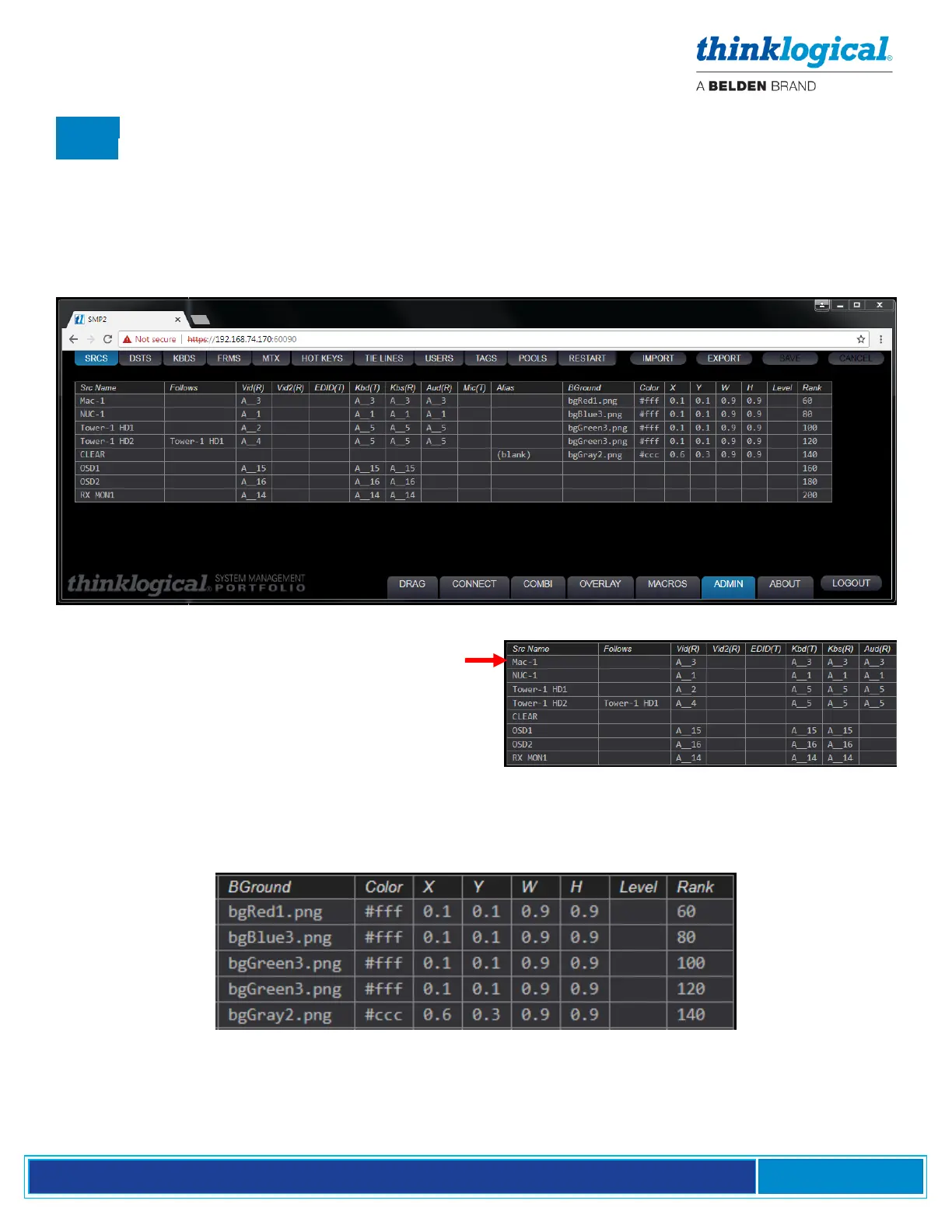
The SRCS (Sources) Tab
.SRCS is the primary mode for adding and deleting Sources to and from the system. Note that the
.SRCS Tab lists the four Sources (NUC-1, Mac-1, Tower-1 HD1 and HD2), two OSDs and RX MON1
to the left. The Source names indicate the Matrix Switch (A) and Source number. In the next column is
the Switch name, a double underscore and a Port Number, indicating the Fiber-optic cable connection
points on each Switch. The naming convention for Vid and Kb connections is Switch Name-
underscore-underscore-Port Number, as in A__1, for example. The double underscore is a
separator between the Switch name (which, in some cases, may contain its own underscore) and the
Port Number. Double underscore is not allowed for anything but port numbers.
On NUC-1 for example, A__1 indicates Port 1 is
used as a Source on Switch A. This carries
video Vid(R) and data Kbs(R) and Aud(R) from
the Source to the Destination. On the same
SFP, a return fiber Kbd(T) carries data from the
Destination back to the Source.
Also displayed are colors, dimensions and positioning rank for each connected device as shown
on the Drag N Drop screen, which will be discussed in the DRAG Tab paragraph on pg. 52.



 To Next Page