The Follows Column
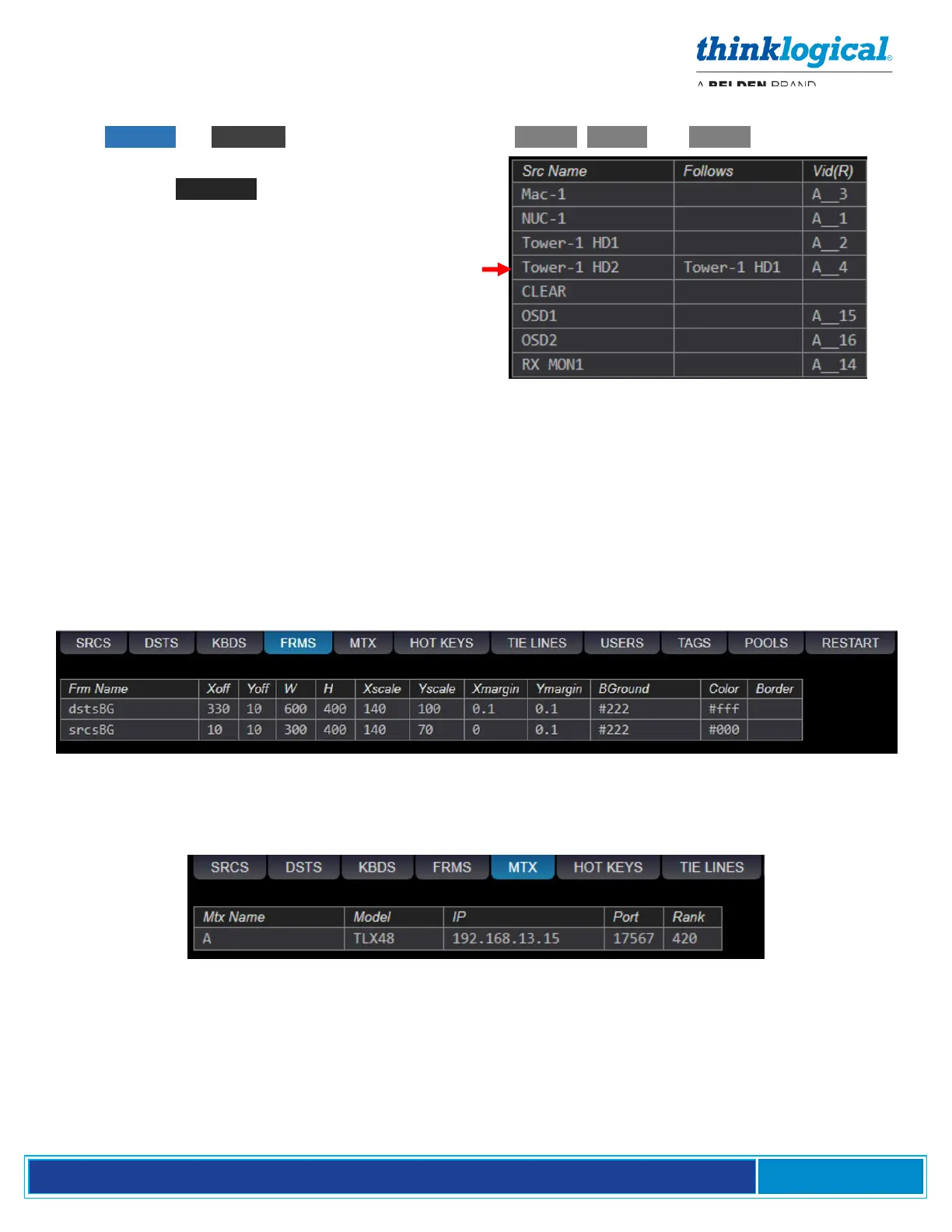
From ADMIN ,the Follows Column is found under the SRCS , DSTS and KBDS tabs.
In this example, right, Tower-1 HD1 has been
added to the Follows column beside Tower-1
HD2. Tower-1 HD2, therefore, is said to “follow”
Tower-1 HD1. This means that, if Tower-1 HD1 is
moved to a different destination, Tower-1 HD2 will
automatically move to the same destination.
If a Source’s row includes a Src Name in the Follows
column, then the Source defined in the Src Name row is
“following” the Source in the Follows column.
If a Source with a follower is then connected to
a Destination with a follower, the Following
Source will be connected to the Following
Destination. This is used to switch both displays
at a dual-linked source in one operation.
If a Destination’s row includes a Dst Name in the Follows
column, then the Destination defined in the Dst Name row is
“following” the Destination in the Follows column.
The FRMS (Frames) Tab
This tab is where the Drag N Drop background colors and sizes are defined. (See more about changing
these under Modify the Backgrounds on pg. 54.) Refer to an RGB Color Table for more on the numeric
codes.
The MTX (Matrix Switch) Tab
This tab indicates the Matrix Switch Name (A, B or C), the Matrix Switch Model (MX48s), the IP address
of each Matrix Switch and the network Port used for communication with the switch.



 To Next Page