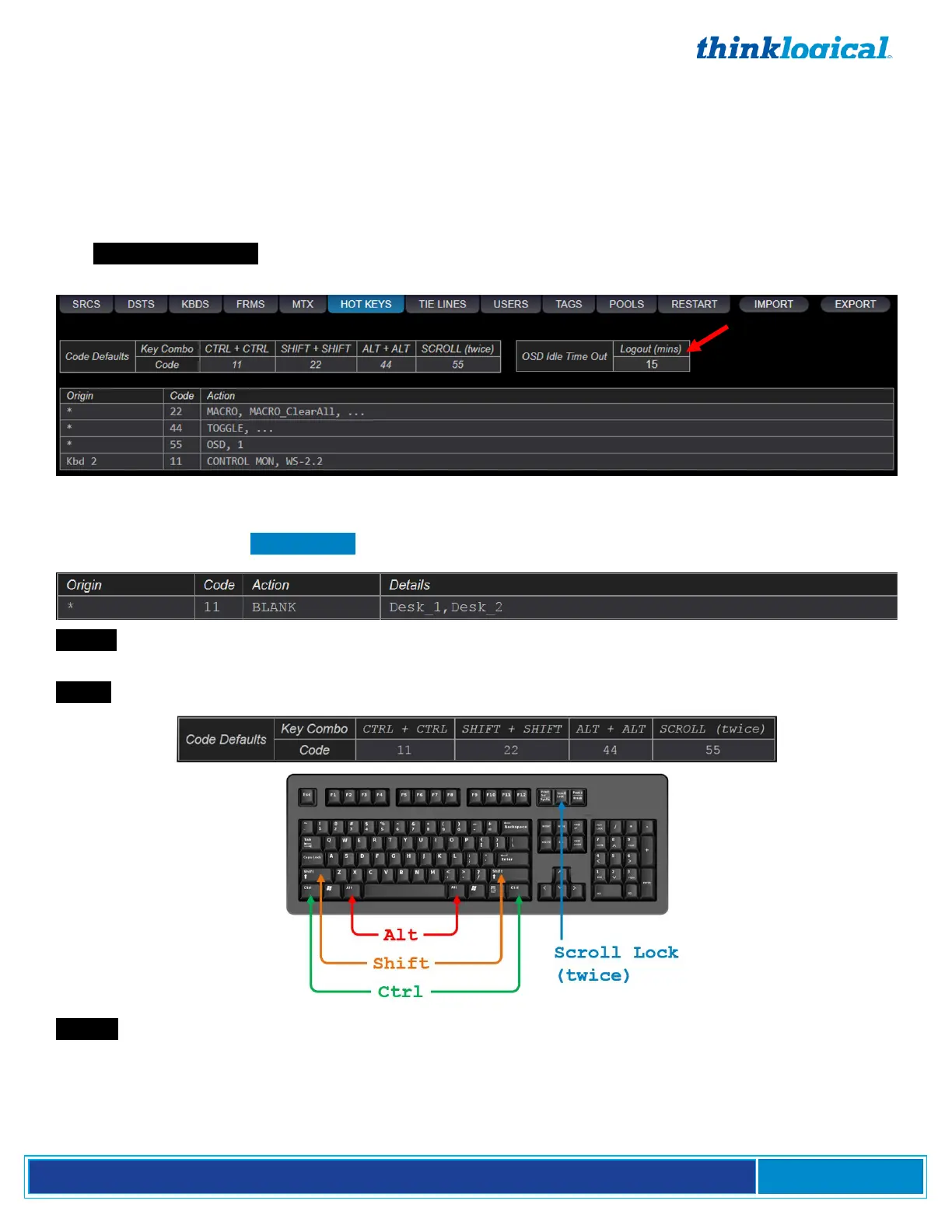
The HOT KEYS Tab
This tab provides access to the Hot Key Manager and displays the default Hot Keys loaded into each
extender, plus any additional Hot Keys as defined by the user.
All Hot Key work is done through the USB HID port on the Thinklogical KVM Receiver. Most
Thinklogical KVM Transmitters and Receivers are equipped with HID. Hot Keys will not work on
extenders without HID capabilities.
The OSD Idle Time Out is also configured on this page. This feature makes an OSD available to other
users after a set time. Set the time-out level here. (15 min. in this example.)
HOT KEYS Syntax
Users can customize their system’s performance and functions by programming the Hot Keys using
the four columns in the HOT KEYS tab as shown below.
Origin : The name of the keyboard where the Hot Keys sequence is entered. An asterisk * indicates
all keyboards.
Code : Hexadecimal key combos as shown below:
Action : The function(s) to be performed. Available Actions are:
OSD (On-Screen Display): Allows local workstation control access giving any authorized receiver on the
Matrix Switch the ability to make a change. Example: OSD, 1 routes the OSD browser to Monitor 1. Note
that a SOURCE must be a member of at least one Tag to be usable by the OSD. (See pg. 36.)
CONNECT: Connects SRCx to DSTx.



 To Next Page