CONTROL MON: Assigns KM control to DSTx.
MACRO: Run a pre-defined macro. This has the advantage of displaying a list of macros when Details is
selected.
MACRO CYCLE: Sequentially executes one or more macros separated by commas. Each time the key
sequence is entered, the program will execute the next macro in the list, then return to the first.
SHARE CYCLE: There are two modes for this operation, described below:
Src_1, Src_2 Connect first/only monitor associated with this keyboard (but not listed) to the first
Source in the list (Src 2). Connect the keyboard named in Origin to the Source. Each subsequent Hot
Key will cycle to the next Source listed, then back to the beginning.
Mon_A, Src_1, Src_2 If the first name in the list is a Destination, connect it to the second through
Source names in the list. Connect the Origin keyboard to Src (like the first example, but with a named
Destination as the first element).
VIEW CYCLE: Same as SHARE CYCLE but without the connecting keyboard.
TAKE CYCLE: Cycles through a string of ‘taken’ sources. Prior destinations are blanked.
CLEAR DST: Blanks the monitor at DSTx.
CLEAR KBD: Removes keyboard/mouse control.
CLEAR SRC: Blanks that source from all destinations.
COLLABORATE: Allows multiple users to easily exchange a single Source’s KM controls. Note that
Collaboration must also be enabled in the extender modules.
TOGGLE: Reset the Monitors/Destinations associated with this keyboard to their previous Sources.
Alternates between two previous Sources called from the OSD.
CAST: Duplicates video on the ‘From’ destination to the ‘To’ destination.
MIRROR: Links one Monitor/Destination to one or more additional “mirrored” Destinations so that any time
a Source is connected to the first Monitor/Destination, the same Source will also be connected to the
remaining Monitors/Destinations.
Mon_1, Mon_2, Mon_3 Any time a Source is connected to Mon 1, it is automatically connected to
Mons 2 and 3.
MIRROR OFF: Turns off mirroring.
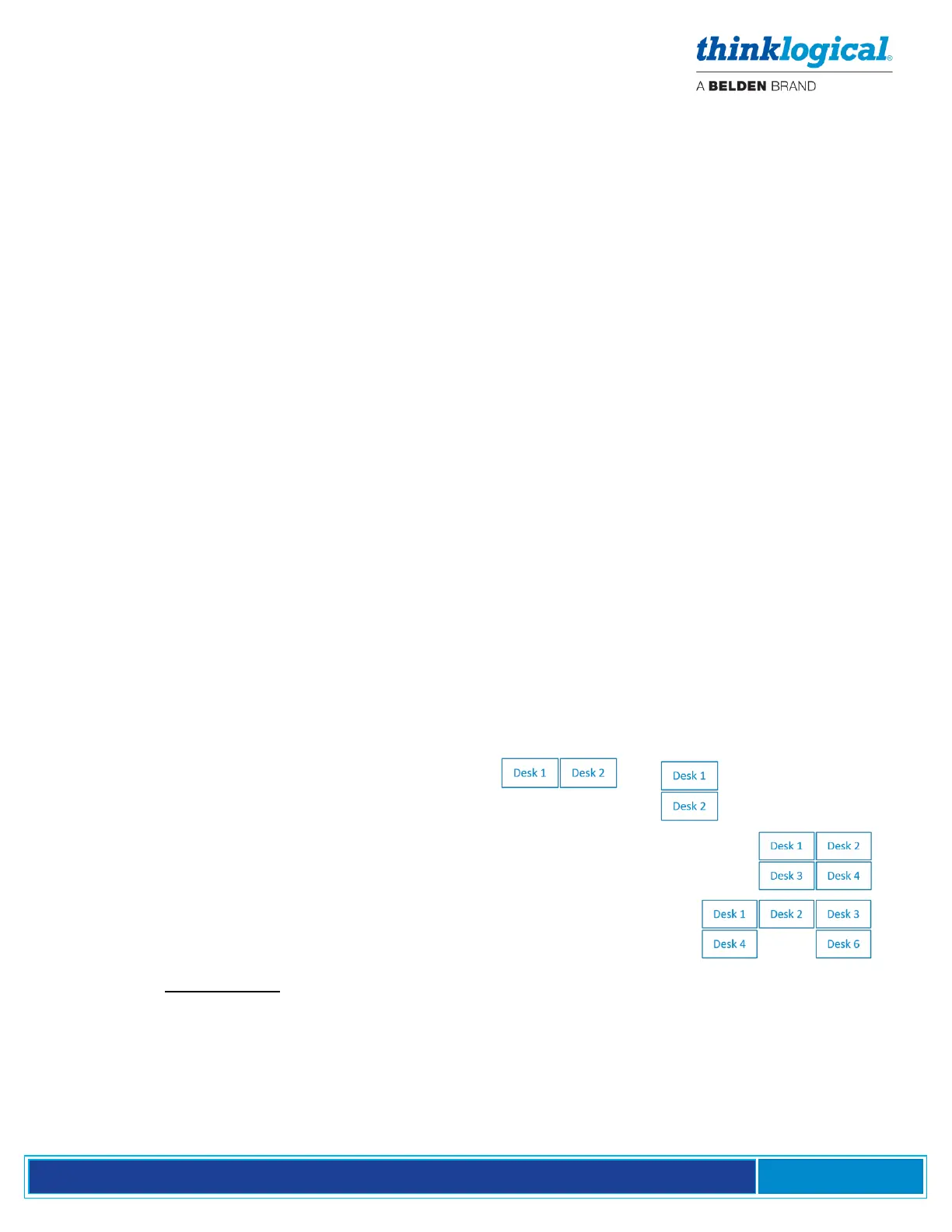
INT MOUSE: Enables the Intuitive Mouse feature and shows a list of monitor names describing how the
monitors are arranged. Commas separate monitors, and slashes (/) separate rows. Examples:
Desk_1, Desk_2 Two Desks, left and right.
Desk_1 / Desk_2 Desk 1 is on the top row; Desk 2 is on the bottom.
Desk_1, Desk_2 / Desk _3, Desk_4 Two rows: Desk 1 and 2 are on the top row
and Desk 3 and 4 are below.
Desk_1, Desk_2, Desk_3 / Desk_4, , Desk_6 Two rows of three with a
blank space in the bottom where Desk 5 would be (signified by empty
space between the commas).
Note that Intuitive Mouse must also be enabled in the extender modules. See Appendix H, pg. 78.
IGNORE: Causes a command to be ignored. This is used to exclude a destination from a wildcard (*) hotkey.
(Enter the keyboard and the Code to be ignored.)



 To Next Page