LOGIN TO SMP2 AS AN ADMINISTRATOR
Note: For SMP2 software release 2.1.70 or greater, a Linux login is required after reboot
or power up. Default is user/user. This step was added for increased security.
The System Management Portfolio 2.0 is accessed via a web browser from any computer on the same
network as its server. The SMP2’s port number is :60090. Set the browser’s URL to your IP address
(for example: https://192.168.13.9:60090) to load the page. Logins are required by default, so
for initial access, the following will be displayed:
The administrator’s default Username and Password are both
“admin” (This should be changed by the administrator.)
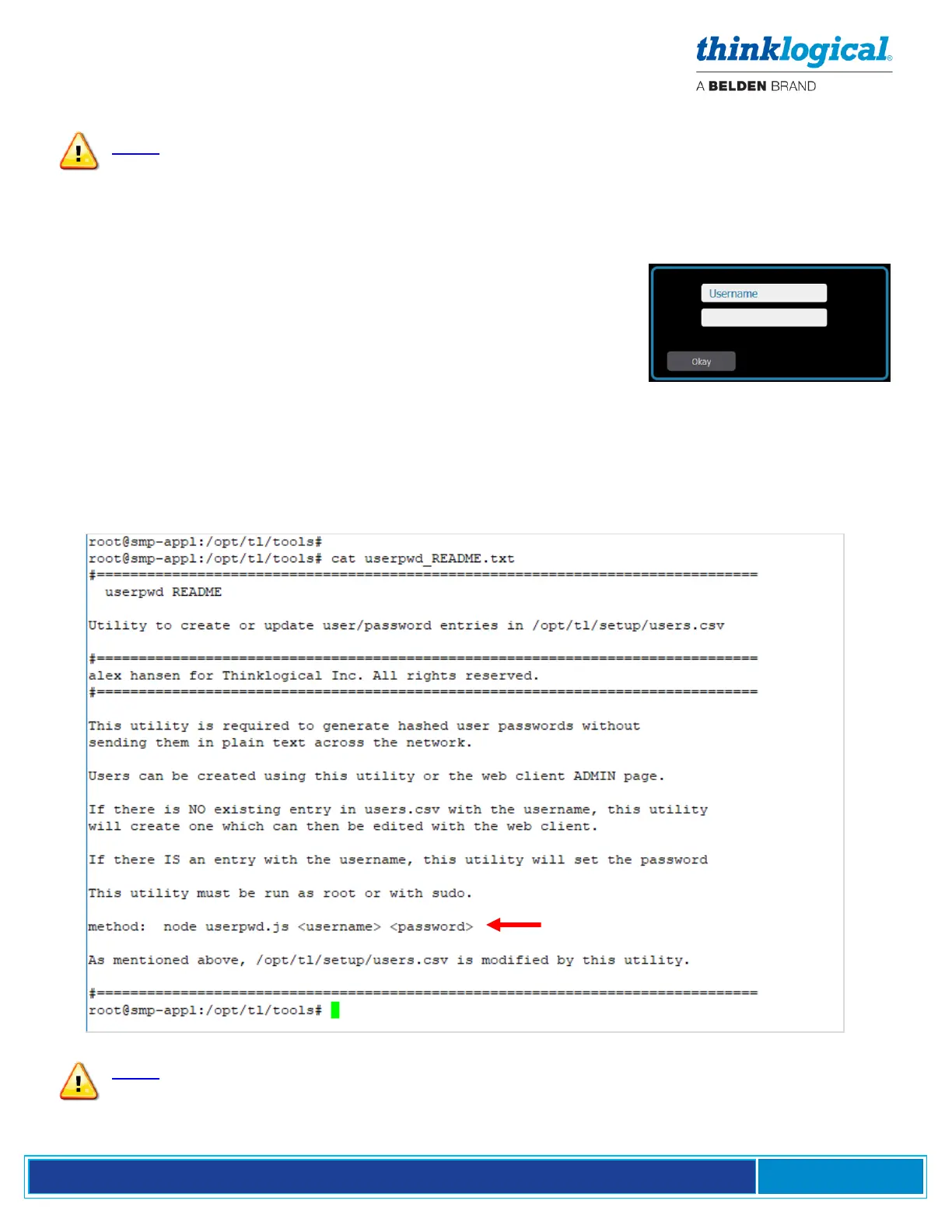
How to Create or Modify a User or Password
1. Open a terminal window and become the root user by typing su without a username. The
password is root.
2. Navigate to /opt/tl/tools
3. Enter ls to show the contents of the directory.
4. Use the cat command to view the file userpwd_README.txt. Follow the instructions that
appear:
Note: Special characters may be used for passwords if they are configured correctly.
When defined with the node command, special characters must be preceded with a
\ which is known as the ‘literal character’. For example, if your password is to be
p@$$w0rd then define it as p\@\$\$w0rd when using the node command above.



 To Next Page