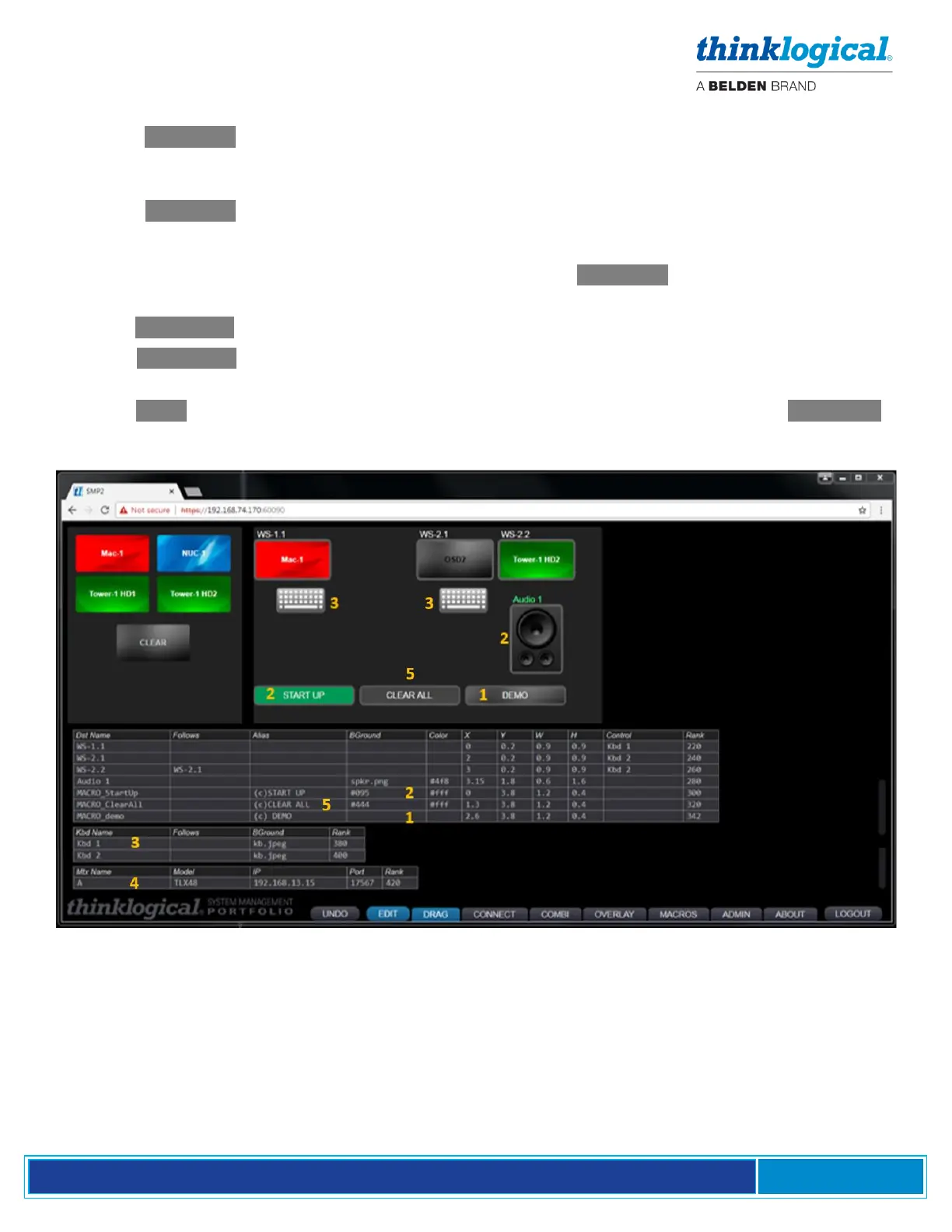
In the Destinations Table screen shot below:
1. If the BGround. Column of a destination is left blank it will appear with a gray gradient when not
connected and will take on the color or image of the source it’s connected to (as in the DEMO
macro).
2. If the BGround. Column of a destination has a color (#095 in the Start Up Macro example) or a
.jpg or .png image name (spkr.png in the Audio example), then the source's name (or Alias) will
appear inside the destination, but the background will be unchanged. The Color column
determines the text color for the source name (or Alias) if BGround. is defined (#4f8 for green
and #fff for white in this example). Standard HTML color codes may be used.
3. The Kbd Name column shows the names of the active keyboards at the destinations.
4. The Mtx Name column shows the name, Model, IP address and port of the Matrix Switch(es)
connected to the system.
5. The Alias column allows optional names (or blanks) to be displayed instead of the Dst Name .
See TECH NOTES: Customize Drag & Drop on pg. 56 for more appearance options.



 To Next Page