3. Configuring the SMP2 units
If available, install the desired SMP2 configuration files on the Primary SMP2 unit. If not completed,
they can be installed later.
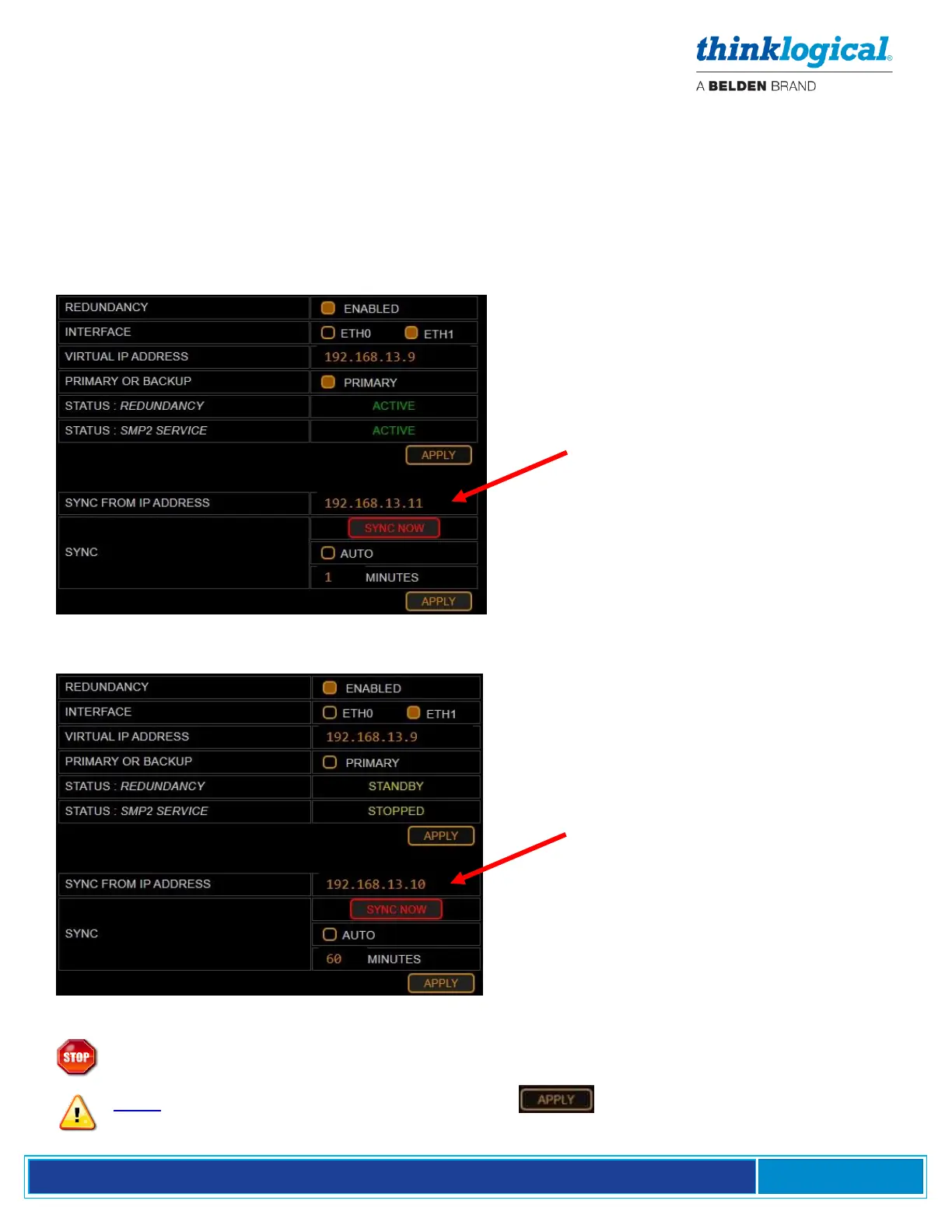
For this example, we have chosen:
- IP address 192.168.13.9 as the virtual IP address.
- IP address 192.168.13.10 as the Primary IP address.
- IP address 192.168.13.11 as the Secondary IP address.
Configure the Primary SMP2 as shown:
Primary Dashboard REDUNDANCY Tab
Configure the Secondary SMP2 as shown:
Secondary Dashboard REDUNDANCY Tab
Warning! If an SMP2 Appliance or SMP2 Module is configured and running and then a
Backup is added, do NOT sync the Primary to the Backup. The configuration may be lost.
Note: If testing your Redundancy setup, click on the SMP2 unit that is currently
active. This will temporarily stop the SMP2 service and the other SMP2 unit will take over.



 To Next Page