101
The function of each parameter
Section 4
HARMONIST
This effect changes the pitch of the original sound. It is
variable up and down 2 octaves.
This effect can be used in the “GUITAR MULTI 1” algorithm
when the MOD “SELECT” parameter is set to “HR.”
* For details on MOD (Modulation) settings, refer to “About
MOD ” (p.47).
VOICE
This selects the number of voices for the pitch shift sound
(harmony).
1 MONO:
One-voice pitch-shifted sound ([1]) output in monaural.
2 MONO:
Two-voice pitch-shifted sound ([1], [2]) output in monaural.
2 STEREO:
Two-voice pitch-shifted sound ([1], [2]) output through left
and right channels.
MODE [1], [2]
Selection for the harmonist mode.
FAST, MEDIUM, SLOW:
A chord can be input with a normal pitch shifter. The
response is slower in the order of FAST, MEDIUM and
SLOW, but the modulation is lessened in the same order.
MONO:
Compared with the conventional pitch shifter, the
modulation is minimized. Play in a single note.
HARMONY:
This creates harmony that matches the key of the song being
played. Play in a single note.
PITCH [1], [2]
Adjusts the amount of pitch shift (the amount of pitch
change) in semitone steps.
FINE [1], [2]
Make fine adjustments to the pitch shift.
* The amount of the change in the Fine “100” is equivalent to that
of the Pitch “1.”
HARMONY [1], [2]
This determines the pitch of the sound added to the input
sound, when you are making a harmony. It allows you to set
it by up to 2 octaves higher or lower than the input sound.
When the scale is set to “SCALE#1–5,” this parameter sets the
user scale number to be used.
* If it is set to “TONIC,” the pitch of the original sound will be
output without being altered.
PRE DELAY [1], [2]
Adjusts the time from when the direct sound is heard until
the pitch shifted sounds are heard. Normally you can leave
this set at “0 ms.”
* If this is set to BPM, the MASTER BPM (p.105) setting for
each patch will determine the time, so that the effect sound will
match the song tempo. However, if the BPM value is low, the
effect will synchronize to twice or four times the BPM.
FEEDBACK
This adjusts the feedback amount of the pitch shift sound.
LEVEL [1], [2]
This adjusts the volume of the pitch shift sound.
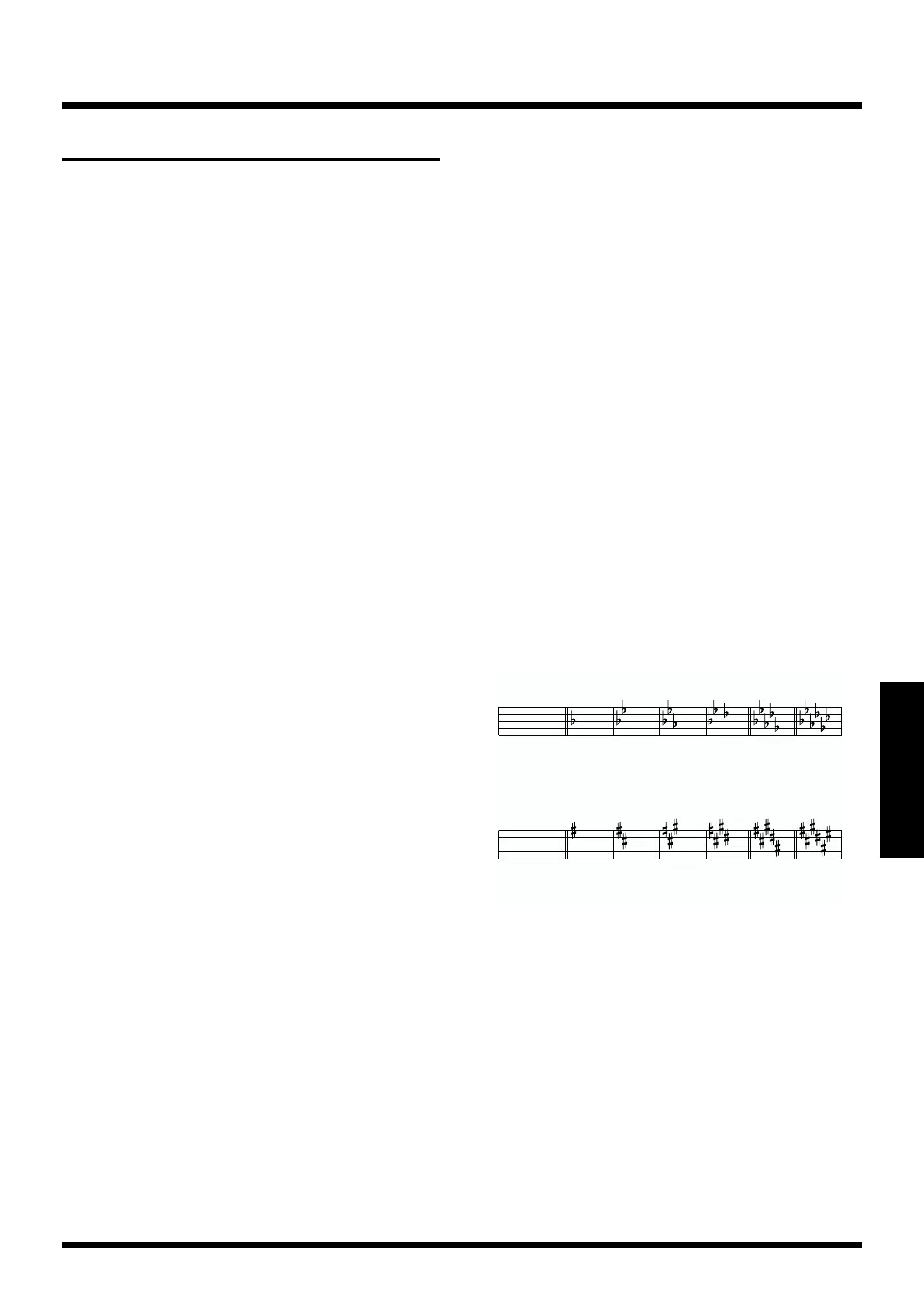
KEY
Specify the key of the song you are playing. By specifying the
key, you can create harmonies that fit the key of the song.
The key setting corresponds to the key of the song (
, ) as
follows.
fig.4-304
DIR LEVEL (direct level)
Adjusts the volume of the direct sound.
Creating a user scale
If the harmonist does not generate the harmonies that you
expect, you can use a User Scale to get the desired harmony.
A different user scale can be specified for each patch and
each voice. Up to 5 different user scales can be created.
* User Scale settings have no effect when using a patch whose
algorithm does not include the Harmonist, or if the Harmonist
is turned off.
Major
CF B
E
A
D
Am Dm Gm Cm Fm B
mMinor
Major GDAEB
Em Bm F
mC
mG
m
Minor
F
D
m
G
E
m



 To Next Page