18
Section 1. Producing Sound
Selecting the effect sound
The VF-1 contains 400 effect settings covering a wide range
of sounds. Each of these is called a Patch. The 400 patches
are organized into four banks, each with 100 patches
numbered 1–100.
To select the desired patch, you can operate the front panel or
an external MIDI device to switch banks and patch numbers.
A “bank” contains 100 patches. There are four banks: Preset
banks A and B, and User banks A and B.
Patches can be selected only when the screen display is in
Play mode (showing the patch number).
If the display is not in Play mode, press [EXIT] several times
to select Play mode.
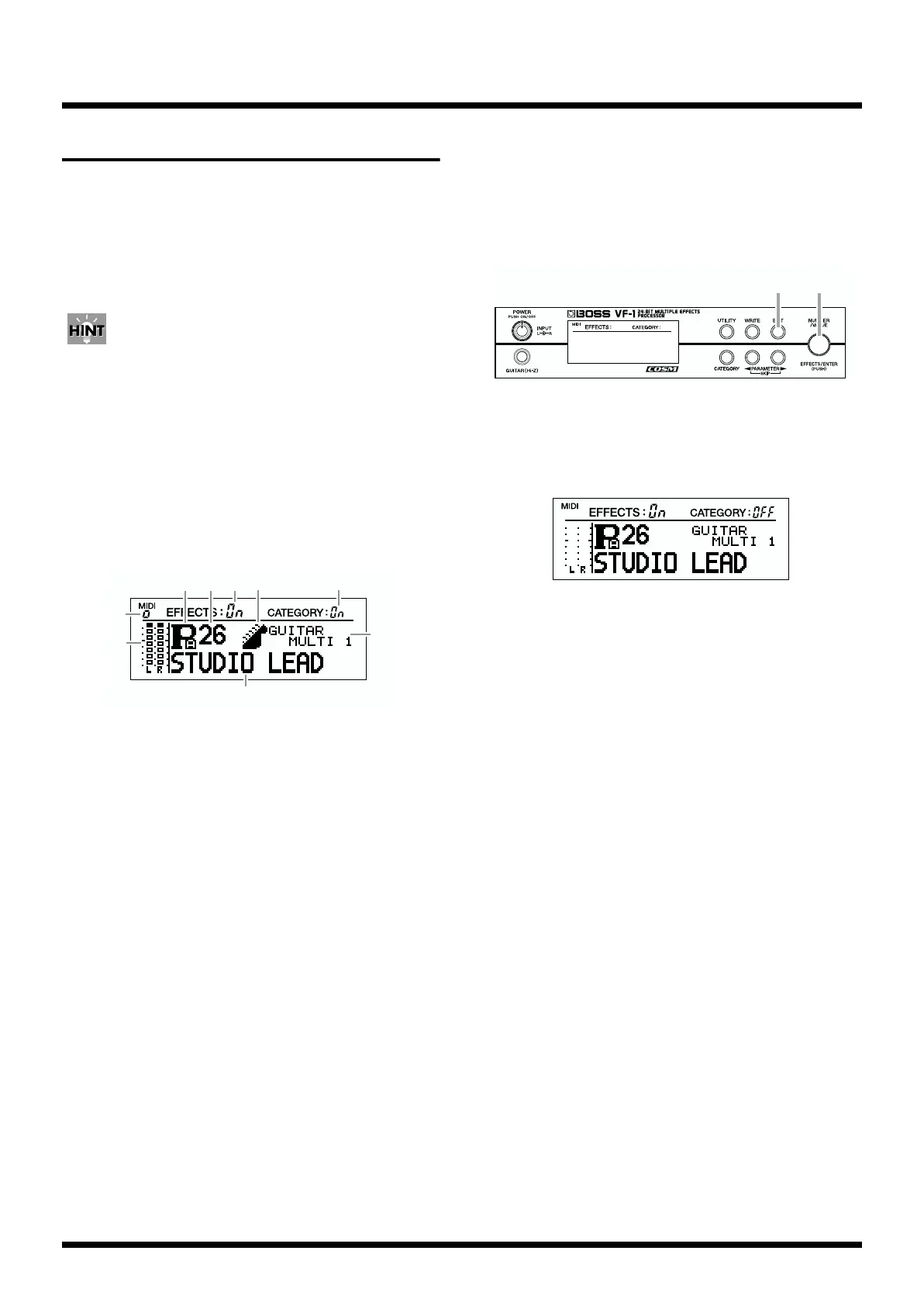
About the Screen Indications
fig.1-13
(1) Level meter:
In Play mode, this shows the level of the input signal.
When you are making effect settings, this shows the level
of the input signal and the output levels from each effect
(p.17, 31).
(2) EFFECTS On/OFF:
This shows the status (on/off (bypass/mute)) of each
effect.
(3) Bank:
This shows the currently selected bank.
(4) Patch number:
This shows the number of the currently selected patch.
(5) Category:
This shows the category of the currently selected patch.
* When the category switch is off (when the display indicates
“CATEGORY OFF”), the categories will not be displayed.
(6) Category search on/off:
This shows the status (on/off) of Category Search.
(7) Algorithm name:
This shows the algorithm of the currently selected patch.
(8) Patch name:
This shows the name of the currently selected patch.
(9) MIDI indicator:
This indicator will light when the VF-1 is receiving MIDI
messages.
Selecting a patch
fig.1-14
1. Make sure that the display indicates “CATEGORY OFF.”
If it indicates “CATEGORY On,” press [EXIT] to make it read
“CATEGORY OFF.”
fig.1-15
2. Rotate [NUMBER] to select the desired patch.
The selected patch will appear in the display.
Rotating the knob toward the right will move through the
patches in increasing order of patch number, and rotating it
toward the left will move in decreasing order.
If you hold down [CATEGORY] as you rotate [NUMBER],
the setting will change more rapidly.
Banks will change as follows.
Rotate to the right:
Preset A –> Preset B –> User A –> User B–> Preset A...
Rotate to the left:
Preset A –> User B –> User A –> Preset B –> Preset A...
* It is not possible to switch patches if the VF-1 is not in Play
mode.
* If the display indicates “CATEGORY On,” the Category Search
function (see following item) is operating, so that not all patch
numbers can be accessed in sequence by rotating [NUMBER].
(
1
)
(
2
)(
3
)(
5
)(
6
)
(
7
)
(
8
)
(
9
)
(
4
)
1 2



 To Next Page