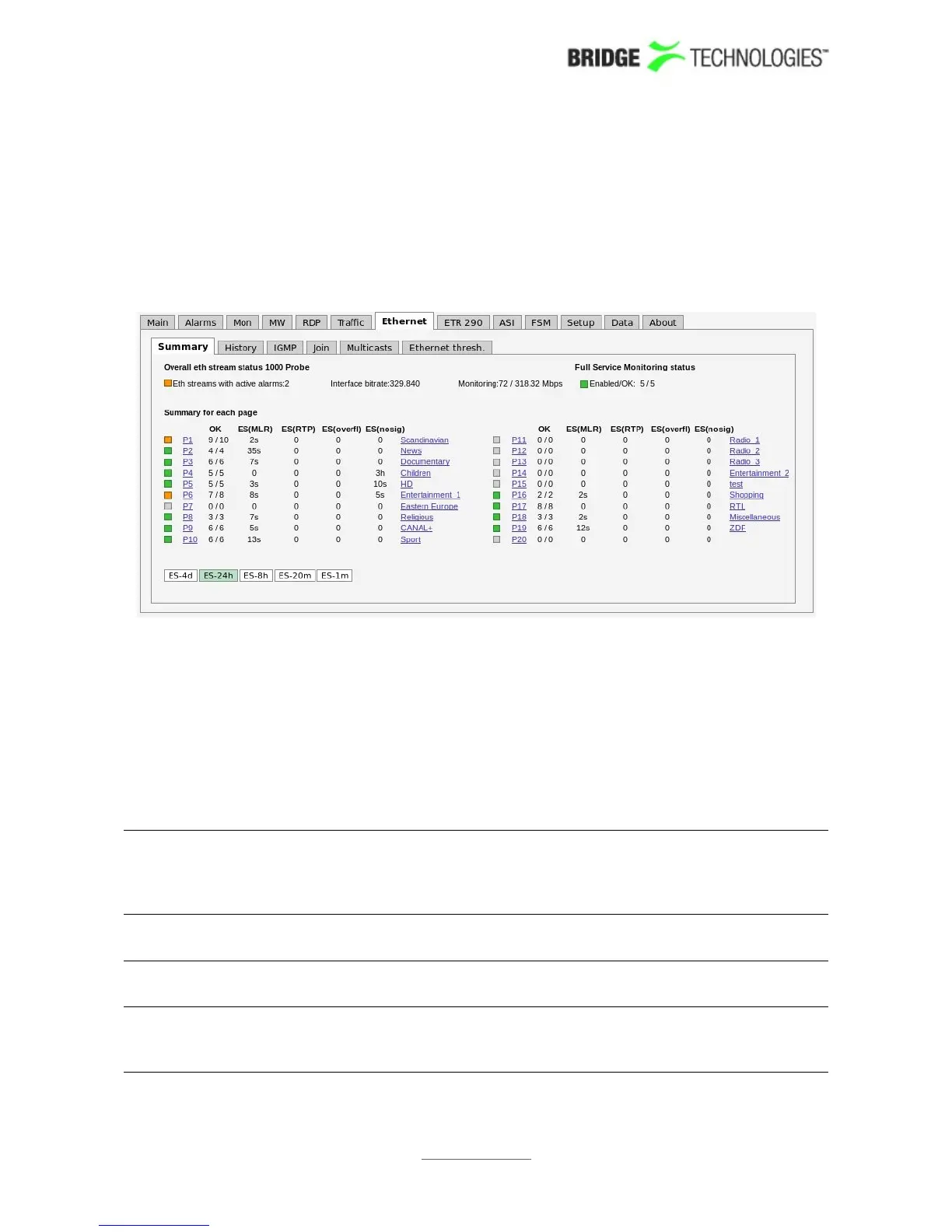
6.8 Ethernet
6.8.1 Ethernet - Summary
The intention of this page, together with the alarm list, is to provide enough
information for the operator to immediately see if there is anything seriously wrong
with one or more Ethernet input streams. The overall status for the Full Service
Monitoring (FSM) is also shown.
Throughout this view the bulb colours indicate the most severe active alarm. They
may be green (no alarm), yellow (warning), orange (error) or red (major). The bulb
colour is based on user defined alarm severity settings for each alarm. A grey bulb
indicates that monitoring is disabled.
The following Ethernet parameters are shown:
Eth streams with
active alarms:
Shows the number of streams that are presently in an alarm
state (0-50). Note that the number of alarms counted refers to
default settings, and alarms disabled by the user will still be
counted.
Interface
bitrate:
This is the total bitrate sensed on eth0. It should be greater
than or equal to the Monitoring bitrate.
Monitoring: This is the total number of Ethernet streams monitored (0-50)
and the total bitrate for these streams.
Full Service
Monitoring
status:
The number of enabled FSM services / number of OK FSM
services
PROBE USERS' MANUAL VERSION 5.0
2014 © BRIDGE Technologies Co AS - Bentsebrugata 20 - N-0476 Oslo, Norway - tel: +47 22 38 51 00 -
www.bridgetech.tv
101



 To Next Page