6.13 COFDM (VB252 Option Module for VB220)
The COFDM tab will only be present in the graphical user interface provided that the
probe chassis is equipped with an optional COFDM demodulator module.
Each COFDM tab represents an independent RF input. The VB250 has one RF input per
module. The VB252 has two RF inputs per module. COFDM1 is the leftmost input as
seen from the front of the unit. There can be up to four COFDM tabs (COFDM1 through
to COFDM4) depending on card configuration.
For the VB252 one input is active by default and the second input can be activated
through the SECOND-RF-INPUT-OPTION license key.
Thumbnails of COFDM services are accessed from the ETR 290 - Services view.
6.13.1 COFDM - Status (VB252)
(Constellation diagram requires The Advanced RF Option)
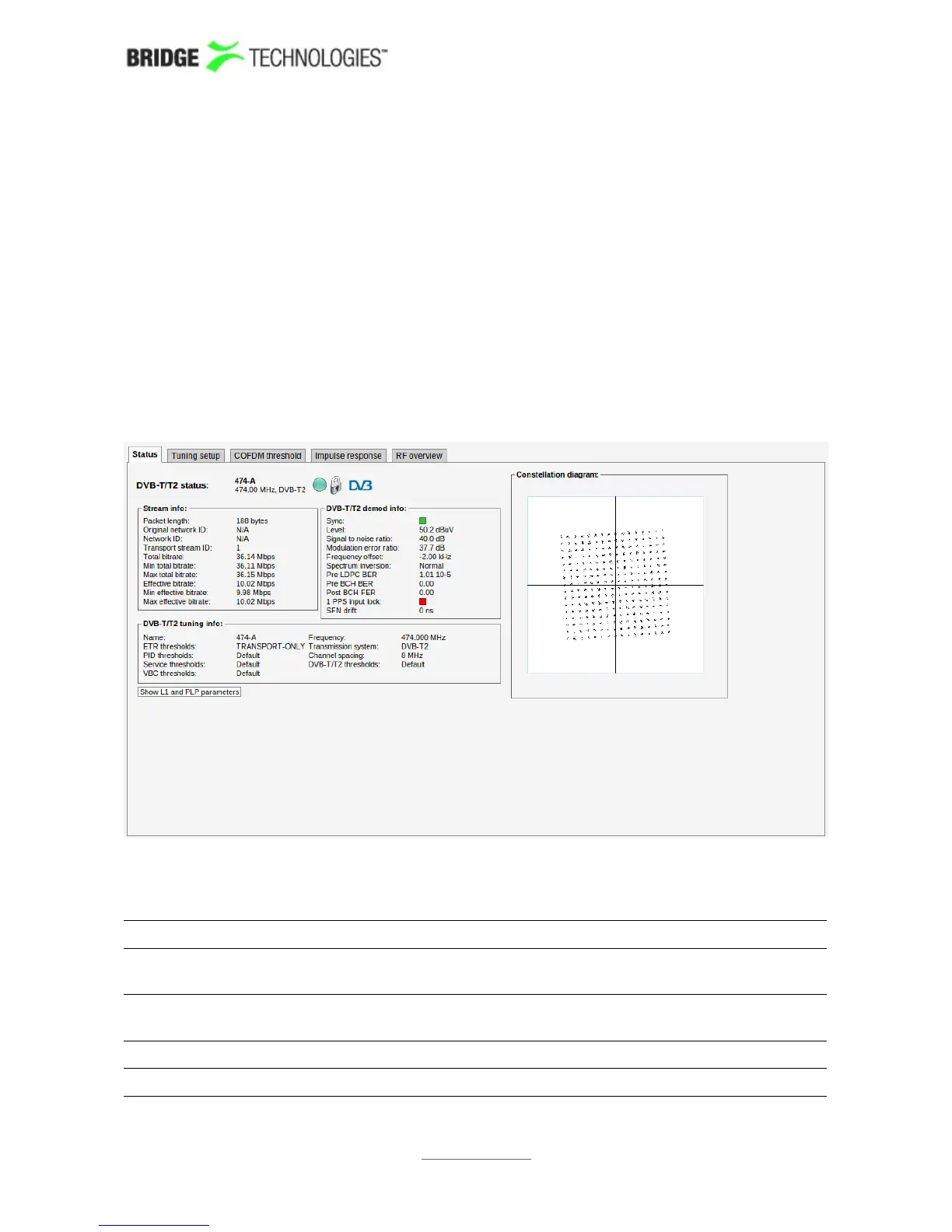
The COFDM - Status view gives an overview of the key input interface parameters.
The COFDM status view displays the following information:
DVB-T/T2 status - Stream info:
Packet length: Indicates if the transport stream packets are 188 or 204
bytes
Original network
ID:
The original network ID as specified in the NIT table
Network ID: The network ID as specified in the NIT table
Transport stream The transport stream ID as specified in the PAT table
PROBE USERS' MANUAL VERSION 5.0
2014 © BRIDGE Technologies Co AS - Bentsebrugata 20 - N-0476 Oslo, Norway - tel: +47 22 38 51 00 -
www.bridgetech.tv
176



 To Next Page