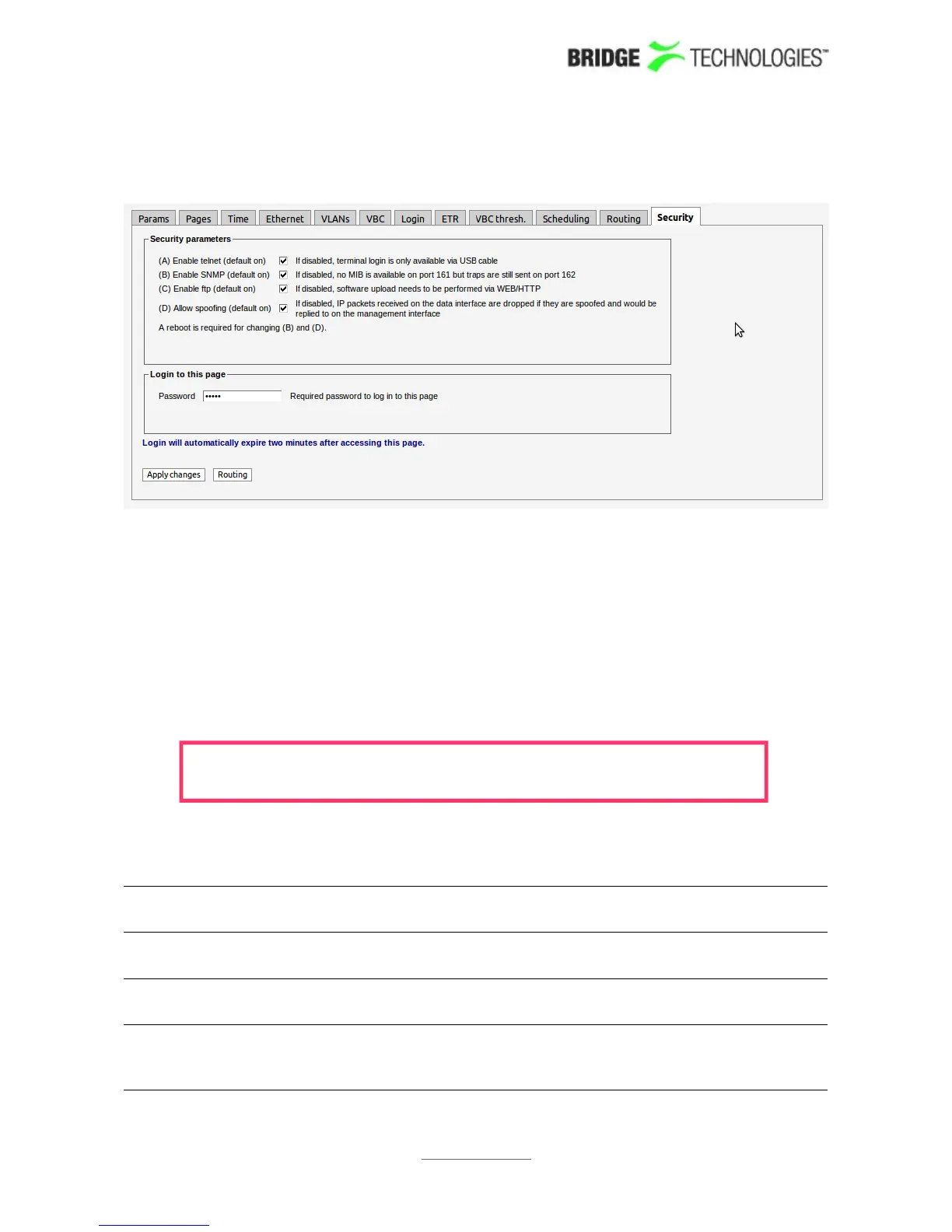
6.17.11 Setup - Security
The Setup - Security view makes it possible to disable selected communication
protocols to increase safety against unauthorised access to the probe. It is also
possible to have the probe disregard IP packets with source address outside the
Ethernet interface's subnet.
Note that the Setup - Security view is not supported when Internet Explorer 6 is
used.
The default user name and password to enter this view is admin and elvis . The
password is changed by entering a new password and clicking the Apply changes
button.
Note that if the password is lost, the probe will have to be factory reset
to access the Setup - Security view.
To disable a protocol deselect it by removing the associated check-mark and click the
Apply changes button. Available security parameters are:
(A) Enable
telnet:
If telnet is disabled, terminal login is only available via USB
cable, i.e. remote login is disabled.
(B) Enable SNMP: If SNMP is disabled, no MIB is available on port 161. However
SNMP traps are sent as usual on port 162.
(C) Enable ftp: If ftp is disabled, software upload needs to be performed via
the regular web interface (from the Data view).
(D) A spoofing: If disabled, IP packets received on the data interface are
dropped if they are spoofed and would be replied to on the
management interface
PROBE USERS' MANUAL VERSION 5.0
2014 © BRIDGE Technologies Co AS - Bentsebrugata 20 - N-0476 Oslo, Norway - tel: +47 22 38 51 00 -
www.bridgetech.tv
239



 To Next Page