3. Appendix: OTT Profile Health
OTT Profile Health Bar
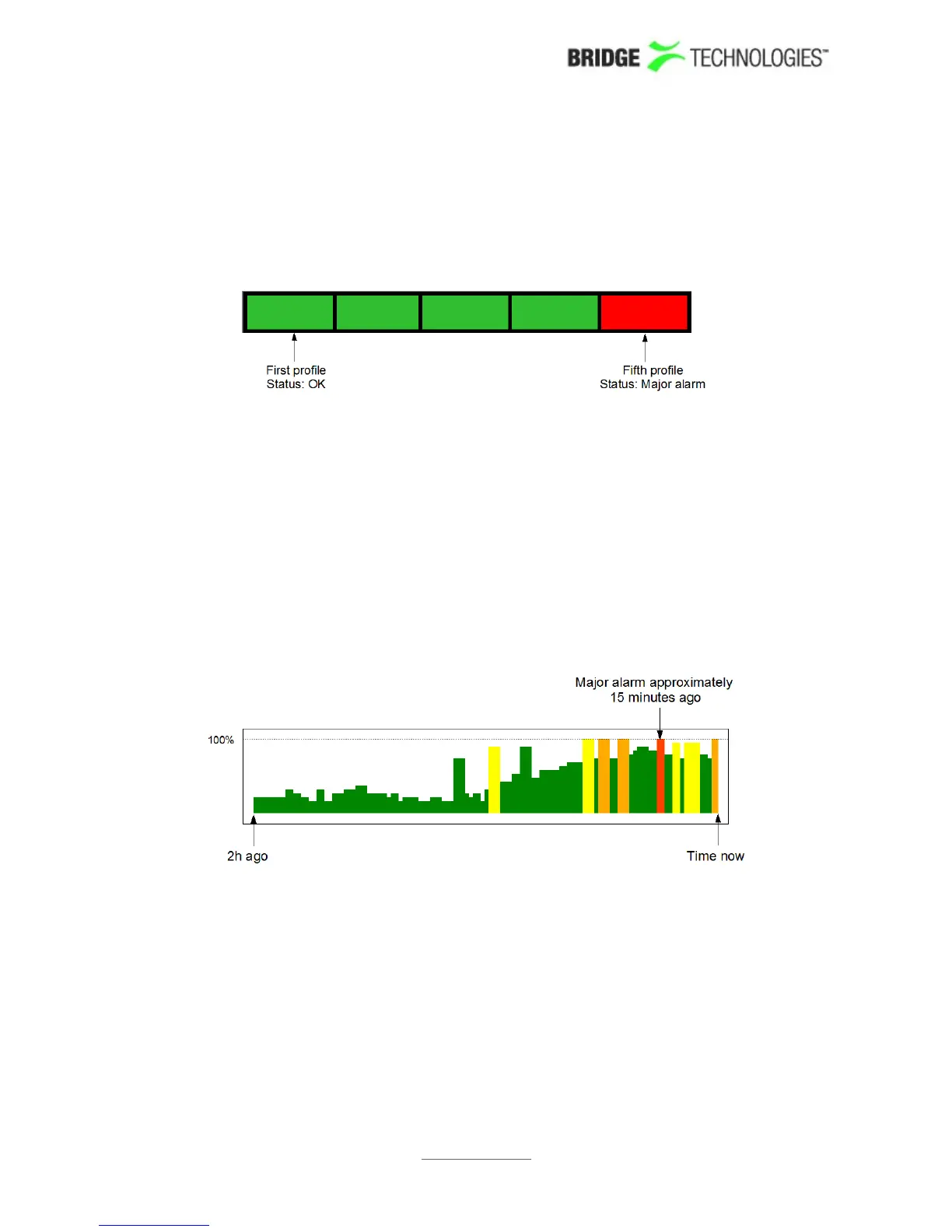
The profile health bar displayed at channel level shows an overview of current status
for individual channel profiles. Different colours indicate status:
Green: OK
Yellow: Warning
Orange: Error
Red: Major
Black: Fatal
All enabled alarms may affect the profile health bar, and alarm severities can be
assigned to each alarm in the Alarms – Alarm setup view.
OTT Profile Health Timeline
The OTT profile health timeline shows information about channel bitrate and channel
alarm status for the last two hours, with a time resolution of one minute. Green parts
of the timeline indicate profile download time versus chunk length. The graph is scaled
so that 100% indicates a chunk download time identical to chunk length (in seconds),
chunk length being signalled in the profile manifest. Quick chunk download times
therefore result in a 'low' green graph, as seen in the left hand part of the graph
above. When download times exceed the user defined profile bitrate warning and error
thresholds the graph is coloured yellow and orange respectively.
In addition to profile bitrate indication the graph displays profile status information
related to non-bitrate alarms. Active profile alarms are represented in the graph as
PROBE USERS' MANUAL VERSION 5.0
2014 © BRIDGE Technologies Co AS - Bentsebrugata 20 - N-0476 Oslo, Norway - tel: +47 22 38 51 00 -
www.bridgetech.tv
255



 To Next Page