3. PANEL OPERATION
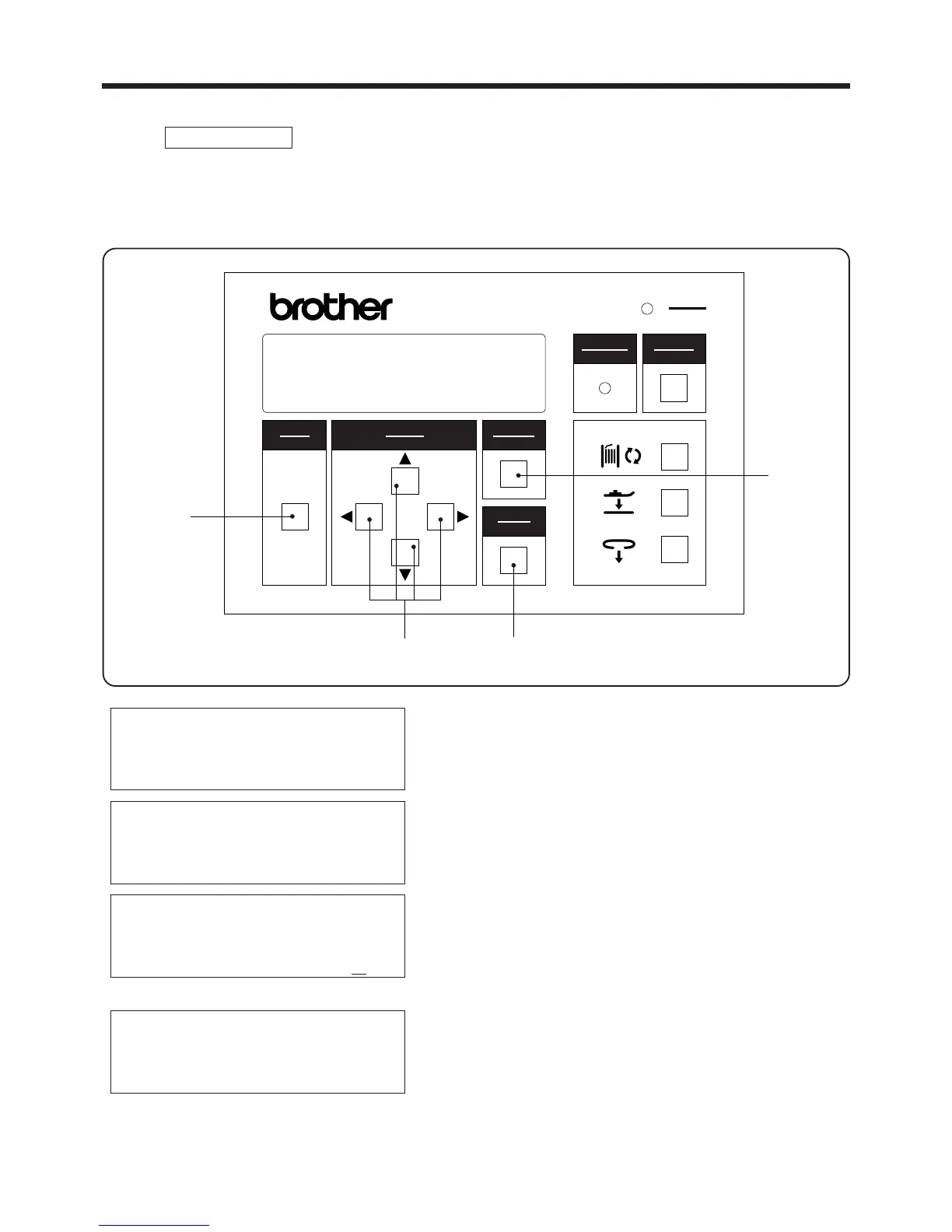
3-2-1.Setting the belt loop feeding-out length
3-2.Data setting methods
1. Press the MODE switch w to select PROGRAM
mode.
2. Use the ▲ and ▼SELECT switches e to move the
pointer " ◆ " so that "Loop length" is selected.
3. While using the SELECT switch eto move the
cursor "-", press the▲ and▼ SELECT switches e
to set the desired belt loop length.
* If the CANCEL switch r is pressed, the setting
will remain at the previous length setting.
4. Press the ENTER switch t to accept the new length
setting. The cursor "-" will then disappear.
・ This sets the length of belt loop material to be fed out before it is cut.
・ The length can be set to between 50 - 120 mm.
▲
PROGRAM mode
PROGRAM MODE
2nd bobbin counter
Speed
◆ Loop length z//
― 13 ―
BAS-705
PROGRAM MODE
◆ 2nd bobbin counter
Speed
Loop length
選択
SELECT
モード
MODE
確定
ENTER
リセット
RESET
電源
POWER
取り消し
CANCEL
警告
WARNING
BAS-705
r
t
e
w
PROGRAM MODE
2nd bobbin counter
Speed
◆ Loop length
PROGRAM MODE
2nd bobbin counter
Speed
◆ Loop length zzb



 To Next Page