5. STANDARD ADJUSTMENT (MACHINE HEAD)
5-8. Adjusting the thread wiper
5-8-1. First bar tacking
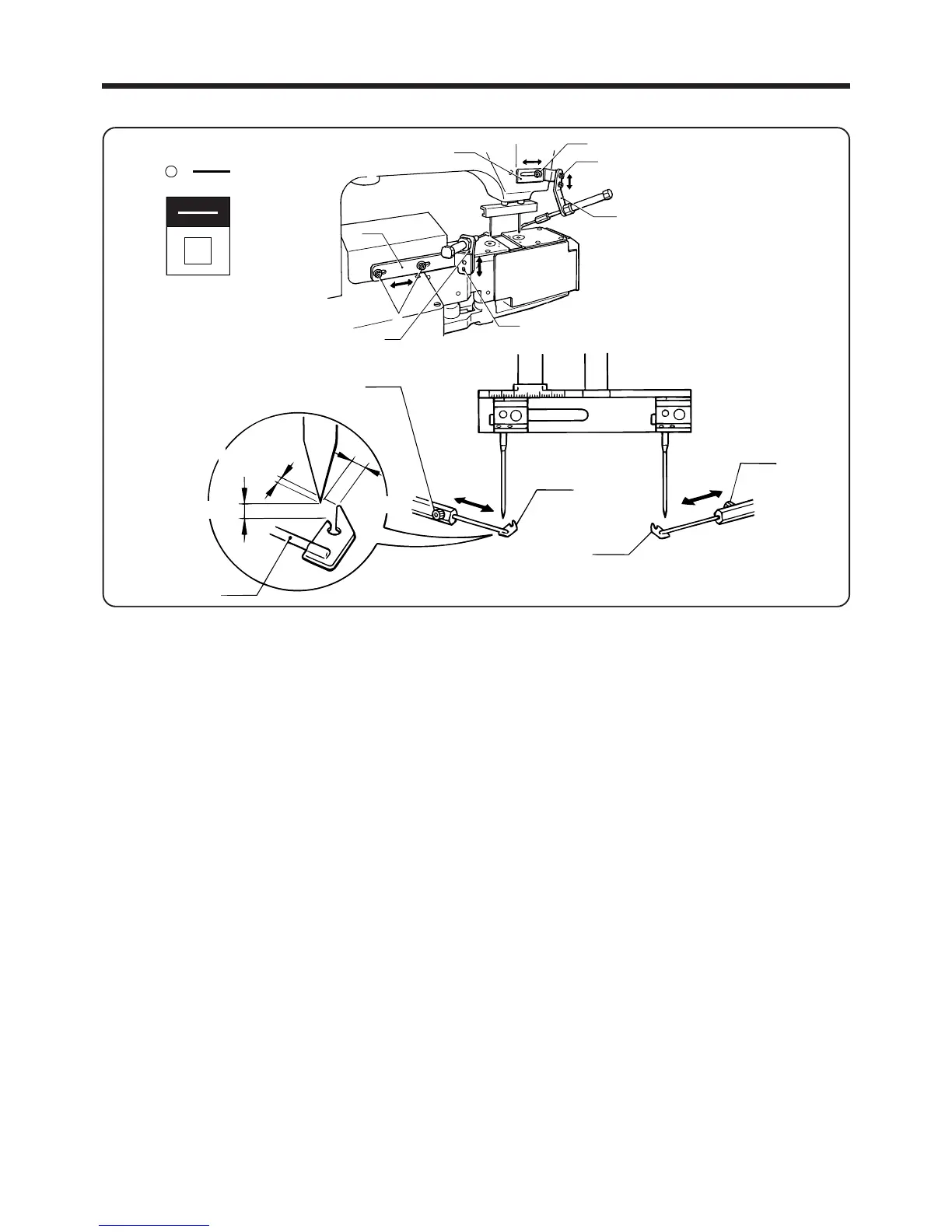
1. Press the RESET switch on the operating panel to raise the needle to the needle up stop position.
2. Press the FOOT switch to lower the presser foot. (The air will be released at this point.)
3. Loosen the set screw w and move the thread wiper q in the direction of the arrow to adjust so that the
point of the thread wiper q is 0.3 - 0.5 mm from the point of the needle.
If adjustment is not possible by moving the thread wiper q, adjust by loosening the bolt e and moving
thread wiper slide plate R r in the direction of the arrow.
4. Loosen the bolt y of thread wiper slide plate F t, and then move thread wiper slide plate F t in the
direction of the arrow to adjust the height of the thread wiper q so that it is 0.5 - 1 mm from the point
of the needle.
5.
Once adjustment is completed, turn on the air and press the RESET switch. (This will clear the error
resulting from abnormal air pressure.)
5-8-2. Second bar tacking
1. Press the RESET switch on the operating panel to raise the needle to the needle up stop position.
2. Press the FOOT switch to lower the presser foot. (The air will be released at this point.)
3. Loosen the set screw i and move the thread wiper u in the direction of the arrow to adjust so that the
point of the thread wiper u is 0.3 - 0.5 mm from the point of the needle.
If adjustment is not possible by moving the thread wiper u, adjust by loosening the bolt o and moving
thread wiper slide plate F !0 in the direction of the arrow.
4. Loosen the screw !2 of thread wiper slide plate F !1, and then move thread wiper slide plate F !2 in the
direction of the arrow to adjust the height of the thread wiper u so that it is 0.5 - 1 mm from the point
of the needle.
5.
Once adjustment is completed, turn on the air and press the RESET switch. (This will clear the error
resulting from abnormal air pressure.)
―45―
BAS-705
i
u
u
q
w
0.5〜1mm
0.3
〜0.5mm
0.3〜0.5mm
!0
o
y
t
r
!2
!1
e
リセット
RESET
電源



 To Next Page