6. STANDARD ADJUSTMENT (MECHANISMS)
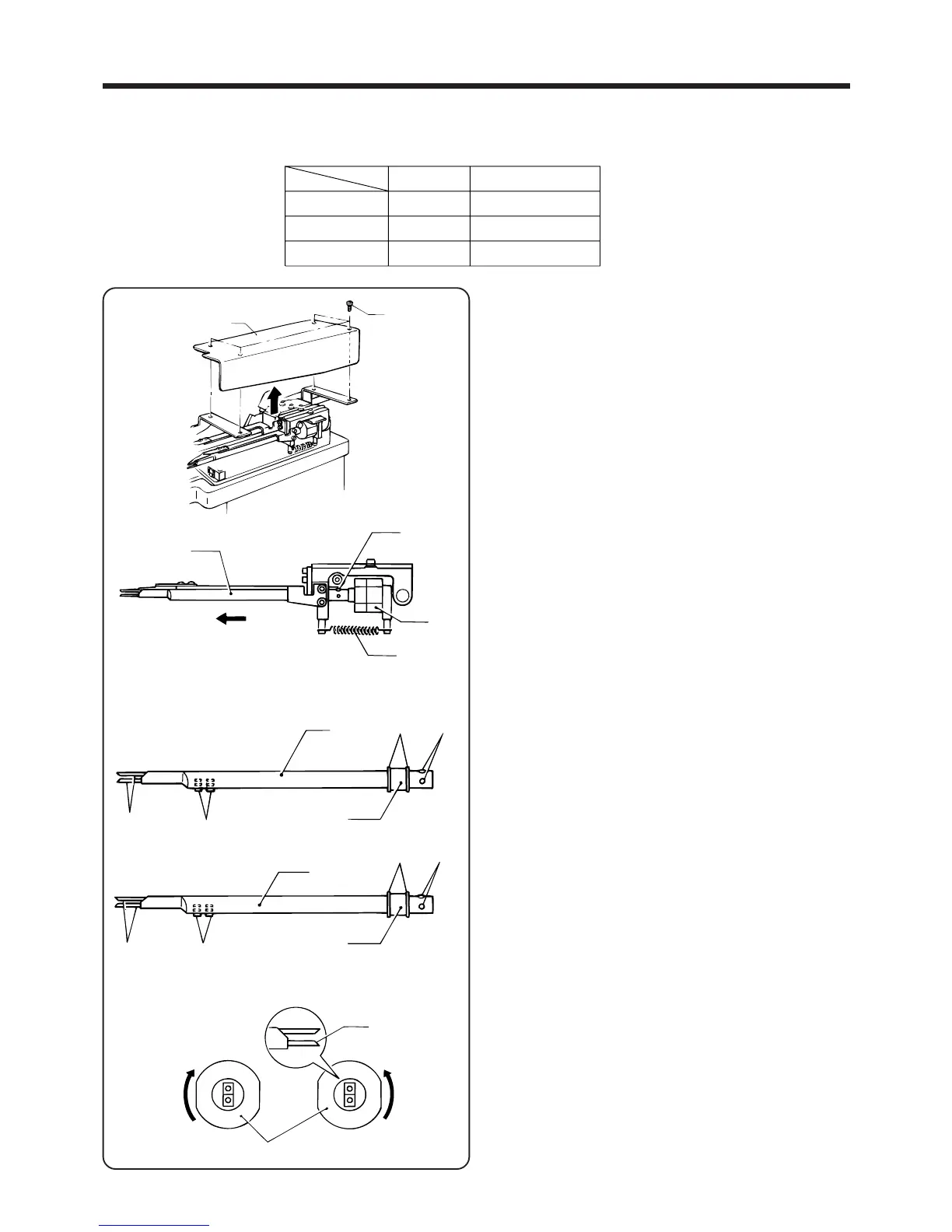
6-3-3. Replacing the fork bracket and fork shafts (L and S)
[When replacing the fork]
1. Remove the four screws q, and then remove the
feeder cover w.
2. Remove the springs e from the cylinder setting
base and from fork bracket F and fork bracket B.
NOTE: Be sure to use the proper tool to remove the
spring.
3. Remove the two screws t on the fork r.
4. Pull the fork r out from the rotary cylinder y.
NOTE: If the fork being replaced is an assembly,
proceed to step 7 below.
5. Loosen the two retaining rings u, the two fork
bushings i and the two set screws o, and then
remove fork shafts L and S !0 from the fork r.
6. Install the two retaining rings u and the fork bush
ings i to the new fork !1.
7. Secure the fork shafts L and S !00 with the two set
screws o so that the bevelled surfaces face inward.
8. Insert the new fork !1 into the rotary cylinder y.
9. Turn the rotary cylinder t as shown in the illustration
until it will not turn further, and then hold fork shafts
L and S !0 vertical beside each other, and install
them with the two set screws o.
10. Install the the springs e to cylinder setting base,
fork bracket F and fork bracket B.
11. Install the feeder cover w with the four screws q.
・Replace the fork in accordance with the thickness of the belt loops by referring to the table below.
―56―
BAS-705
r
t
y
e
r
u
i
t
o
!0
!0
o
!1
i
u
t
!0
!1
w
q
Thin material
Standard
Thick material
Clearance (mm)
1.8
2.6
3.2
Belt loop thickness (mm)
0.7〜1.3
1.1〜2.1
1.8〜2.7



 To Next Page