11. OPTIONS
11. OPTIONS
11-1. Hand set switch unit
......
(S41639-001)
<Attachment>
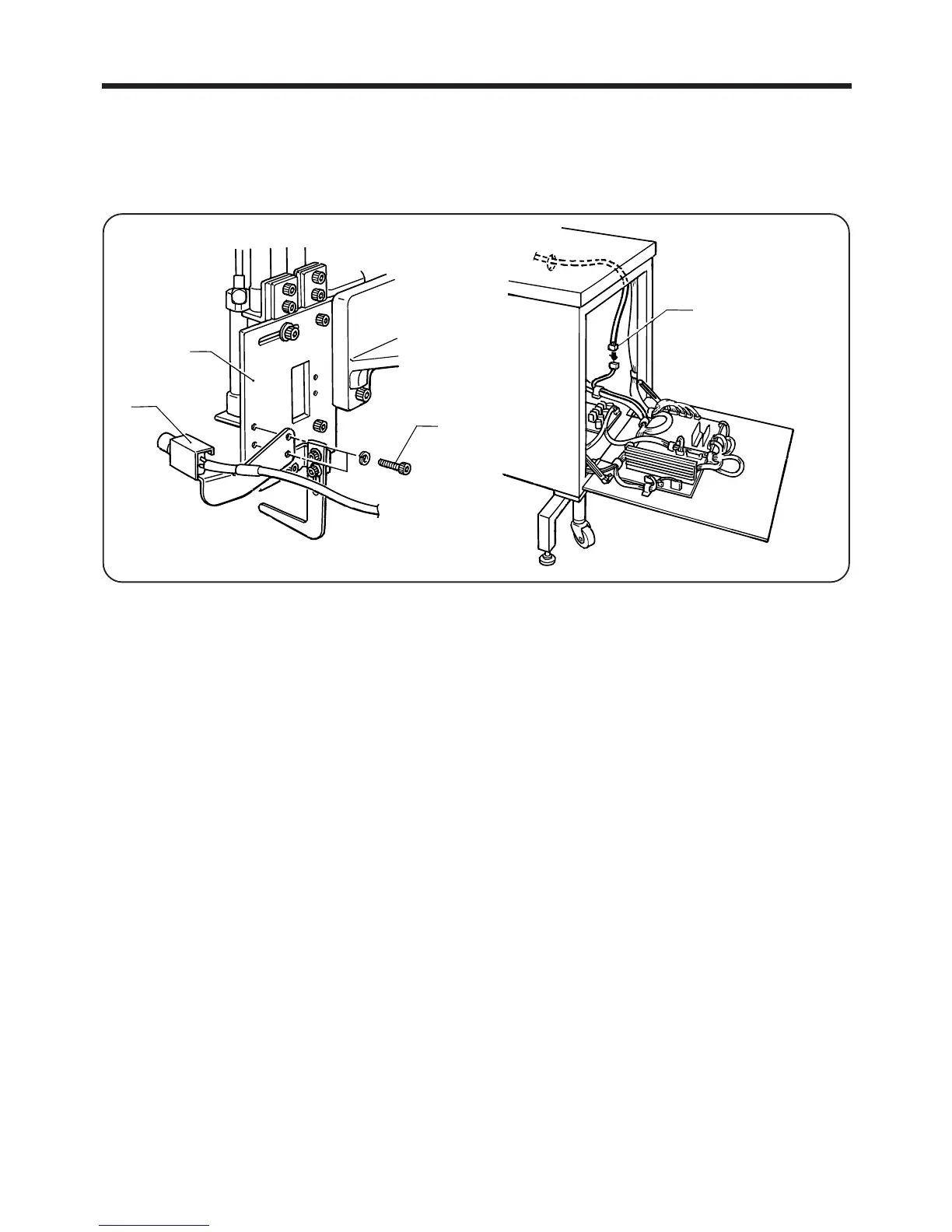
1. Attach the hand set switch q to the fold unit mounting plate w with the bolt e.
2. Open the control box and disconnect the connector r.
● Use the hand set switch when you wish to sew in a cycle that is different from standard automatic sewing
(as far as operation of the belt loop guide).
<Use>
1. Set DIP switch 17 to ON and then turn on the power. (Refer to page 68 for operation of the DIP switch.)
●
The belt loop guide will operate.
NOTE: Always be sure to return the DIP switch to RESET when turning off the power.
2. Put the cut off belt loop on loop presser foot B and loop presser foot F .
3. Press the hand set switch q.
●
The belt loop will be folded.
NOTE: At this time, if the hand set switch is pressed once more, the belt loop will be released.
4. Press the START switch.
●
After sewing, the belt loop guide will operate.
― 82 ―
BAS-705
q
w
e
r



 To Next Page