38
8175
ENGLISH
CALIBRATION MENU
ENTER
0......9
X
0......9
X
Y
Z
0......9
ENTER
0......9
ENTER
0......9
ENTER
0......9
ENTER
ENTER
ENTER
VER. CYL
CUBE
SPHERE
MANUAL
SPECIAL
VALID Y
VALID N
CURRENT
CURRENT
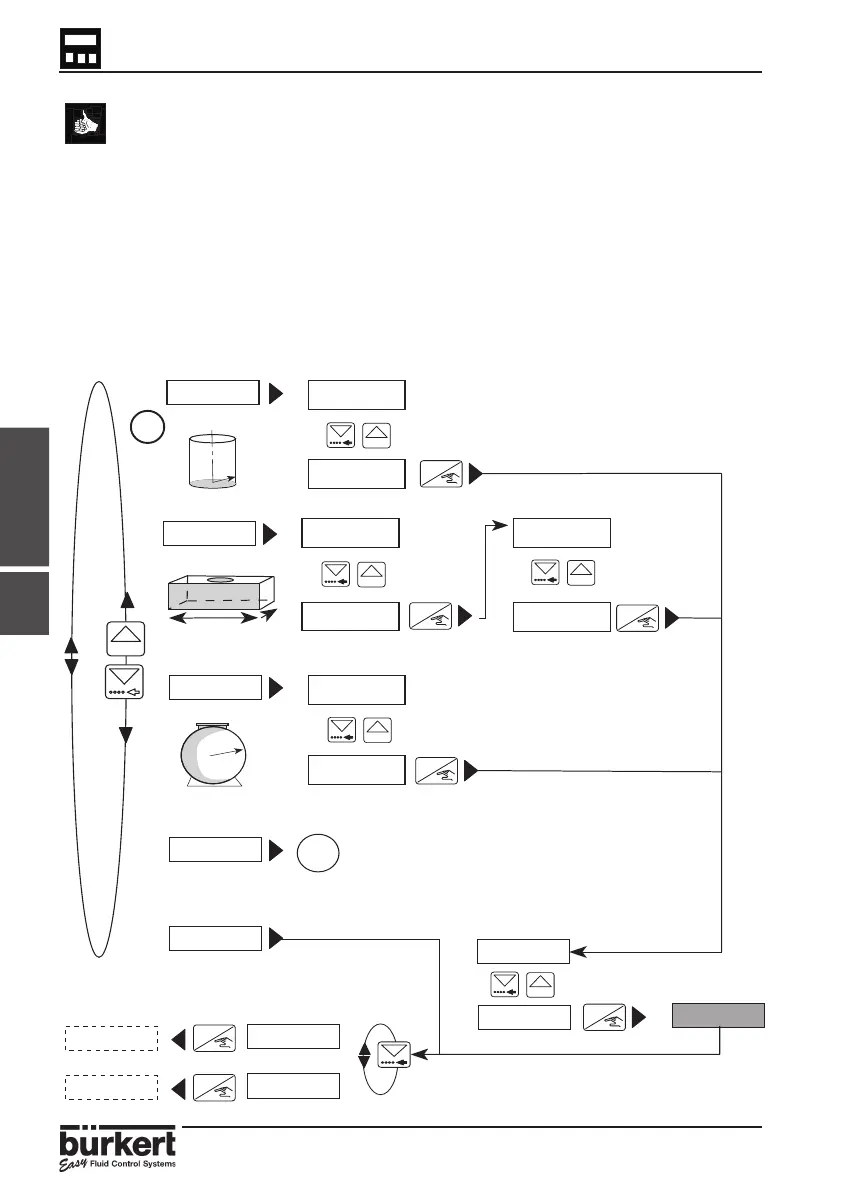
● The diagram below displays the available options and the information
required in the following format;
X = Radius
Y = Length
Z = Width.
● Enter the dimensions of the tank, then enter the actual present volume
within the tank or vessel and the transmitter will automatically measure
the distance and display the value.
● If an horizontal cylinder is to be used pre-calculate the values by using
the table within section 6.2. After select and complete a manual input of
distances and associated volumes procedure by entering the values
identified.
4.4.6
X=00.00
X=01.20
Y=00.00
Y=01.30
Z=00.00
Z=01.65
X=00.00
X=01.65
0000 L
0000 L
1.36 M



 To Next Page