41
8175
ENGLISH
CALIBRATION MENU
- VOLUME TEACH-IN PROCEDURE
This function identifies the distance between the base of the sensor and fluid surface
and associated volumes are entered to fix the relationship between the transmitter
display and real measurement.
● This function allows upto 12 individual associated volume measurements
to be entered in relation to the distance measured by the transmitter.
● To perform this function the associated volumes must be known in
relation to the measured distance.
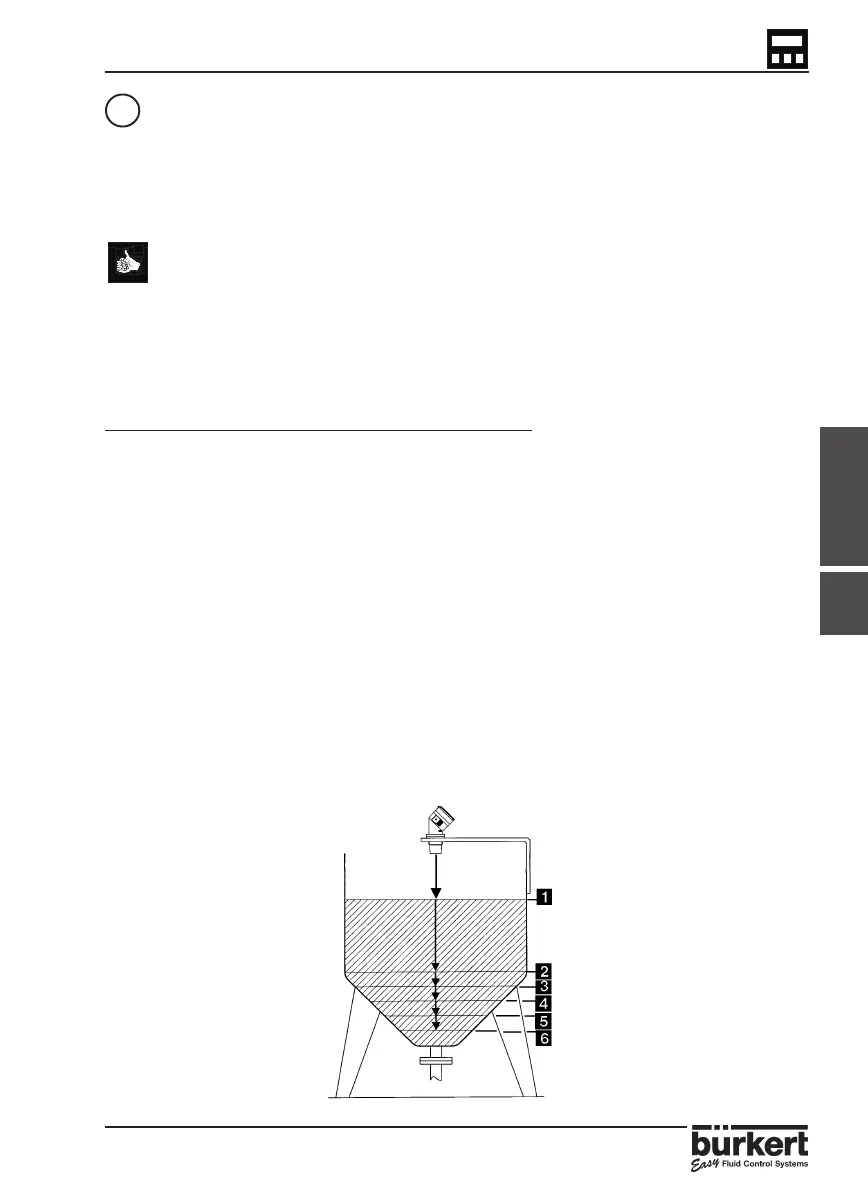
● The accuracy of this function is highly dependent on the selected
reference points according to the shape of the tank or vessel. (see
diagram below)
STEPS FOR SUCCESSFUL MEASUREMENT:
● Identify at least 2 reference points according to the shape of the tank or vessel
for entering the associated volume to the measured distance given by the
transmitter.
● The tank or vessel can be filled or emptied for each reference point although
the maximum volume which can be entered is 599.9m
3
or 5999.9 litre/Gal.
● Select ‘TEACH Y‘ on entering the Teach-In function and press enter.
● The transmitter will automatically calculate the first distance measurement.
● If the distance measurement is correct, press ‘enter‘ and insert the volume
associated to the measured distance and press enter.
● The previous 2 steps will be repeated automatically as the transmitter requires
at least 2 reference points.
● After entering the 2nd associated volume it is possible to quit the function by
selecting ‘END YES‘ and select ‘VALID Y‘ to validate the option or ignore and
advance to the next function. Alternatively it is possible to continue and enter
associated volumes by selecting ‘END NO‘ . This can be repeated to enter a total
of 12 measurements.
4.4.6



 To Next Page