40
8175
ENGLISH
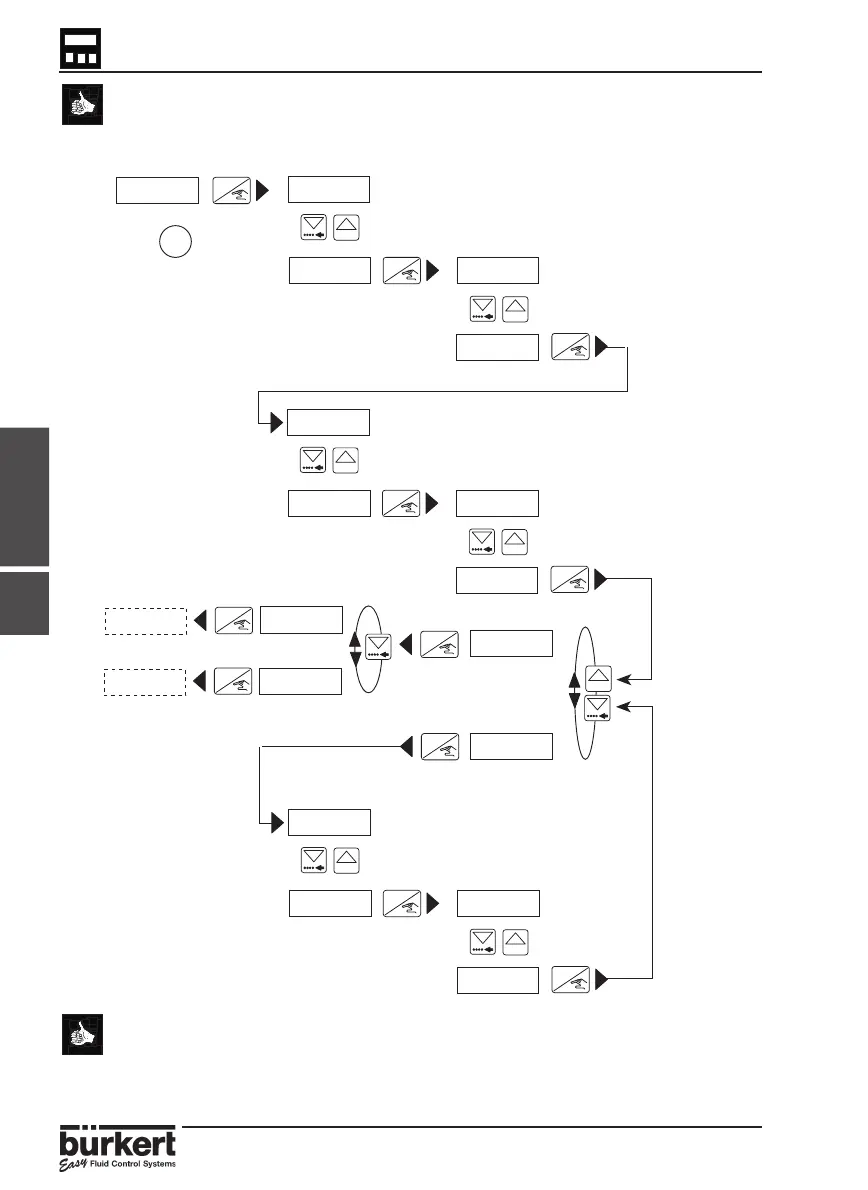
CALIBRATION MENU
If an incorrect value is entered, select ‘END YES‘ and validate the measurements
entered. Within the main menu (calibration) select ‘END‘, then re-enter the menu
and function and repeat the input of the measurements starting at the incorrect
value.
4.4.6
ENTER
0......9
ENTER
0......9
ENTER
0......9
ENTER
0......9
ENTER
0......9
ENTER
0......9
ENTER
0......9
ENTER
ENTER
ENTER
ENTER
Enter the first distance measurement
Enter the first volume measurement
Enter the second distance measurement
Enter the second volume measurement
Enter the n
th
distance measurement
Enter the n
th
volume measurement
MANUAL
END YES
END NO
VALID Y
VALID N
CURRENT
CURRENT
N ≤ 12
● This option enables to display volume in a percentage for example or in
alternative units. The units selected must then not be taken into
account.
● In the same way, the 8175 can be used to display the flow rate within
open channels.
1=0000.0
1=0013.0
2=0000.0
2=0035.2
00.00 M
00.65 M
00.00 M
00.65 M
00.00 M
02.05 M N=0000.0
N=0041.1



 To Next Page