37
GasAlertMicroClip
Calibration
Connecting the Gas Cylinder to the Detector
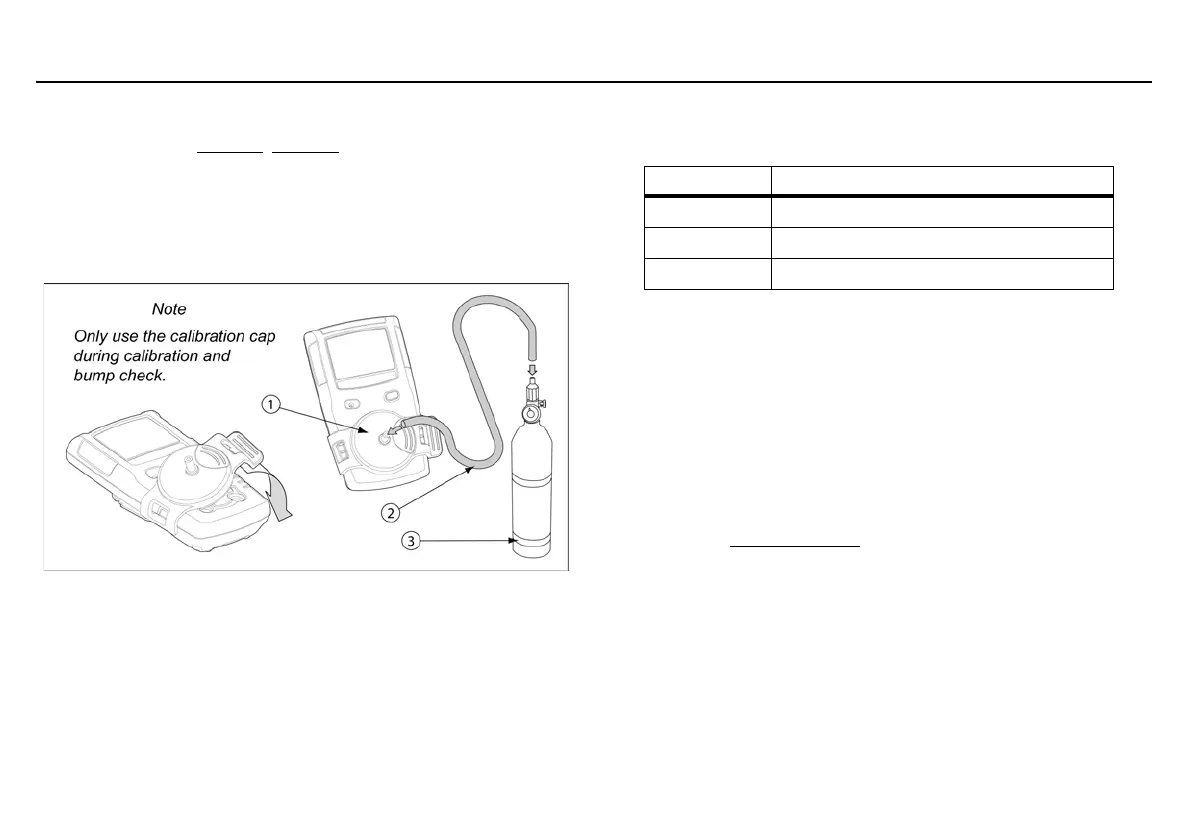
Refer to the following Figure 7., Table 11., and procedures to connect the
gas cylinder to the detector for calibration.
Note
Wind currents may cause false readings and poor calibrations.
Figure 7. Connecting the Gas Cylinder to the Detector
Table 11. Connecting the Gas Cylinder to the Detector
Read the following steps (1-7) before beginning calibration.
1. Verify the calibration gas being used matches the span
concentration value(s) that are set for the detector. Refer to
Calibration Gas in Fleet Manager II.
2. Attach a 0.5 ml/min regulator to the gas cylinder. To perform an
automated calibration, use a demand flow regulator and refer to
the MicroDock II User Manual.
3. Connect the calibration hose to the calibration cap.
4. Connect the other end of the calibration hose to the regulator on
the gas cylinder.
5. Refer to Calibration Setup
to apply gas.
6. When calibration is complete turn off gas and disconnect the
hose from the calibration cap and regulator.
7. Ensure the gas cylinder is stored according to the manufacturer’s
specifications.
Item Description
1
Calibration cap
2
Calibration hose
3
Gas cylinder with 0.5 ml/min regulator



 To Next Page