GasAlertMicroClip
User Manual
18
Using Fleet Manager II to Configure the Detector
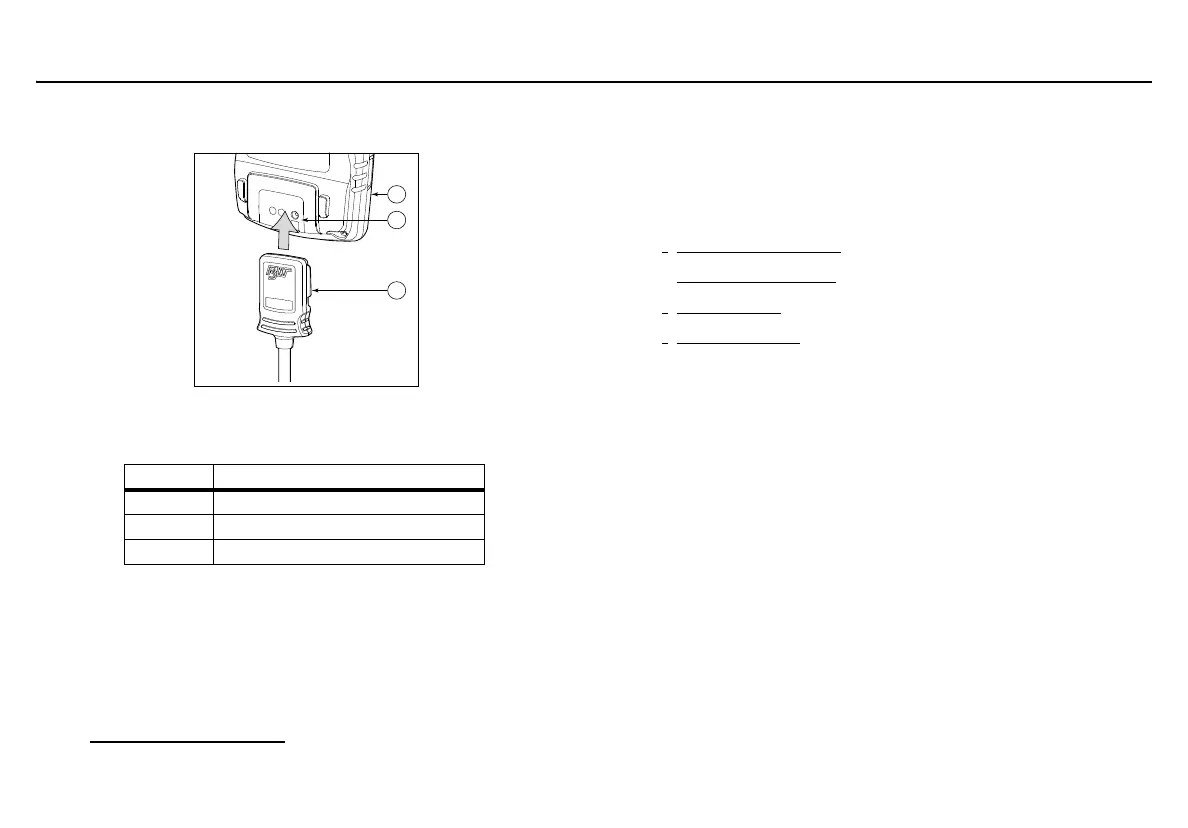
Table 6: Connecting to the IR Link
1. Activate the detector and wait for the startup tests to complete.
2. Connect the USB cable to the USB port on the computer.
3. Connect the USB cable to the IR Link.
4. Insert the IR link onto the IR interface on the back of the detector.
5. Open Fleet Manager II and access the Sensors tab. Refer to
Installing Fleet Manager II
.
6. From the Sensors tab, click Retrieve from Device at the bottom
of the window.
The fields will populate with the detector’s current configurations.
7. Refer to the descriptions in the following sections to define
settings and enable/disable options:
•
Detector Identification
• Sensor Configuration (CO, O
2
, H
2
S, and LEL)
•
User Options
• Language Menu
8. When configuration of new settings is complete, click Save to
Device at the bottom of the window. The detector automatically
updates with the new settings.
Item Description
1 Detector
2 IR and charger interface
3 IR Link



 To Next Page