47
GasAlertMicroClip
Maintenance
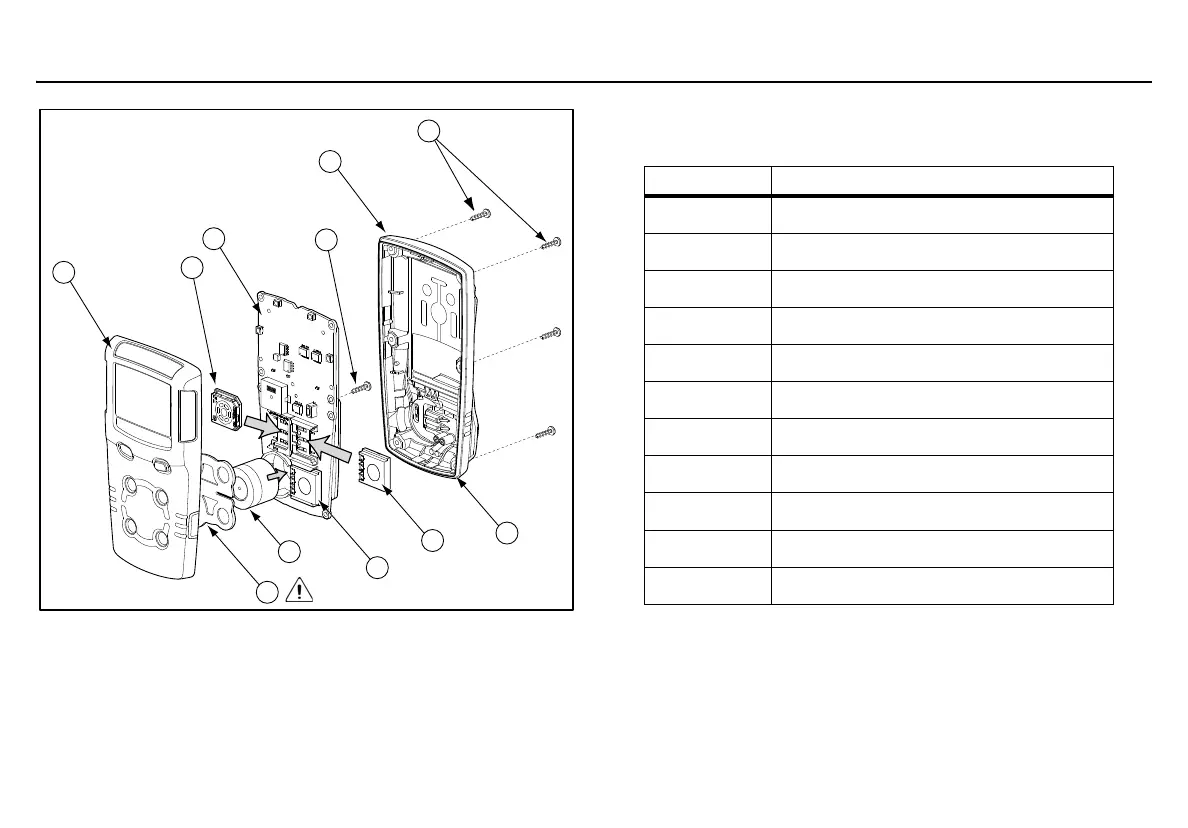
Figure 9. Replacing a Sensor or Sensor Filter
Table 14. Replacing a Sensor or Sensor Filter
Removing the back shell
1. Deactivate the detector. On a clean surface, place the detector
f
ace down.
2. Remove the six machine screws on the rear shell.
3. Remove the back cover by lifting the top and the bottom upwar
ds
s
imultaneously to prevent damaging the charger pin
s.
Item Description
1 Front shell
2 Combustible (LEL) sensor
3PCB
4 PCB screws (2)
5Rear shell
6 Machine screws (6)
7 Sealing rib
8 Carbon monoxide (CO) sensor
9
Hydrogen sulfide (H
2
S) sensor
10
Oxygen (O
2
) sensor
11 Sensor filter



 To Next Page