50
GasAlertMicroClip
Maintenance
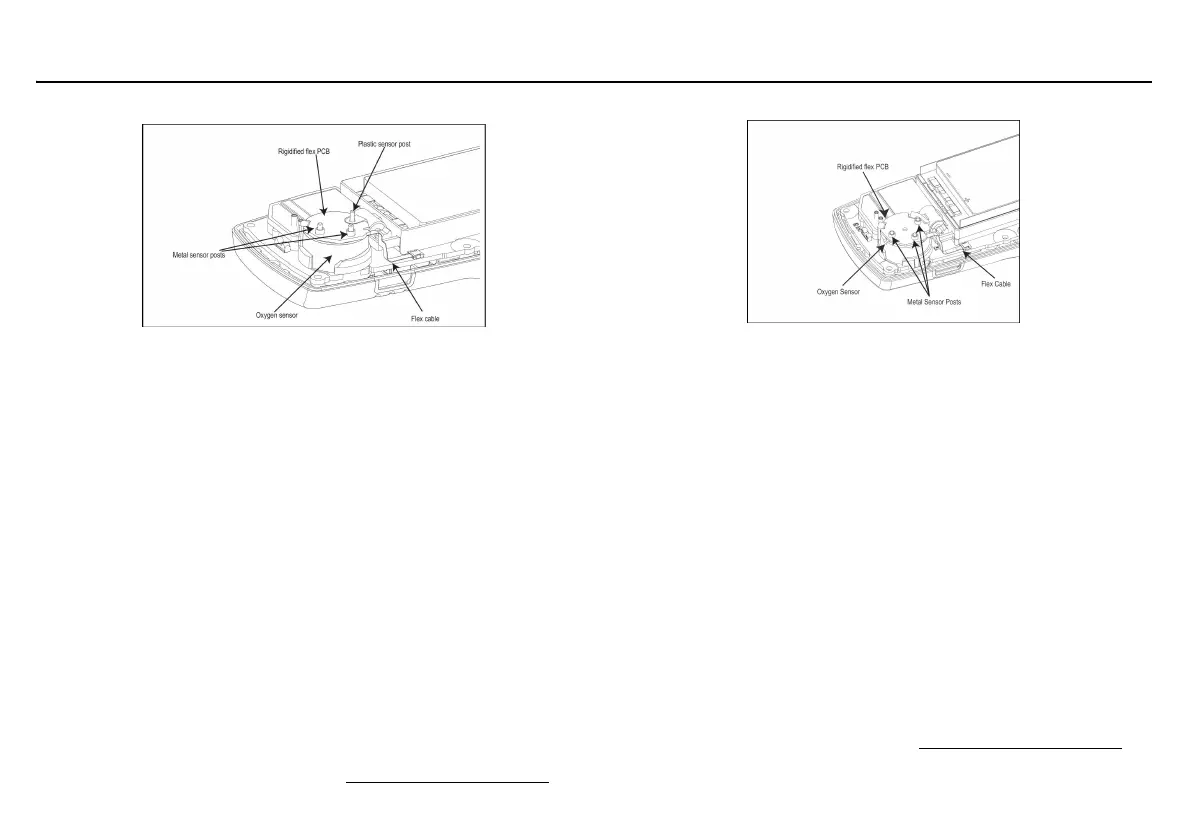
Replacing the Oxygen Sensor XT and XL
Note: Detectors that are configured for 1, 2, or 3 gases may
contain a dummy sens
or in one of the four sensor locations.
1. Gently remove the circular rigidified flex PCB atop the sensor
from the metal sensor posts. Take care not to tear the flex cable.
2. Note the placement of the PCB to ensure it is replaced correctly.
Remove the two screws on the PCB.
a Caution
Ensure no damage occurs to the battery.
3. Lift the PCB straight up. The oxygen sensor will stay in the front
shell. Remove the sensor.
4. On roughly the same spot on the front shell, place the new
sensor. Lower the PCB over the oxygen sensor.
5. Carefully replace the circular rigidified flex PCB atop the metal
sensor posts. Ensure the plastic sensor post is inserted into the
clear plastic hole. Take care not to tear the flex cable.
6. Press down to secure the circular rigidified flex PCB atop the
metal sensor posts.Take care not to press down too hard and
accidentally activate the detector.
7. To complete the detector, refer to Reassembling the detector
.
Replacing the Oxygen Sensor X3
Note: Detectors that are configured for 1, 2, or 3 gases may
contain a dummy sensor in one of the four sensor locations.
1. Gently remove the circular rigidified flex PCB atop the senso
r
from the metal sensor posts. Take care not to tear the flex cable.
2. Note the placement of the PCB to ensure it is replaced correctly.
Remove the two screws on the PCB.
a Caution
Ensure no damage occurs to the battery.
3. Lift the PCB straight up. The oxygen sensor will stay in the front
shell. Remove the sensor.
4. On roughly the same spot on the front shell, place the n
ew
sensor. Lower the PCB over the oxygen sensor.
5. Carefully replace the circular rigidified flex PCB atop the metal
sensor posts. Take care not to tear the flex cable.
6. Press down to secure the circular rigidified flex PCB atop the
metal sensor posts.Take care not to press down too hard and
accidentally activate the detector.
7. To complete the detector, refer to Reassembling the detector
.



 To Next Page