GasAlertMicroClip
User Manual
56
Startup Troubleshooting
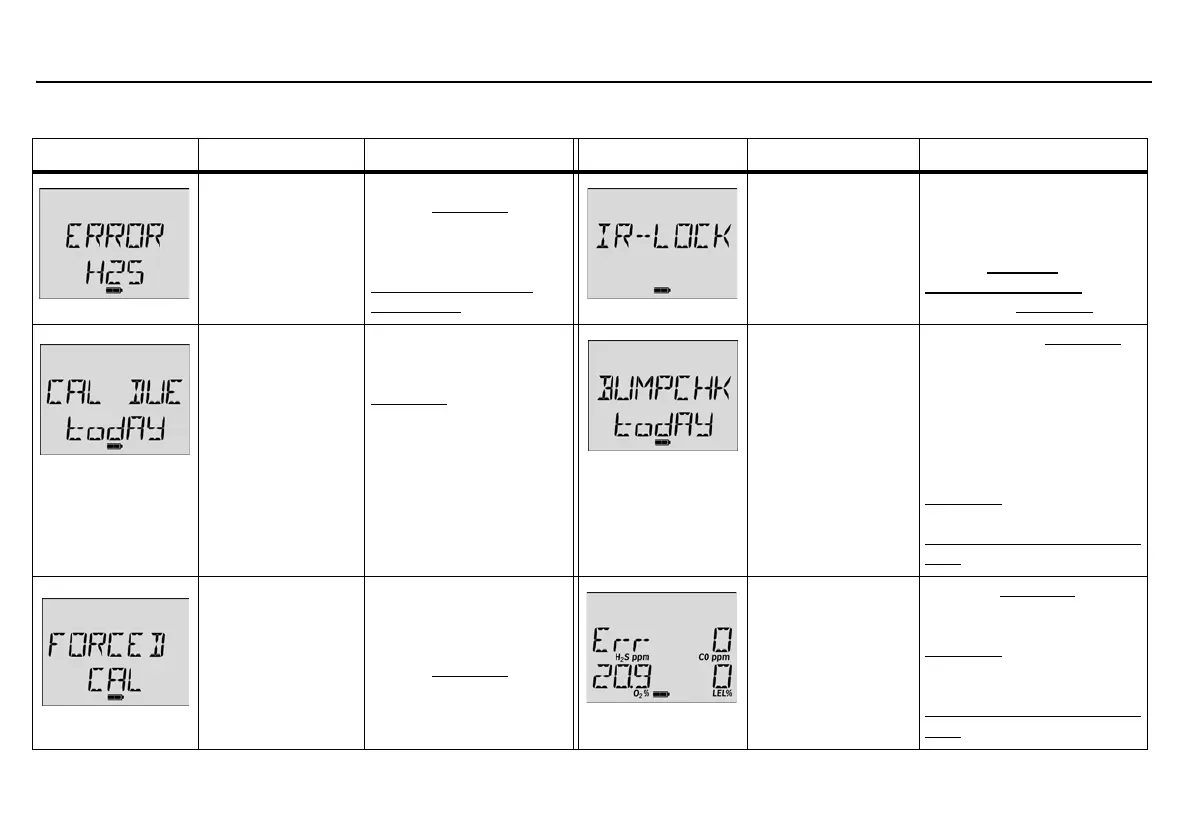
Error Screen Problem Solution Error Screen Problem Solution
Sensor Error
The sensor failed
during the self-test.
Calibrate the sensor(s).
Refer to Calibration
.
Reactivate the detector. If
error displays again, replace
the sensor. Refer to
Replacing a Sensor or
Sensor Filter.
IR Lock Enabled
If the IR Lock screen
displays, an IR device
is required to calibrate
the sensors.
Perform calibration using the
IR Link with Fleet Manager II
software, or insert the detector
into the MicroDock II station.
Refer to Cal Lock
(Calibration IR Lock) in User
Options and Calibration
.
Calibration Overdue
Displays when
calibration is
overdue. If the Force
Calibration When
Overdue
option is
enabled, the
sensor(s) must be
calibrated to enter
normal operation.
Press C to continue and
calibrate the sensor(s)
immediately. Refer to
Calibration
.
If the IR Lock enabled
screen displays, the
MicroDock II station or the
IR Link with Fleet Manager
II must be used to calibrate.
Bump Test Fail
A bump test has just
been performed. The
detector is prompting
for another bump test
because a sensor(s)
has failed.
Perform another Bump Test
.
Ensure the cylinder is not
empty and that the cylinder is
not past the expiry date.
Ensure the regulator is fully
opened to apply gas. If Bump
Check Today displays again,
calibrate the sensors. Refer to
Calibration
. If the calibration is
unsuccessful, refer to
Replacing a Sensor or Sensor
Filter.
Forced Calibration
If Force Calibration
When Overdue is
enabled, the sensors
must be calibrated to
enter normal
operation.
Press and hold C to
calibrate the sensors, or
press C and release to
deactivate the detector.
Refer to Calibration
. If the
IR Lock enabled screen
displays, an IR device must
be used to calibrate.
Sensor Fail
A sensor has failed
during the startup
self-test.
Perform a Bump Test
and
reactivate the detector. If the
sensor fails again, perform
Calibration
. Reactivate the
detector again. If the sensor
still does not pass, refer to
Replacing a Sensor or Sensor
Filter.



 To Next Page