53
GasAlertMicroClip
User Manual
Troubleshooting
If a problem occurs, refer to the solutions in the Troubleshooting section.
If the problem persists, contact BW Technologies by Honeywell
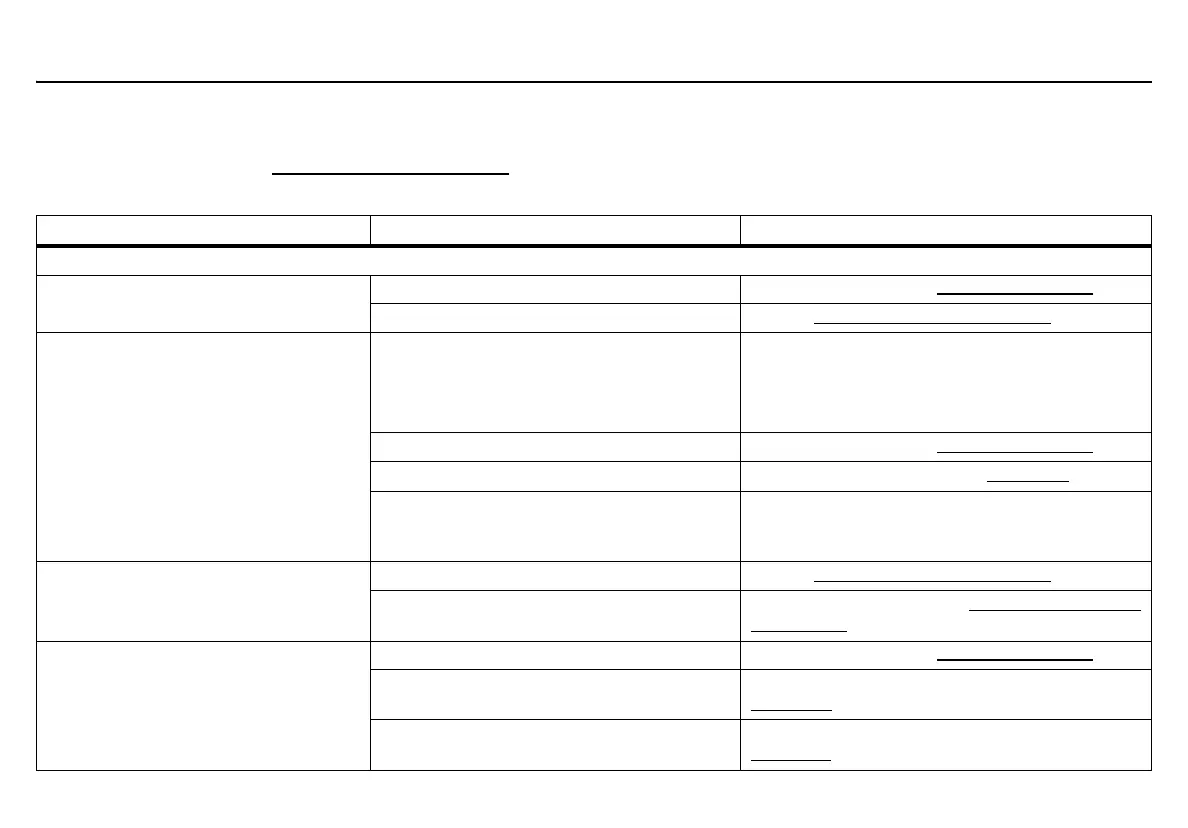
Table 15. Troubleshooting
Problem Possible Cause Solution
Startup
The detector does not activate. Depleted battery Charge battery. Refer to Charging the Battery.
Damaged or defective detector Contact BW Technologies by Honeywell
.
The detector enters alarm immediately
when activated.
Sensor needs to stabilize Used sensor: wait 60 seconds
New sensor: wait 5 minutes
(The oxygen sensor in the X3 needs 60 minutes to
stabilize)
Low battery alarm Charge battery. Refer to Charging the Battery
.
Detector requires calibration Calibrate the detector. Refer to Calibration
.
Hazardous environment Leave the area immediately. Deactivate and
reactivate in a safe area that is free of hazardous
gas, in an atmosphere of 20.9% oxygen.
The activation self-test fails. General fault Contact BW Technologies by Honeywell
.
Sensor failure Replace the sensor. Refer to Replacing a Sensor or
Sensor Filter.
Detector automatically deactivates during
startup.
Battery power too low to operate Charge battery. Refer to Charging the Battery
.
Force Calibration When Overdue option is
enabled and calibration is not attempted
Calibrate the sensor(s) immediately. Refer to
Calibration
.
Force Bump When Overdue option is
enabled and a bump test is not attempted
Bump test the sensor(s) immediately. Refer to
Bump Test
.



 To Next Page