57
GasAlertMicroClip
Calibration Troubleshooting
Calibration Troubleshooting
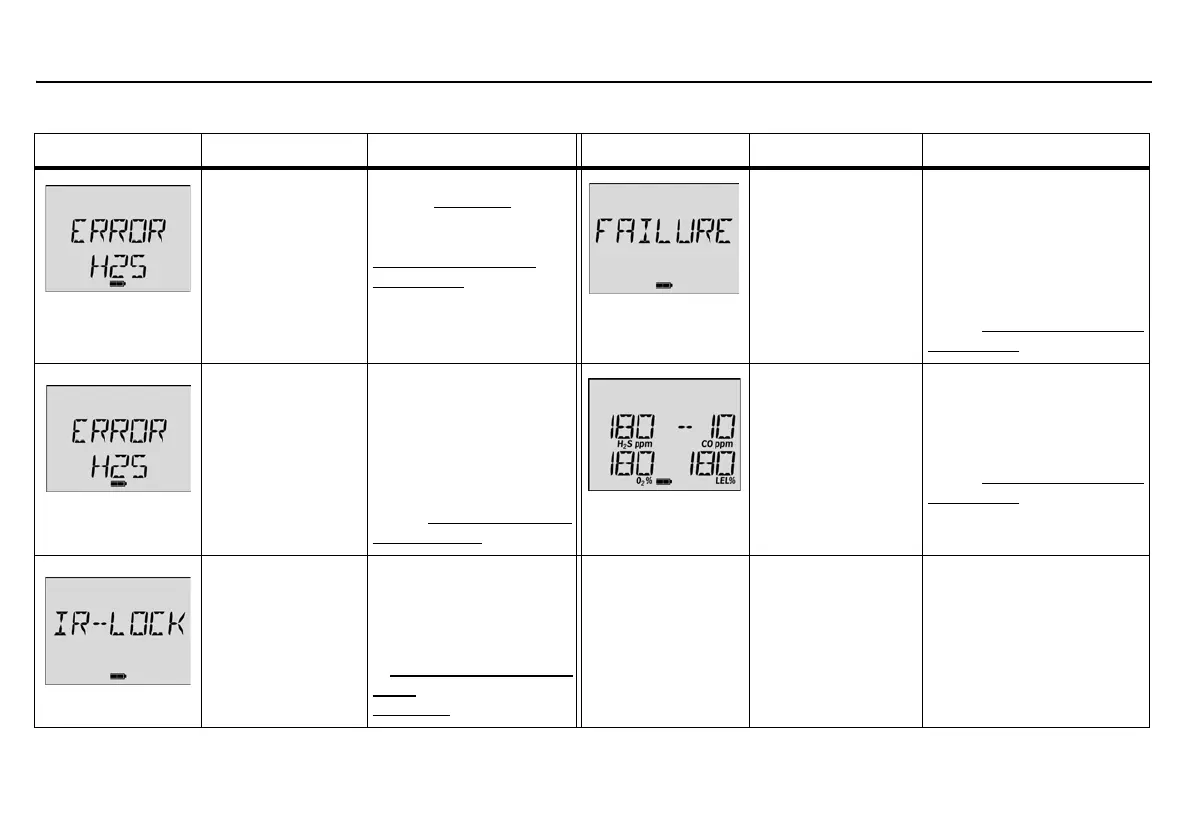
Error Screen Problem Solution Error Screen Problem Solution
Auto-zero
Unsuccessful
H
2
S, CO, or LEL
sensor fails to auto-
zero, or O
2
sensor
fails to calibrate.
Attempt calibration again.
Refer to Calibration
. If
ERROR displays again,
replace the sensor. Refer to
Replacing a Sensor or
Sensor Filter.
No Gas Detected
If the gas is not
detected about 30
seconds after the
APPLY GAS message
is displayed, the
detector fails the
calibration.
Ensure the sensor is enabled.
Verify gas cylinder is not
empty or past the expiration
date. Check/replace the
regulator.
Attempt calibration again. If
the calibration fails again,
refer to Replacing a Sensor or
Sensor Filter.
Auto Span
Unsuccessful
H
2
S, CO, or LEL, or
O
2
sensor fails to
auto-span.
Ensure sensor is enabled.
Verify gas cylinder is not
empty or past the expiration
date. Check/replace the
regulator. Attempt
calibration again. If the
sensor fails the span again,
refer to Replacing a Sensor
or Sensor Filter.
Calibration Due Date
Overdue
A sensor displays a
negative number for a
next due date after
calibration is
performed.
Calibration for the sensor was
unsuccessful. The due date
will not reset. Attempt
calibration of the sensor
again. If still unsuccessful,
refer to Replacing a Sensor or
Sensor Filter. Calibrate the
new sensor immediately.
IR Lock Enabled
IR-Lock displays
when calibration is
attempted.
Perform calibration using
the IR Link with Fleet
Manager II software, or
insert the detector into the
MicroDock II station. Refer
to Cal Lock (Calibration IR
Lock) in User Options and
Calibration
.



 To Next Page