55
GasAlertMicroClip
Troubleshooting
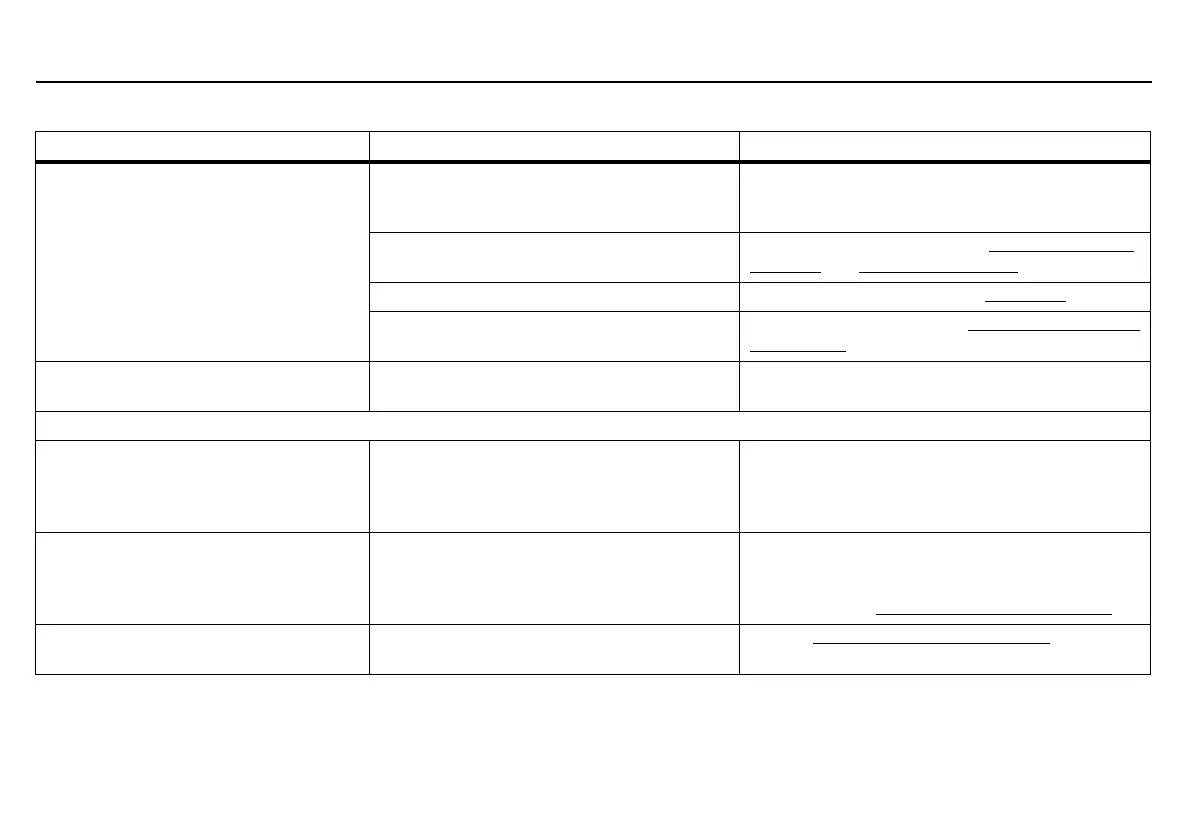
Detector intermittently enters alarm
without reason.
Ambient gas levels are near alarm setpoint or
the sensor is exposed to a puff of the target
gas
Detector is operating normally. Use caution in
suspect areas. Check the peak (maximum) gas
exposure reading.
Alarm setpoints defined incorrectly Reset alarm setpoints. Refer to Factory Gas Alarm
Setpoints and Sensor Configuration.
Detector requires calibration Calibrate the sensors. Refer to Calibration
.
Missing or faulty sensor(s) Replace the sensor. Refer to Replacing a Sensor or
Sensor Filter.
Features and options are not operating as
expected.
Changes have been made in Fleet Manager II Verify settings in Fleet Manager II are correct.
Charging
Battery has been charging for 3+ hours
(XT model) or 6+ hours (XL-X3 models).
The charging indicator on the detector
LCD shows the battery is still charging.
Battery is trickle charging Battery is fully charged and ready for operation.
Battery indicator does not display when
charging.
Detector is depleted below normal levels Charge the battery for 8 hours. Detector LEDs may
light during first 5 hours. This is normal. If the
battery indicator does not light after charging for
8 hours, contact BW Technologies by Honeywell
.
When detector is activated after charging,
the battery indicator does not display.
Battery is defective Contact BW Technologies by Honeywell
.
Table 15. Troubleshooting
Problem Possible Cause Solution



 To Next Page