57
MC-III™ Panel Mount Flow Analyzer Section 4
Turbine Input
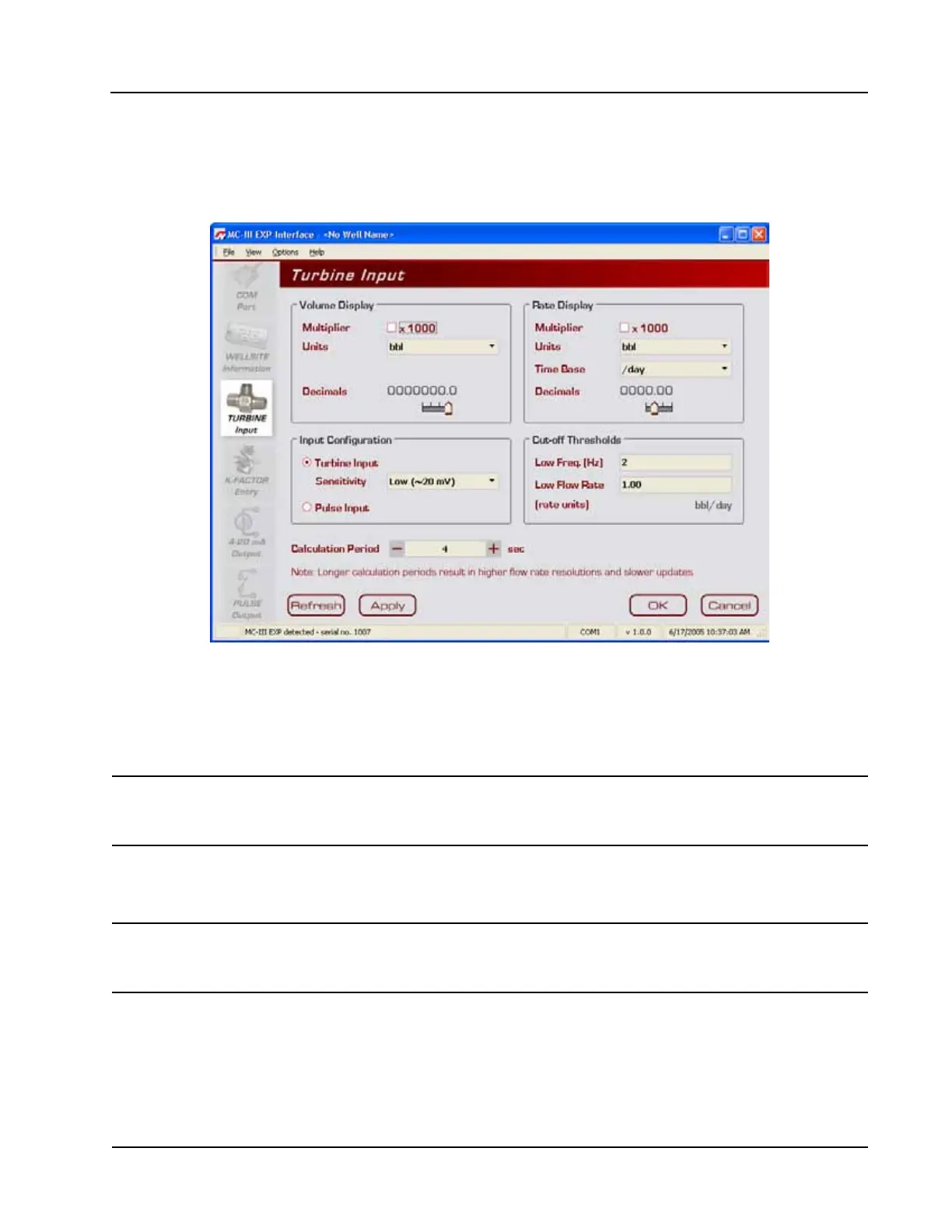
The Turbine Input screen (Figure 4.21) allows users to congure the displays for volume and rate, select the
type of input to be used (turbine input or pulse input), determine cut-off thresholds for measuring ow, and
determine the display update frequency.
Figure 4.21—Turbine Input screen
Volume Display
The Volume display can be congured to display totals in one of ve preprogrammed engineering units or in a
user-dened unit (for use with a calculated divisor).
Important: If volume is to be measured in user-dened units, the K-Factor unit must also be
entered as “pulses per unit.” For more information, see Entering a Calculated Divisor, page
27.
To display the volume in multiples of 1,000 units, check the “Multiplier” checkbox. Users can specify
decimal point position, from 0.1 to 0.0001 of a unit, using the slide bar on the Turbine Input screen.
Important: Before enabling or disabling the “× 1000” unit option for displaying ow totals, clear the
total display to zero. If the total is not cleared, the accumulated total displayed will repre-
sent a combination of two different units and will not provide an accurate ow reading.
Rate Display
The Rate display comprises two parts: a volume unit and a time-base unit. The volume portion of the Rate
display can be congured in one of ve preprogrammed engineering units or in a user-dened unit (for use
with a calculated divisor).
To display the volume portion in multiples of 1,000 units, check the “Multiplier” checkbox.




 To Next Page