4
4
4-24
4-24
Parts Replacement and Cleaning Procedure > Clutch Solenoid Motor Fan PCB (DADF) > Removing the Sensor(SR1,SR2,SR3)
Parts Replacement and Cleaning Procedure > Clutch Solenoid Motor Fan PCB (DADF) > Removing the Sensor(SR1,SR2,SR3)
12) Remove the pickup clutch/registration clutch support base.("Pickup Clutch/Registration
Clutch(CL1/CL2)"(page 4-20).)
13) Remove the feed unit.("Removing the Feed Unit"(page 4-15).)
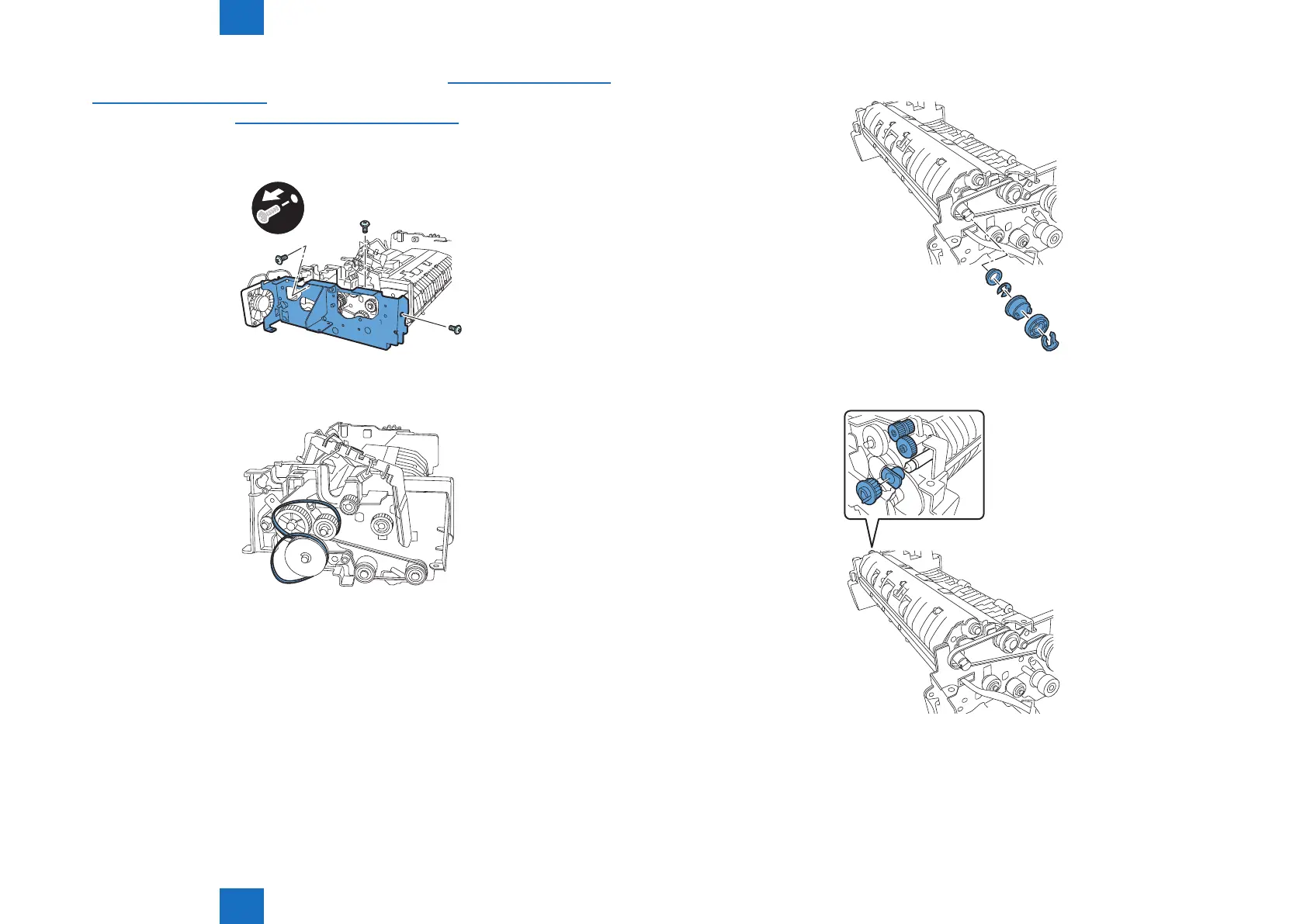
14) Remove the metal plate
- Screw 3 pcs.
x3
15) Remove the two timing belts.
F-4-52
F-4-53
16) Remove the resin ring, pulley, gear, E-ring, and bearing.
17) Remove the gear, gear, gear, and bearing.
F-4-54
F-4-55



 To Next Page