---------------------e
••••
Getting
to
Know
the
Camcorder
CD
w®®
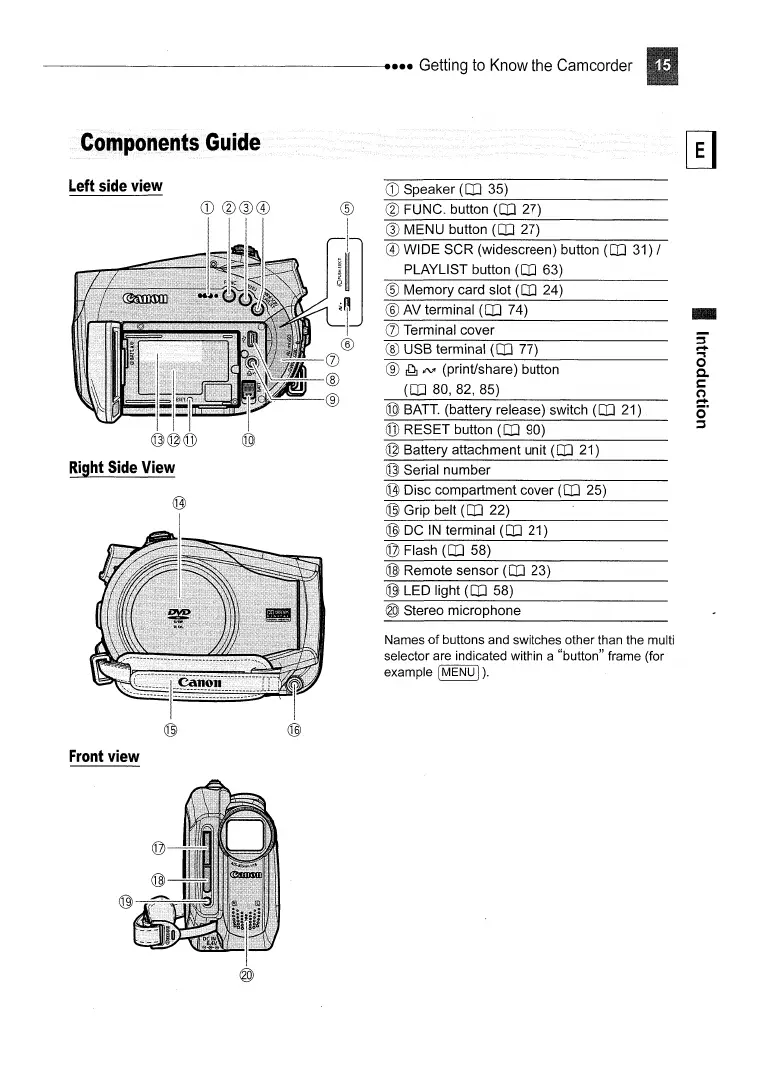
Left
side
view
Right
Side
View
®
:1]
®
Q)
®
<JY.---@
CD
Speaker (OJ 35)
@ FUNC. button (OJ 27)
® MENU button (OJ 27)
® WIDE SCR (widescreen) button (OJ 31) /
PLAYLIST button
(OJ 63)
® Memory card slot (OJ 24)
® AV terminal (OJ 74)
(j) Terminal cover
® USB terminal (OJ 77)
® ~
;NI
(print/share) button
(OJ
80,82,85)
@
BATT.
(battery release) switch (OJ 21)
@ RESET button (OJ 90)
© Battery attachment unit (OJ 21)
@ Serial number
(jj)
I
Front
view
Q])
Disc compartment cover (OJ 25)
@ Grip belt (OJ 22)
@ DC
IN
terminal (OJ 21)
@ Flash (OJ 58)
@ Remote sensor (OJ 23)
@ LED light (OJ 58)
@ Stereo microphone
Names
of
buttons and switches other than the multi
selector are indicated within a "button" frame (for
example
[MENU
I
).



 To Next Page