EasyManua.ls Logo

Canon DC22 - Page 16

Canon DC22
123 pages
Print Icon
To Next Page IconTo Next Page
To Previous Page IconTo Previous Page
Loading...
Getting
to
KnowtheCamcorder
•••••
~~~~~~~~~~~~~~~~~~
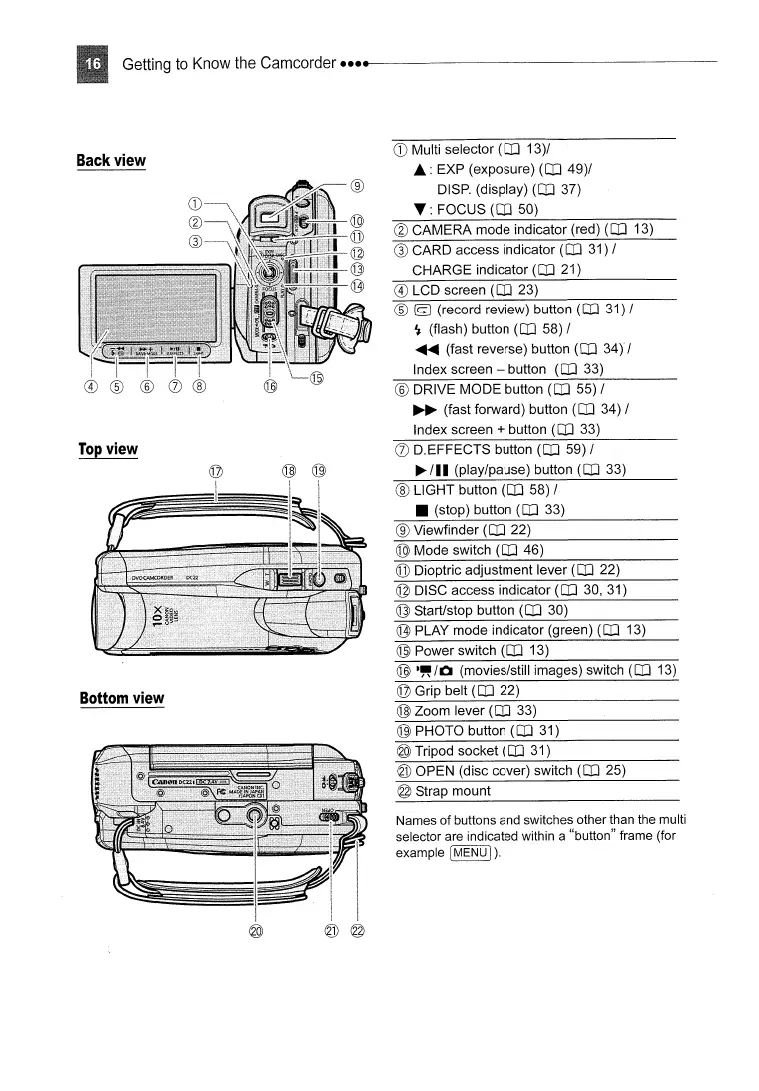
Back
view
Bottom
view
CD
Multi selector
(CD
13)/
.:
EXP (exposure)
(CD
49)/
DISP. (display)
(CD
37)
.:
FOCUS
(CD
50)
@
CAMERA
mode
indicator (red)
(CD
13)
®
CARD
access indicator
(CD
31) /
CHARGE
indicator
(CD
21)
® LCD screen
(CD
23)
®
[9
(record review) button
(CD
31) /
'I (flash) button
(CD
58) /
.....
(fast reverse) button
(CD
34Y/
Index screen - button
(CD
33)
® DRIVE
MODE
button
(CD
55) /
~
(fast forward) button
(CD
34) /
Index screen
+ button
(CD
33)
(J)
D.EFFECTS button
(CD
59) /
~
/11
(play/pause) button
(CD
33)
®
LIGHT
button
(CD
58) /
(stop) button
(CD
33)
® Viewfinder
(CD
22)
@
Mode
switch
(CD
46)
@ Dioptric adjustment lever
(CD
22)
© DISC access indicator
(CD
30, 31)
@ Start/stop button
(CD
30)
G3J
PLAY
mode
indicator (green)
(CD
13)
@ Power switch
(CD
13)
®
-"/0
(movies/stili images) switch
(CD
13)
© Grip belt
(CD
22)
@
Zoom
lever
(CD
33)
® PHOTO button
(CD
31)
@ Tripod socket
(CD
31)
@
OPEN
(disc cover) switch
(CD
25)
@ Strap
mount
Names
of
buttons and switches other than the multi
selector are indicated within a "button" frame (for
example
[MENU
I).

Table of Contents

Other manuals for Canon DC22

Related product manuals