Recording
Disc Type
Mode
DVD-R,
DVD-R DL
DVD-RW
Em
20 min.
36 min.
~
30 min.
54 min.
m1
60 min.
108 min.
[~
STILL LREC OFF],
[.
5 FINE/640x480],
[.II 5 NORMAL/640x480]
Size:
[L
1632x1224],
[M
1280x960],
[5640x480]
Quality:
[~SUPER
FINE],
[.
FINE],
[.II NORMAL]
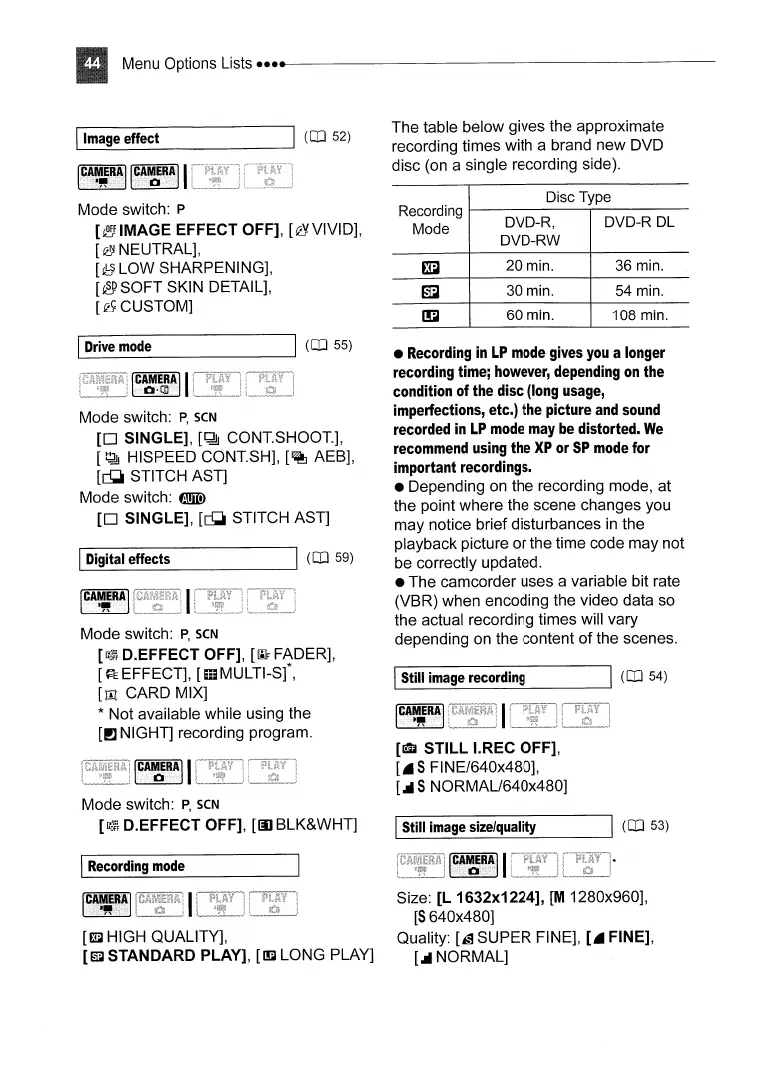
The table below gives the approximate
recording times with a brand new DVD
disc (on a single recording side).
•
Recording
in
LP
mode
gives
you
a longer
recording time;
however,
depending
on
the
condition of
the
disc
(long
usage,
imperfections, etc.)
the
picture
and
sound
recorded
in
LP
mode
may
be
distorted.
We
recommend
using
the
XP
or
SP
mode
for
important recordings.
• Depending on the recording mode, at
the point where the scene changes you
may notice brief disturbances
in
the
playback picture or the time code may not
be
correctly updated.
• The camcorder uses a variable bit rate
(VBR) when encoding the video data so
the actual recording times will vary
depending
on
the content of the scenes.
1.-
1
S_ti_lI_im_a-:;,g_e_re_c_or_d_in-=-g
-----JI
(CO
54)
[~~t#"~l
IStill
image
size/quality
[m
HIGH QUALITY],
[£ffi1
STANDARD PLAY],
[~LONG
PLAY]
[~~~!~II
Mode switch:
P,
SCN
[GC?~}
D.EFFECT OFF],
[III
BLK&WHT]
\.C
A
..
M
ER.A.···.·····.·······.··.II
·.O·Ql
Mode switch:
P,
SCN
[0
SINGLE],
[~
CONTSHOOT],
[~
HISPEED CONTSH],
[~
AEB],
[~
STITCH AST]
Mode switch:
tmID
[0
SINGLE],
[~
STITCH AST]
Mode switch:
P
[~IMAGE
EFFECT OFF], [eYVIVID],
[~
NEUTRAL],
[~LOW
SHARPENING],
[@SOFT
SKIN DETAIL],
[~CUSTOM]
,-I
D_ig_it_a_1
e_ff_e_ct_s
----.JI
(CO
59)
ICAt#R~1
Mode switch:
P,
SCN
[GC?~}
D.EFFECT OFF],
[!IF
FADER],
[~EEFFECT],
[mMULTI-S(,
[til CARD MIX]
* Not available while using the
[PJ
NIGHT] recording program.
1-1
D_r_iv_e_m_od_e
----.JI
(CO
55)
I.-11_m_ag_e_e_ff_ec_t
.......J1
(CO
52)
I
Recording
mode



 To Next Page