---------------------------------e
••••
Trouble?
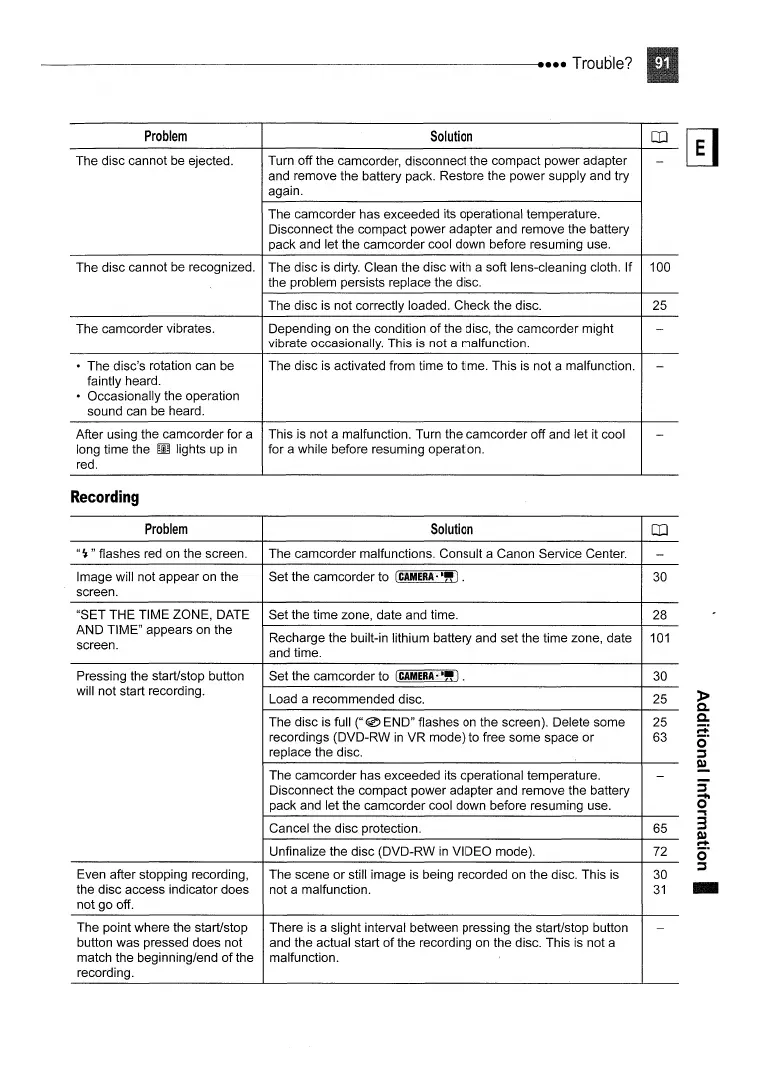
Problem
Solution
OJ
The disc cannot be ejected. Turn off the camcorder, disconnect the compact power adapter
-
and remove the battery pack. Restore the power supply and try
again.
The camcorder has exceeded its operational temperature.
Disconnect the compact power adapter and remove the battery
pack and let the camcorder cool down before resuming use.
The disc cannot be recognized. The disc is dirty. Clean the disc with a soft lens-cleaning cloth. If
100
the problem persists replace the disc.
The disc
is
not correctly loaded. Check the disc.
25
The camcorder vibrates. Depending on the condition
of
the disc, the camcorder might
-
vibrate occasionally. This
is
not a malfunction.
• The disc's rotation can be
The disc is activated from time to time. This
is
not a malfunction.
-
faintly heard.
• Occasionally the operation
sound can be heard.
After using the camcorder for a This
is
not a malfunction. Turn the camcorder off and let it cool
-
long time the
~
lights up
in
for a while before resuming operation.
red.
Recording
Problem
Solution
OJ
"~"
flashes
red
on
the screen. The camcorder malfunctions. Consult a Canon Service Center.
-
Image will not appear on the
Set the camcorder to
(CAMERA·-,,).
30
screen.
"SET THE TIME ZONE, DATE
Set the time zone, date and time.
28
AND TIME" appears on the
Recharge the built-in lithium battery and set the time zone, date
101
screen.
and time.
Pressing the start/stop button
Set the camcorder to
(CAMERA·-").
30
will not start recording.
Load a recommended disc. 25
The disc is full
("
® END" flashes on the screen). Delete some 25
recordings (DVD-RW
in
VR mode) to free some space or
63
replace the disc.
The camcorder has exceeded its operational temperature.
-
Disconnect the compact power adapter and remove the battery
pack and let the camcorder cool down before resuming use.
Cancel the disc protection.
65
Unfinalize the disc (DVD-RW
in
VIDEO mode).
72
Even after stopping recording,
The scene or still image
is
being recorded on the disc. This is
30
the disc access indicator does
not a malfunction.
31
not go off.
The point where the start/stop
There
is
a slight interval between pressing the start/stop button
-
button was pressed does not and the actual start
of
the recording on the disc. This
is
not a
match the beginning/end
of
the malfunction.
recording.



 To Next Page