Trouble?
•••••
-----------------------------
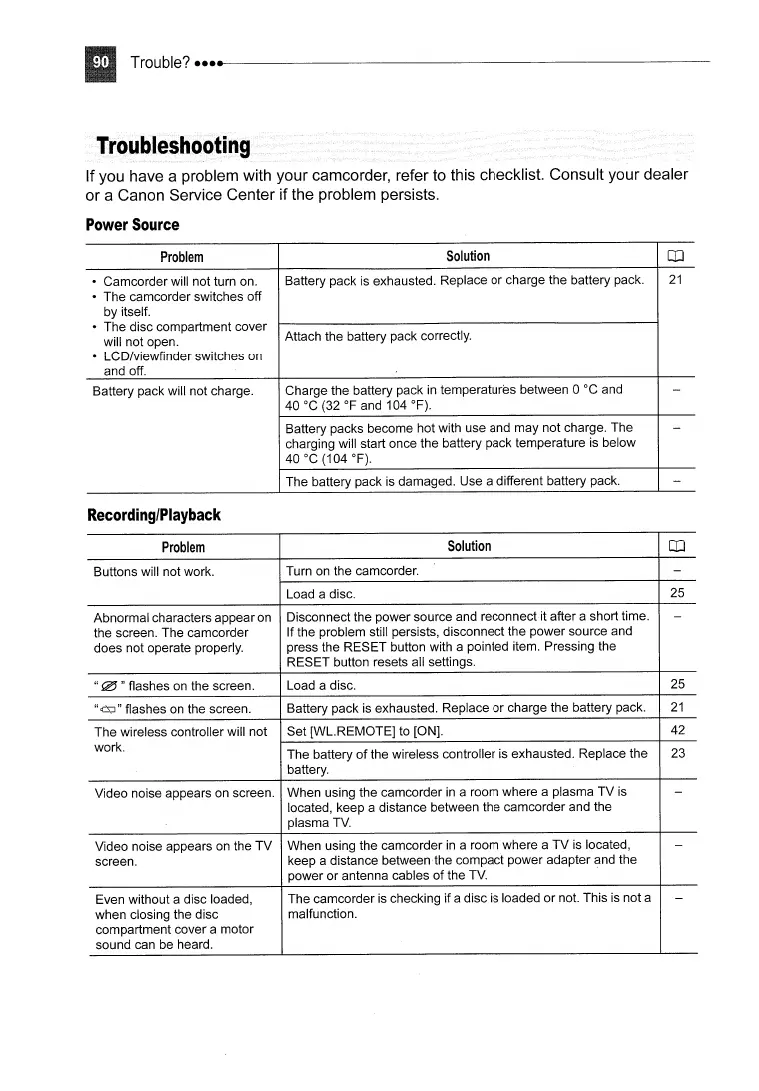
If you have a problem with your camcorder, refer to this checklist. Consult your dealer
or a Canon Service Center if the problem persists.
Power
Source
Problem
Solution
OJ
• Camcorder will not turn on.
Battery pack is exhausted. Replace or charge the battery pack.
21
• The camcorder switches off
by itself.
• The disc compartment cover
Attach the battery pack correctly.
will not open.
• LCD/viewfinder switches on
and off.
Battery pack will not charge.
Charge the battery pack
in
temperatures between 0 °C and
-
40°C
(32
OF
and 104
OF).
Battery packs become hot with use and may not charge. The
-
charging will start once the battery pack temperature
is
below
40°C
(104
OF).
The battery pack is damaged. Use a different battery pack.
-
Recording/Playback
Problem
Solution
OJ
Buttons will not work. Turn on the camcorder.
-
Load a disc.
25
Abnormal characters appear
on
Disconnect the power source and reconnectit after a short time.
-
the screen. The camcorder If the problem still persists, disconnect the power source and
does not operate properly. press the RESET button with a pointed item. Pressing the
RESET button resets all settings.
"
!i!J
"flashes
on
the screen.
Load a disc.
25
"cLs;J"
flashes
on
the screen.
Battery pack
is
exhausted. Replace or charge the battery pack.
21
The wireless controller will not
Set [WL.REMOTE] to [ON]. 42
work.
The battery
of
the wireless controller is exhausted. Replace the
23
battery.
Video noise appears on screen. When using the camcorder
in
a room where a plasma TV
is
-
located, keep a distance between the camcorder and the
plasma
TV.
Video noise appears
on
the
TV
When using the camcorder
in
a room where a
TV
is
located,
-
screen.
keep a distance between the compact power adapter and the
power or antenna cables
of
the
TV.
Even without a disc loaded, The camcorder
is
checking if a disc
is
loaded or not. This is not a
-
when closing the disc
malfunction.
compartment cover a motor
sound can be heard.



 To Next Page