-----------------------------
.........
Trouble?
Problem
Solution
OJ
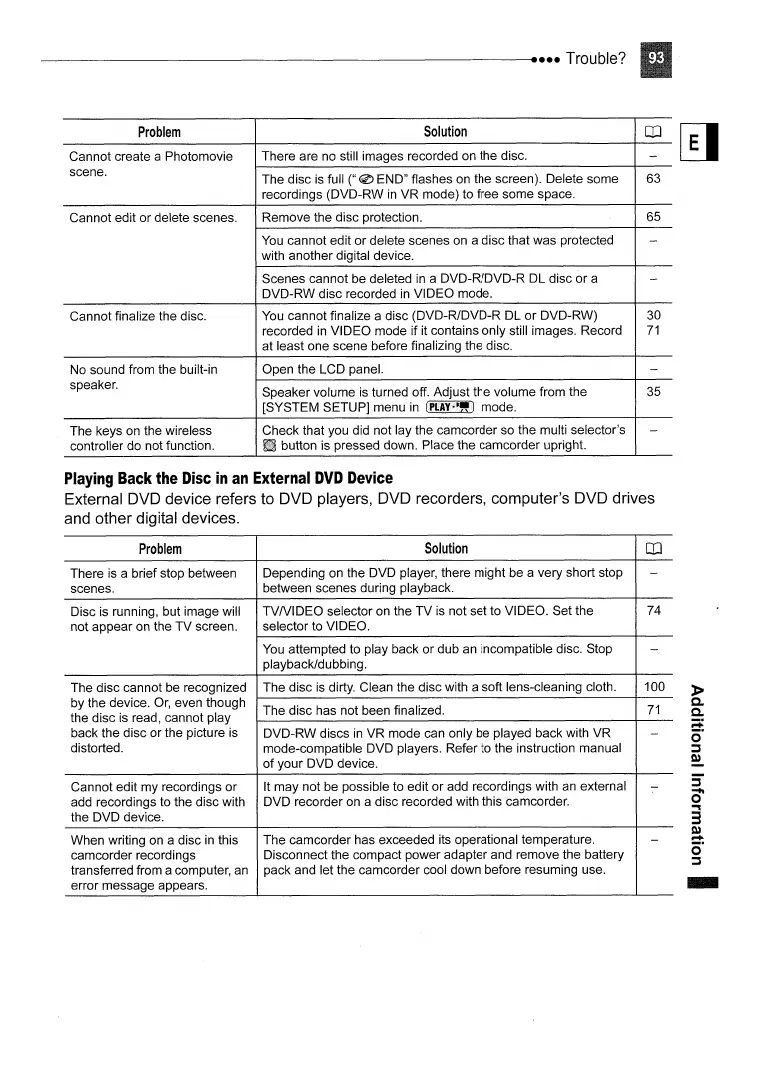
Cannot create a Photomovie There are no still images recorded on the disc.
-
scene.
The disc is full
("@
END" flashes on the screen). Delete some 63
recordings (DVD-RW
in
VR
mode) to free some space.
Cannot edit or delete scenes. Remove the disc protection. 65
You
cannot edit
or
delete scenes on a disc that was protected
-
with another digital device.
Scenes cannot be deleted
in
a DVD-R/DVD-R DL disc
or
a
-
DVD-RW disc recorded
in
VIDEO mode.
Cannot finalize the disc. You cannot finalize a disc (DVD-R/DVD-R DL
or
DVD-RW)
30
recorded
in
VIDEO mode if it contains only still images. Record
71
at least one scene before finalizing the disc.
No sound from the built-in Open the LCD panel.
-
speaker.
Speaker volume is turned off. Adjust the volume from the 35
[SYSTEM SETUP] menu
in
(PI.AY·~")
mode.
The keys on the wireless Check that you did not lay the camcorder so the multi selector's
-
controller do not function. button is pressed down. Place the camcorder upright.
Playing
Back
the
Disc
in
an
External
DVD
Device
External DVD device refers to DVD players, DVD recorders, computer's DVD drives
and other digital devices.
Problem
Solution
OJ
There is a brief stop between Depending on the DVD player, there might be a very short stop
-
scenes. between scenes during playback.
Disc is running, but image will
TVNIDEO
selector on the
TV
is not set to VIDEO. Set the 74
not appear on the
TV
screen. selector to VIDEO.
You attempted to play back or dub an incompatible disc. Stop
-
playback/dubbing.
The disc cannot be recognized The disc is dirty. Clean the disc with a soft lens-cleaning cloth.
100
by the device.
Or,
even though
The disc has not been finalized.
71
the disc is read, cannot play
back the disc or the picture is
DVD-RW discs
in
VR mode can only be played back with VR
-
distorted.
mode-compatible DVD players. Refer to the instruction manual
of
your DVD device.
Cannot edit my recordings or
It may not be possible to edit
or
add recordings with an external
-
add recordings to the disc with DVD recorder on a disc recorded with this camcorder.
the DVD device.
When writing on a disc
in
this The camcorder has exceeded its operational temperature.
-
camcorder recordings
Disconnect the compact power adapter and remove the battery
transferred from a computer, an pack and let the camcorder cool down before resuming use.
error message appears.
-



 To Next Page