--------------,--------------------e
••••
Trouble?
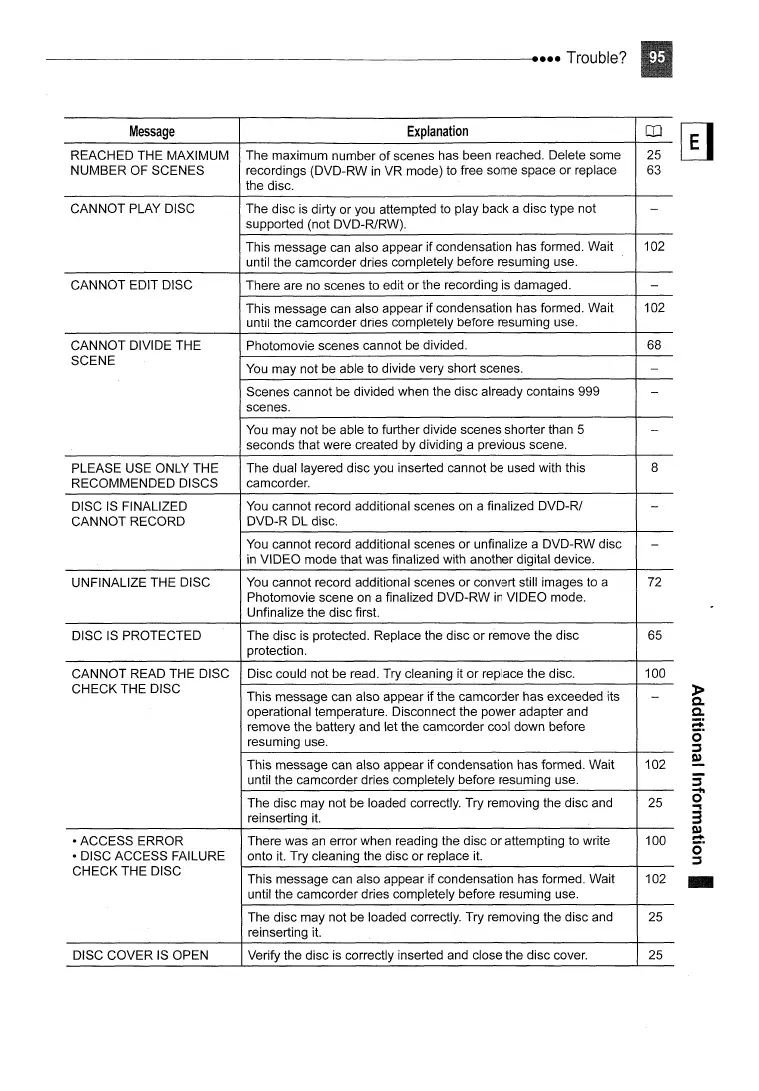
Message
Explanation
OJ
REACHED THE MAXIMUM The maximum number
of
scenes has been reached. Delete some
25
NUMBER OF SCENES recordings (DVD-RW
in
VR mode) to free some space or replace
63
the disc.
CANNOT PLAY DISC
The disc
is
dirty or you attempted to play back a disc type not
-
supported (not DVD-R/RW).
This message can also appear if condensation has formed. Wait
102
until the camcorder dries completely before resuming use.
CANNOT EDIT DISC There are no scenes to edit or the recording is damaged.
-
This message can also appear if condensation has formed. Wait
102
until the camcorder dries completely before resuming use.
CANNOT DIVIDE THE Photomovie scenes cannot be divided.
68
SCENE
You
may not be able to divide very short scenes.
-
Scenes cannot be divided when the disc already contains 999
-
scenes.
You
may not be able to further divide scenes shorter than 5
-
seconds that were created by dividing a previous scene.
PLEASE USE ONLY THE
The dual layered disc you inserted cannot be used with this
8
RECOMMENDED DISCS
camcorder.
DISC
IS
FINALIZED
You
cannot record additional scenes on a finalized DVD-R/
-
CANNOT RECORD
DVD-R DL disc.
You
cannot record additional scenes or unfinalize a DVD-RW disc
-
in
VIDEO mode that was finalized with another digital device.
UNFINALIZE THE DISC
You
cannot record additional scenes or convert still images to a 72
Photomovie scene on a finalized DVD-RW
in
VIDEO mode.
Unfinalize the disc first.
DISC
IS
PROTECTED The disc is protected. Replace the disc or remove the disc
65
protection.
CANNOT READ THE DISC
Disc could not be read. Try cleaning it or replace the disc. 100
CHECK THE DISC
This message can also appear if the camcorder has exceeded its
-
operational temperature. Disconnect the power adapter and
remove the battery and let the camcorder cool down before
resuming use.
This message can also appear if condensation has formed. Wait
102
until the camcorder dries completely before resuming use.
The disc may not be loaded correctly. Try removing the disc and 25
reinserting
it.
• ACCESS ERROR
There was an error when reading the disc or attempting to write 100
• DISC ACCESS FAILURE
onto
it.
Try cleaning the disc or replace
it.
CHECK THE DISC
This message can also appear if condensation has formed. Wait 102
until the camcorder dries completely before resuming use.
The disc may not be loaded correctly. Try removing the disc and 25
reinserting it.
DISC COVER
IS
OPEN
Verify the disc
is
correctly inserted and close the disc cover. 25
-



 To Next Page