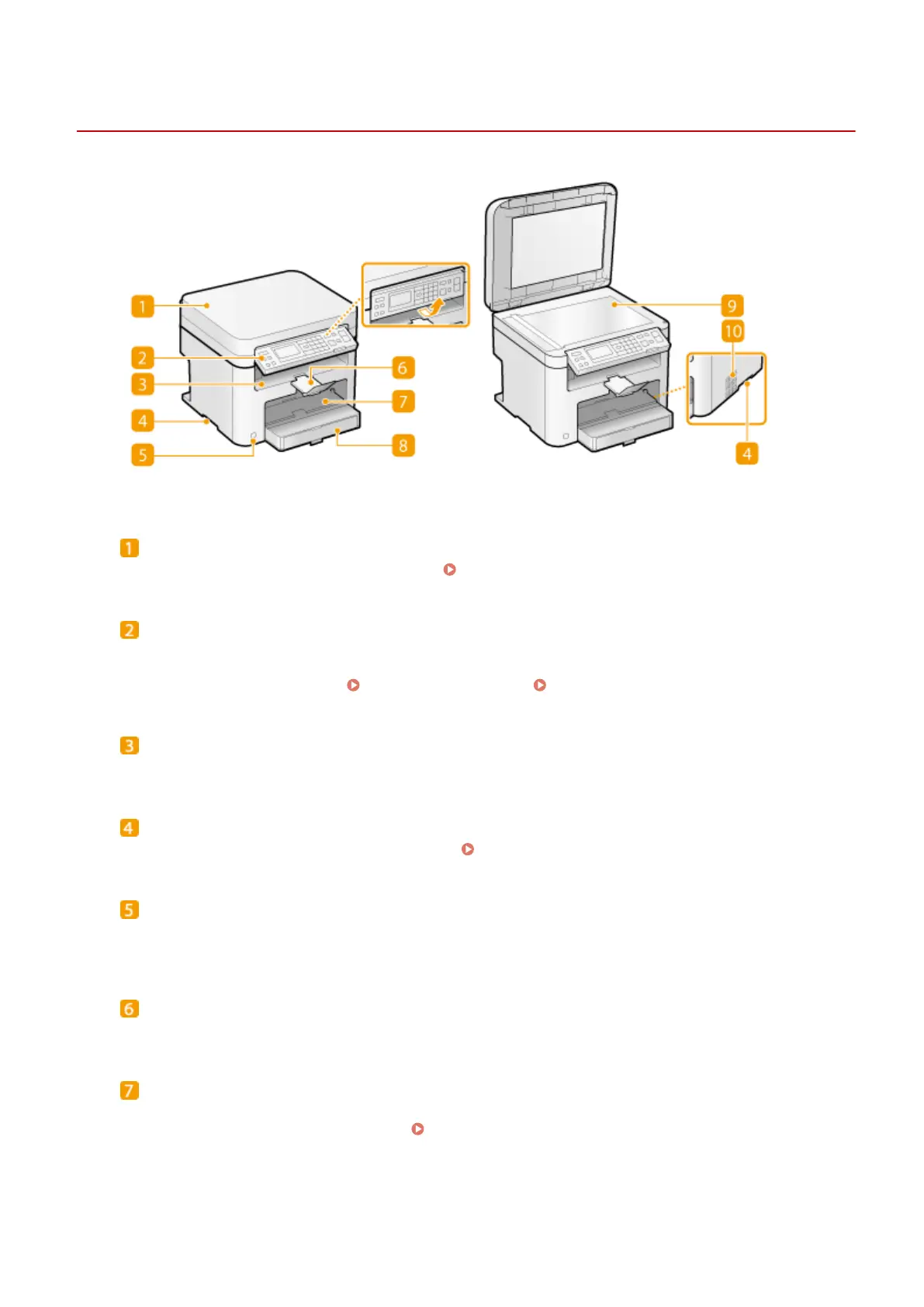
Front Side
19Y4-008
Platen glass cover
Open to place documents on the platen glass. Placing Documents(P. 34)
Operation panel
The operation panel consists of keys such as the numeric keys and [Start] key, a display, and status indicators.
You can perform all the operations and specify settings from the operation panel. You can move it up or
down so it is easier to operate. Operation Panel(P. 22) Display(P. 26)
Output tray
Printed paper is output to the output tray.
Lift handles
Hold the lift handles when carrying the machine. Relocating the Machine(P. 382)
Power switch
Turns the power ON or OFF. To restart the machine, turn OFF the machine, wait for at least 10 seconds, and
turn it back ON.
Paper stopper
Prevents paper that has been output after printing from falling.
Manual feed slot
Load the paper into the manual feed slot when you want to temporarily use a type of paper different from
that which is loaded in the paper drawer.
Loading Paper in the Manual Feed Slot(P. 41)
Basic Operations
16












 To Next Page