4
4
4-332
4-332
Parts Replacement and Cleaning > Periodic Replacing Parts, Durable Parts, Cleaning Parts > Removing Duplex Decurler Belt Unit
Parts Replacement and Cleaning > Periodic Replacing Parts, Durable Parts, Cleaning Parts > Removing Duplex Decurler Belt Unit
Removing Duplex Decurler Belt Unit
<Preparation>
1) Open Front Left Cover.
(Refer to page 4-54)
2) Pull Out Buffer Delivery Unit.
(Refer to page 4-133)
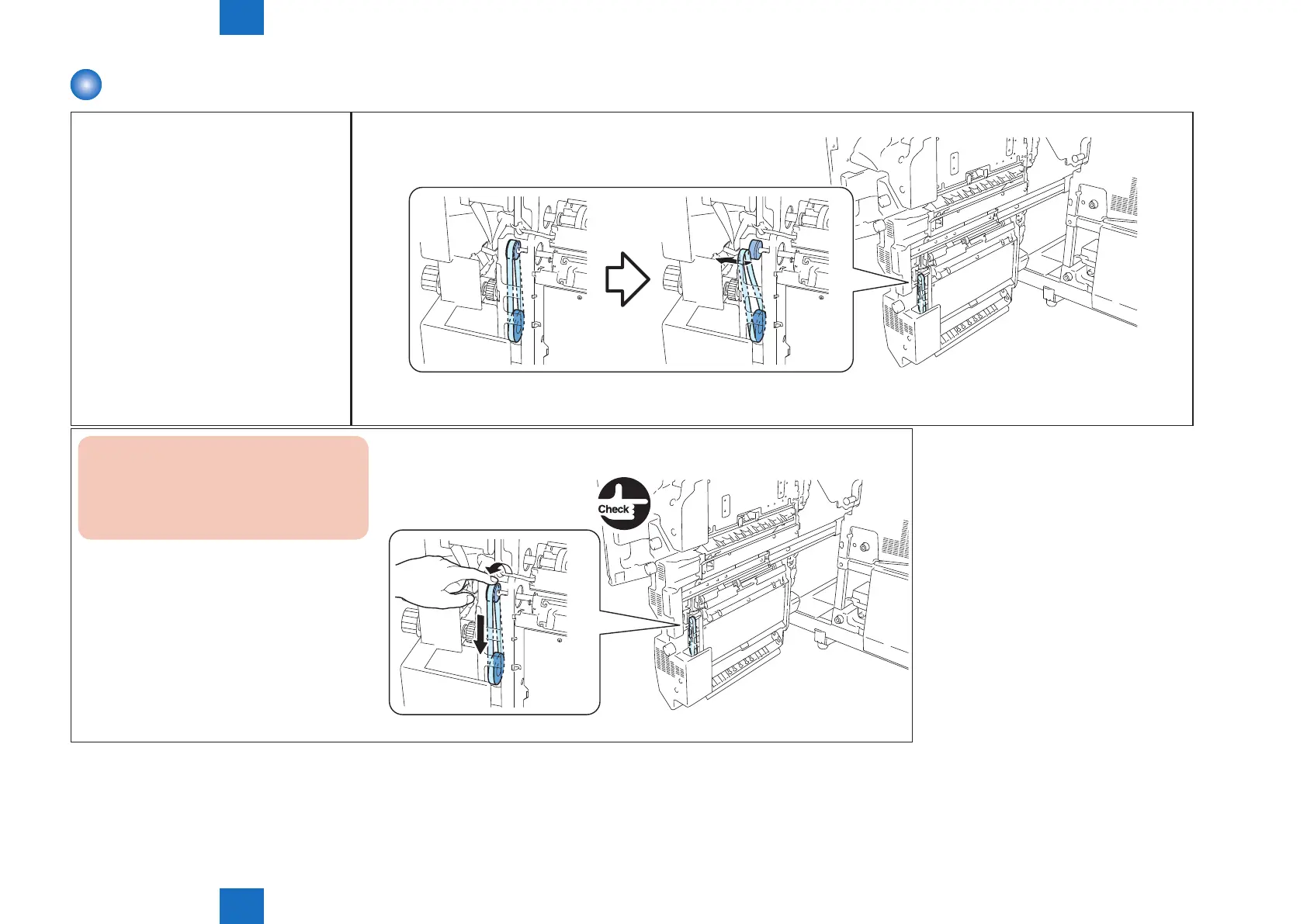
1) Remove the belt from the gear .(It is not necessary to remove from the gear of the motor)
F-4-756
Caution : caution at installation
Rotate the belt for more then 1rotation,
when gear rotate make sure belt doesn't
fall off.
F-4-757







 To Next Page