Chapter 3
3-87
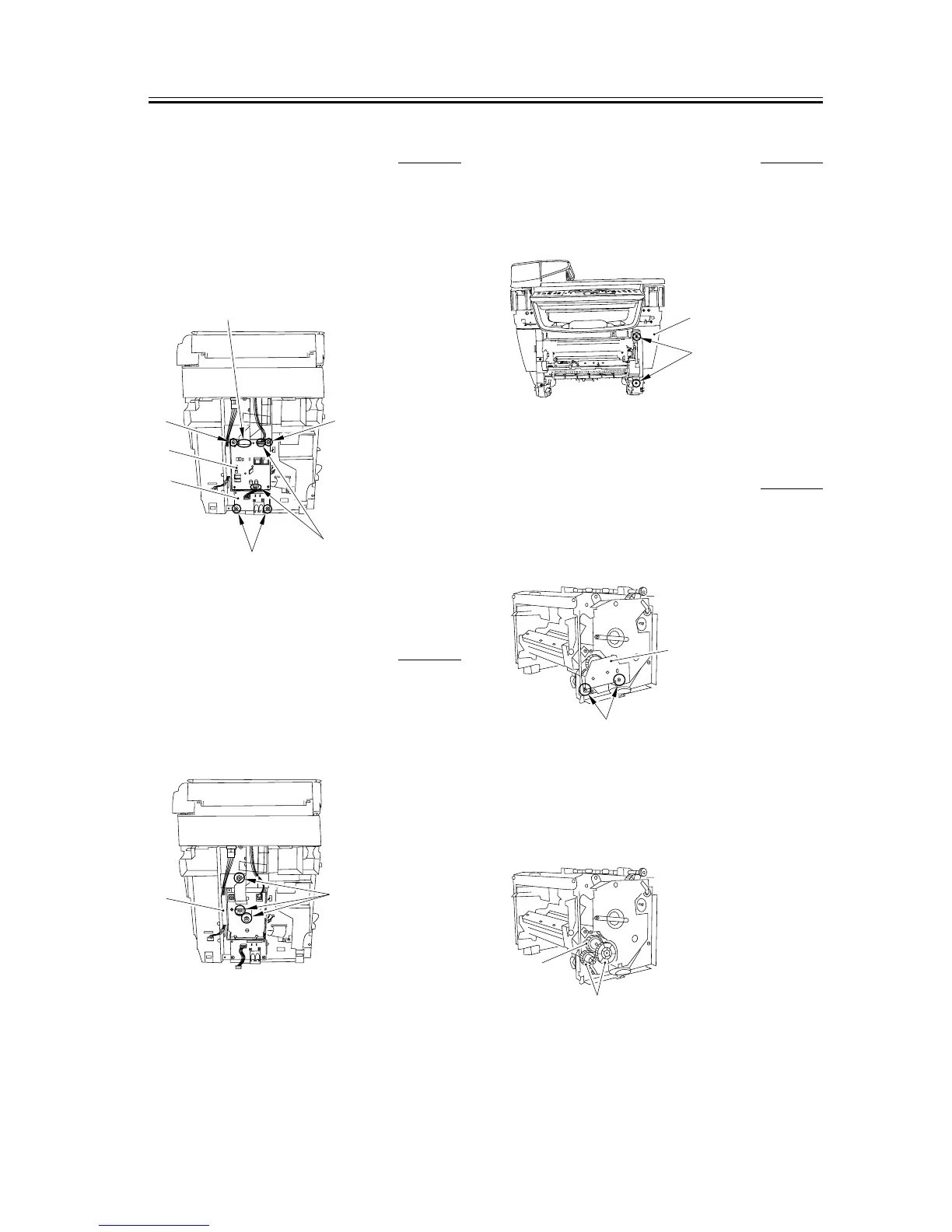
3.5.5.8 Removing the NCU
Board and Modular Board
0006-3686
1) Remove the two connectors [1] and the flat cable
[2].
2) Remove the four screws [3] and remove the NCU
board [4] and modular board [5].
F-3-375
3.5.5.9 Removing the NCU
Case
0006-3692
1) Remove the three screws [1]; then, pull the upper
portion of the NCU case [2] toward you, and lifting
it upward, remove the NUC case.
F-3-376
3.5.5.10 Removing the Right
Front Cover
0002-7136
1) Remove the two screws [1] and then removes the
right front cover [2].
F-3-377
3.5.5.11 Removing the Gear
Unit
0005-4218
1) Remove the 2 screws [1], and detach the drive plate
(small) [2].
F-3-378
2) Remove the 2 gears [1].
3) While freeing the claw, detach the gear unit [2].
F-3-379
[1]
[4]
[3]
[3]
[2]
[5]
[3]
[1]
[2]
[1]
[2]
[2]
[1]
[2]
[1]














 To Next Page