Chapter 3
3-89
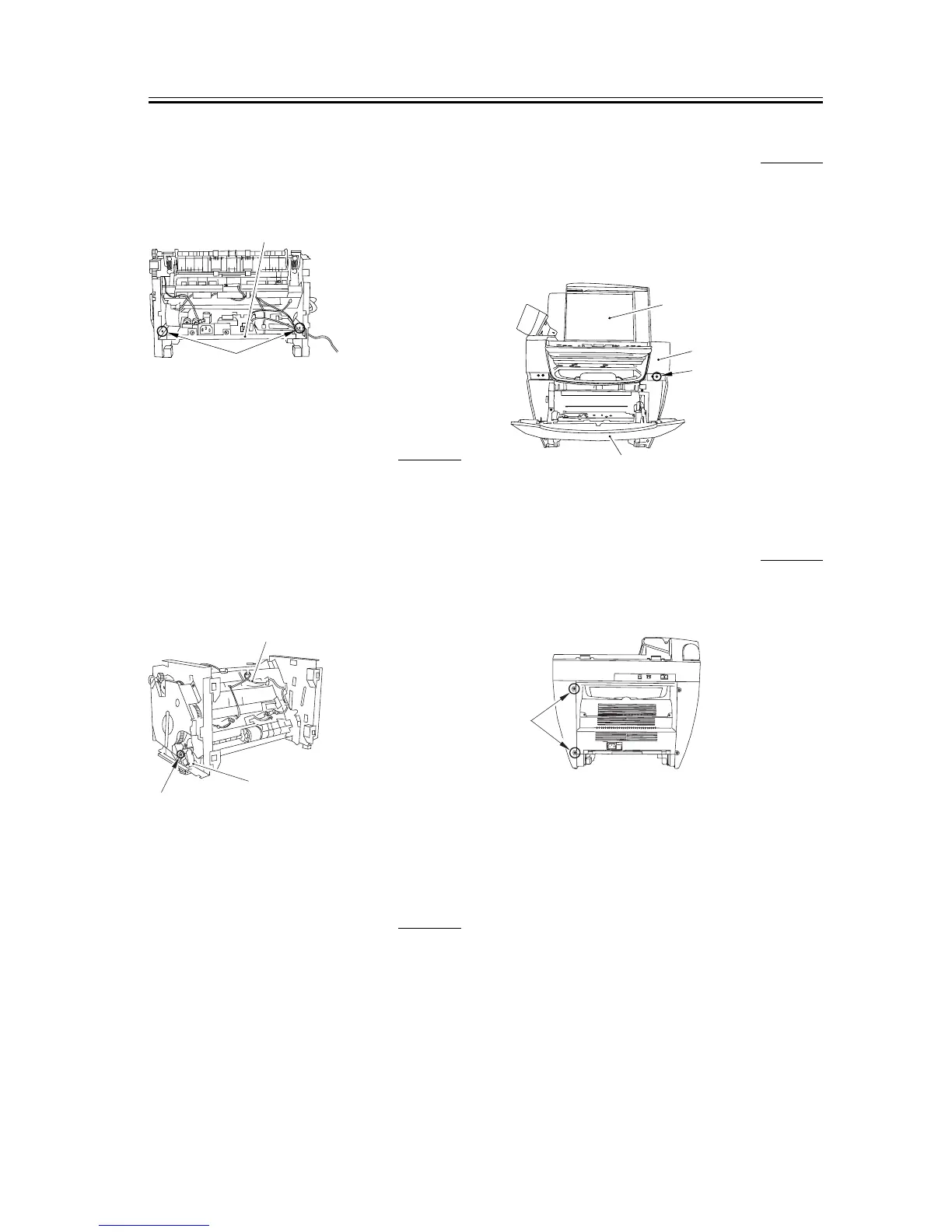
4) As you remove the bosses on both sides [1], lower
the front part of the power supply assembly [2].
Then pull it to remove the power supply assembly.
F-3-385
3.5.5.15 Removing the Manual
Paper Feed Solenoid
0002-7152
1) Place the main unit down on its front face (so that
the interior of the main unit is easily visible).
2) Remove the cable [1] from the cable guide.
3) Remove the screw [2] to remove the manual pickup
solenoid [3].
F-3-386
3.5.6 Main Motor
3.5.6.1 Removing the Cassette 0002-7570
1) Remove the cassette by holding the cassette handle.
3.5.6.2 Removing the Reader
Right Front Cover
0002-7572
1) Open the platen glass cover [1].
2) Open the front cover [2], remove one screw [3], and
remove the reader right front cover [4].
F-3-387
3.5.6.3 Removing the Right
Cover
0002-7575
1) Remove the two screws [1] on the back side.
F-3-388
[1]
[2]
[1]
[2]
[3]
[1]
[4]
[3]
[2]
[1]














 To Next Page