Chapter 3
3-14
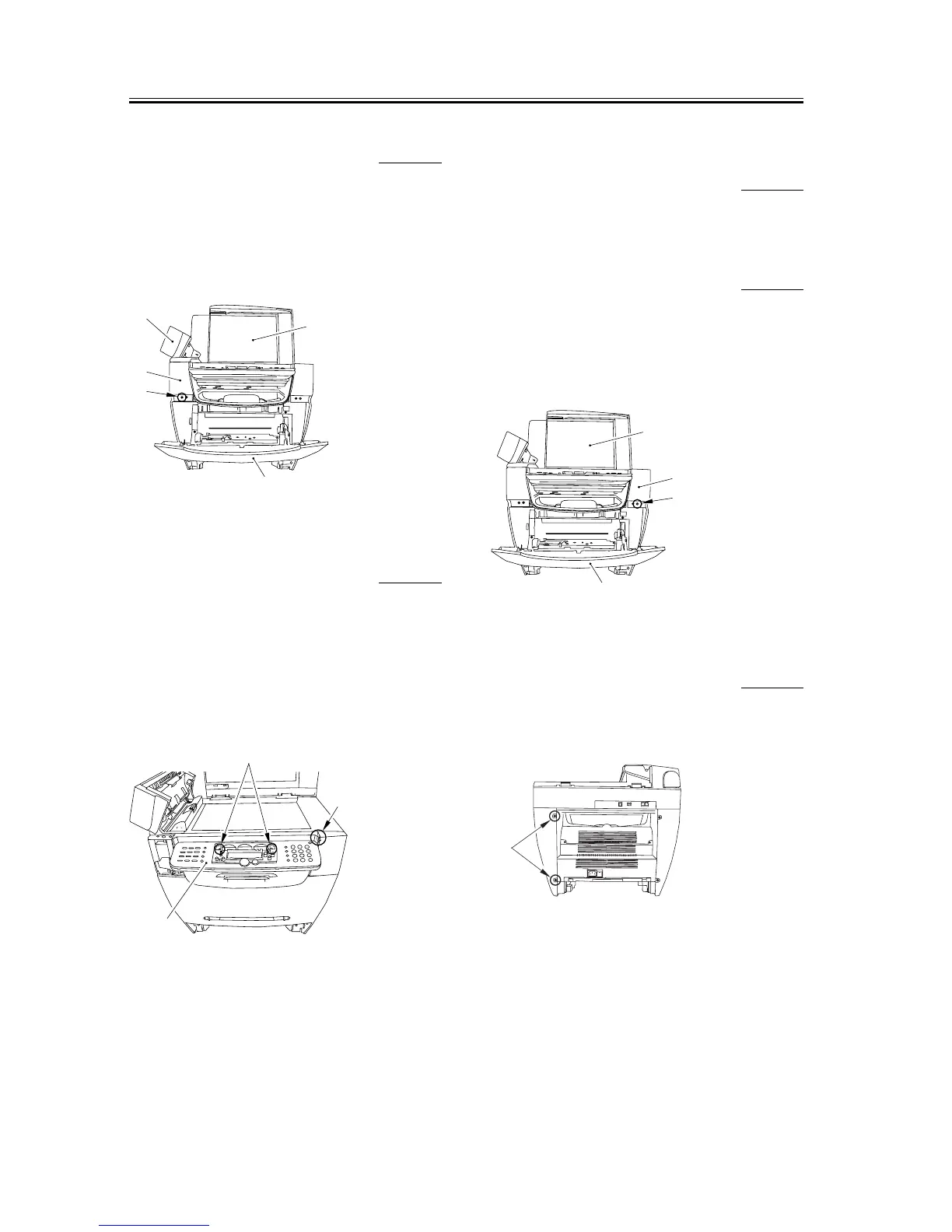
3.1.9.2 Removing the Reader
Left Front Cover
0002-7713
1) Open the platen glass cover [1].
2) Open the front cover [2] and the ADF part [3],
remove one screw [4], and remove the reader left
front cover [5].
F-3-56
3.1.9.3 Removing the
Operation Panel Unit
0002-7714
1) Remove the two screws [1].
2) Disengage the claw [3] on the rear right side of the
operation panel unit [2] and lift it up. After
removing the two flat cables, remove the operation
panel unit.
F-3-57
3.1.10 SCNT Board
3.1.10.1 Removing the Cassette 0006-2984
1) Remove the cassette by holding the cassette handle.
3.1.10.2 Removing the Reader
Right Front Cover
0006-2985
1) Open the platen glass cover [1].
2) Open the front cover [2], remove one screw [3], and
remove the reader right front cover [4].
F-3-58
3.1.10.3 Removing the Right
Cover
0006-2986
1) Remove the two screws [1] on the back side.
F-3-59
[1]
[5]
[4]
[3]
[2]
[1]
[2]
[3]
[1]
[4]
[3]
[2]
[1]














 To Next Page