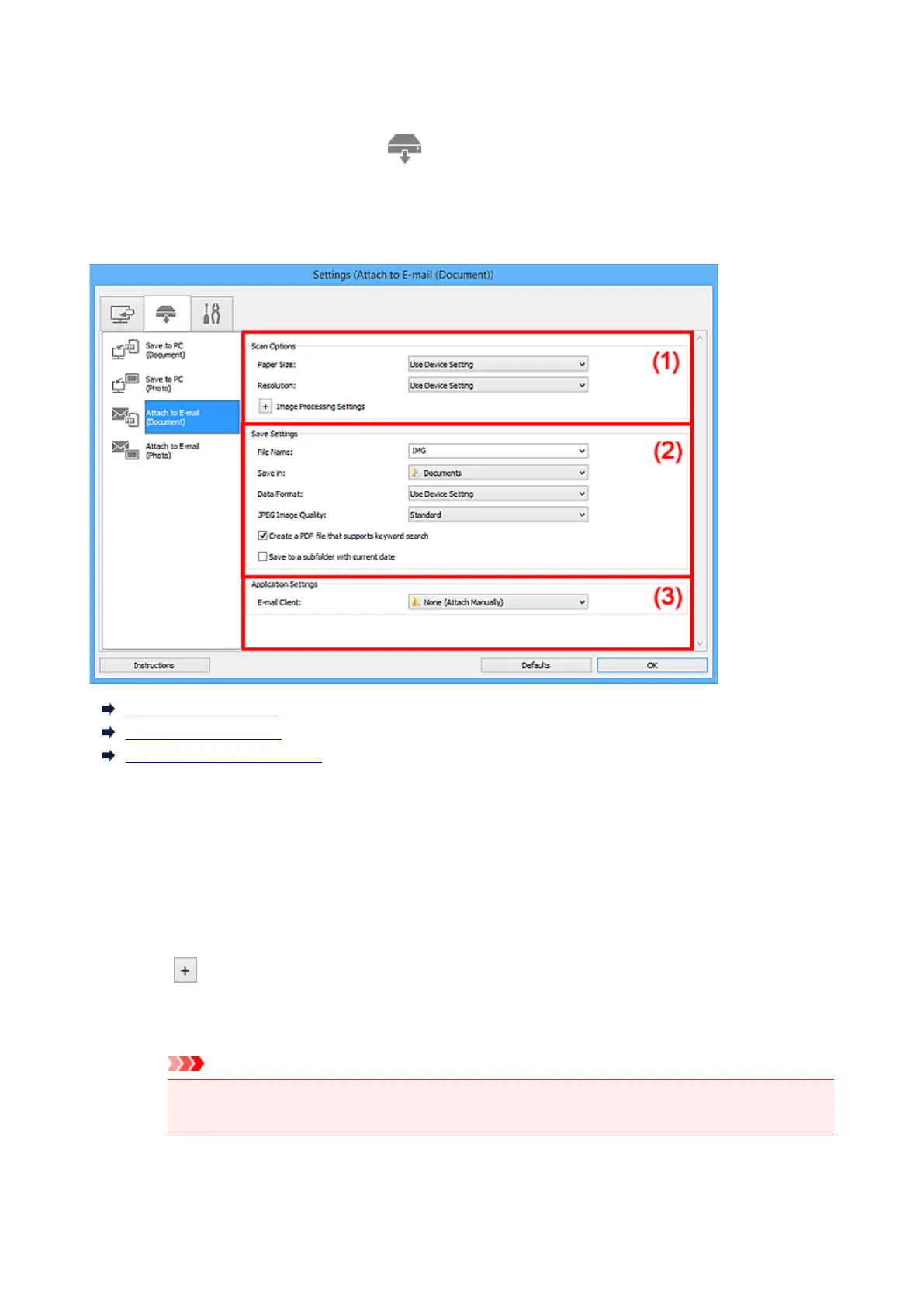
Settings (Attach to E-mail (Document)) Dialog Box
Click Attach to E-mail (Document) on the (Scanning from the Operation Panel) tab to display the
Settings (Attach to E-mail (Document)) dialog box.
In the Settings (Attach to E-mail (Document)) dialog box, you can specify how to respond when attaching
images to an e-mail as documents after scanning them from the operation panel.
(1) Scan Options Area
(2) Save Settings Area
(3) Application Settings Area
(1) Scan Options Area
Paper Size
Set from the operation panel.
Resolution
Set from the operation panel.
Image Processing Settings
Click (Plus) to set the following.
Apply Auto Document Fix
Select this checkbox to sharpen text in a document or magazine for better readability.
Important
• The color tone may differ from the source image due to corrections. In that case, deselect
the checkbox and scan.
754









 To Next Page