SECTION 55 - ELECTRICAL SYSTEM 113
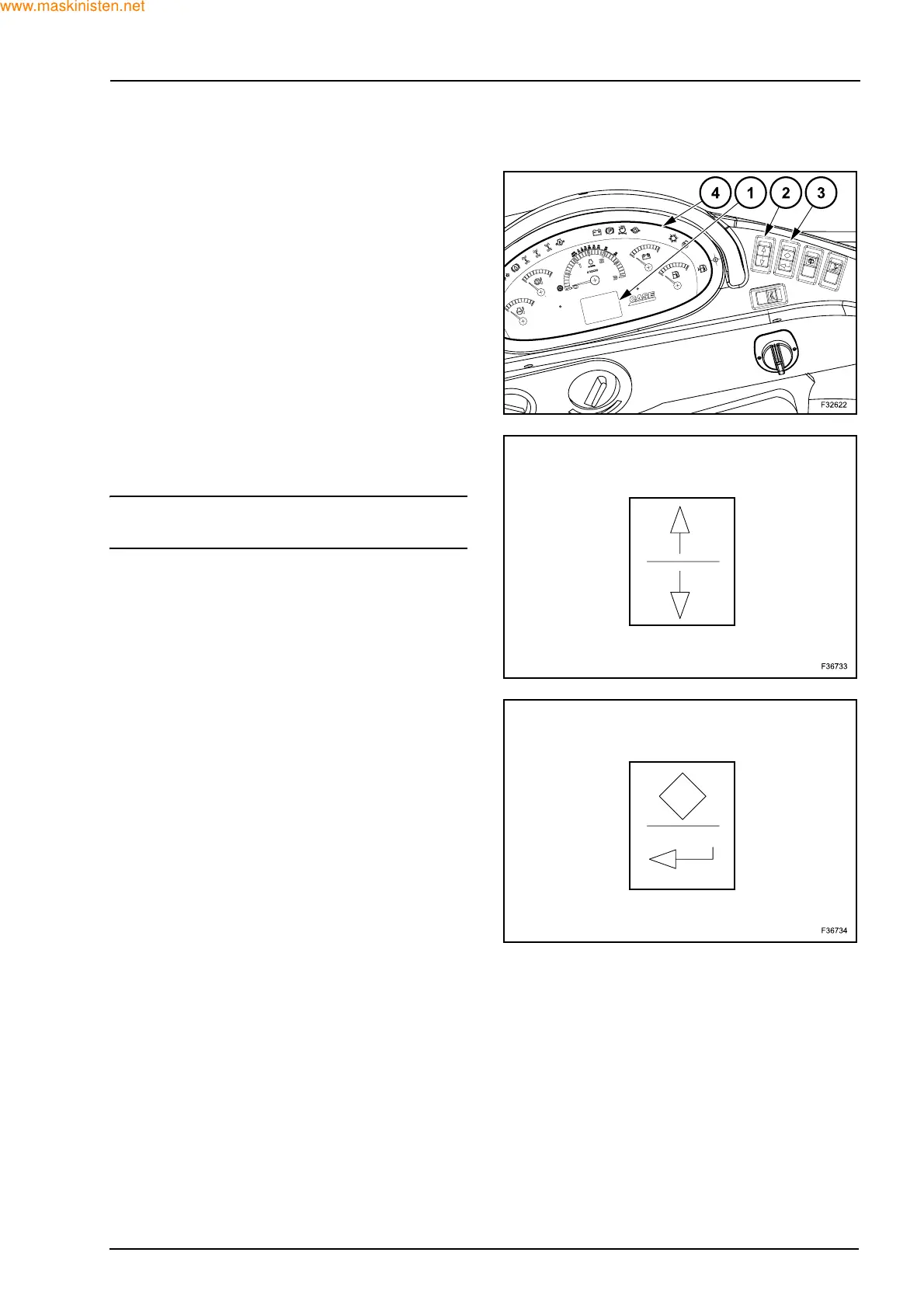
4. DIAGNOSTIC DISPLAY (580SR+ / 590SR / 695SR)
The diagnostics display (1) is located in the middle
of the side instrument panel (4).
The switches used to enter diagnostics are follow-
ing:
Z UP/DOWN SWITCH (2)
Use this UP/DOWN switch to scroll through the men-
us.
NOTE: push the arrow at start up to display engine
rpms on the display.
Z DISPLAY ENTER SWITCH (3)
Use this switch to select and confirm a service
menu.
The Diamond icon, or top portion of the switch, is
used to select displays.
The 90° arrow icon or bottom portion of the switch,
is used to enter selected choices.
Features adjustable during setup:
- backlighting dimming and contrast control,
- maintenance/service interval customization;
- storage of error codes;
- “grid heater” presence:
it is possible to select or deselect the “grid heater”
option;
- low temperature idle speed setting:
when the engine coolant temperature is below
10 °C, the unit will change from a normal low idle
to a low temperature idle which can be adjusted
between 975 and 1500 rpm. The default setting is
1000 rpm;
- high idle speed setting (2500 rpm maximum).



 To Next Page