OPERATION & MAINTENANCE MANUAL STE35SR
decrease / increase by one level;
Press and hold the VOL -/+ key, and the current volume will decrease / increase gradually until the
key is released.
4、AUX radio input mode key function description (optional)
4.1 Short press MODE key to switch the mode to AUX audio input mode(optional), and the
screen displays LINE.
4.2 In AUX audio input mode, the SEEK / key has no effect.
4.3 In the AUX audio input mode, the volume level can be adjusted through the VOL -/+ key.
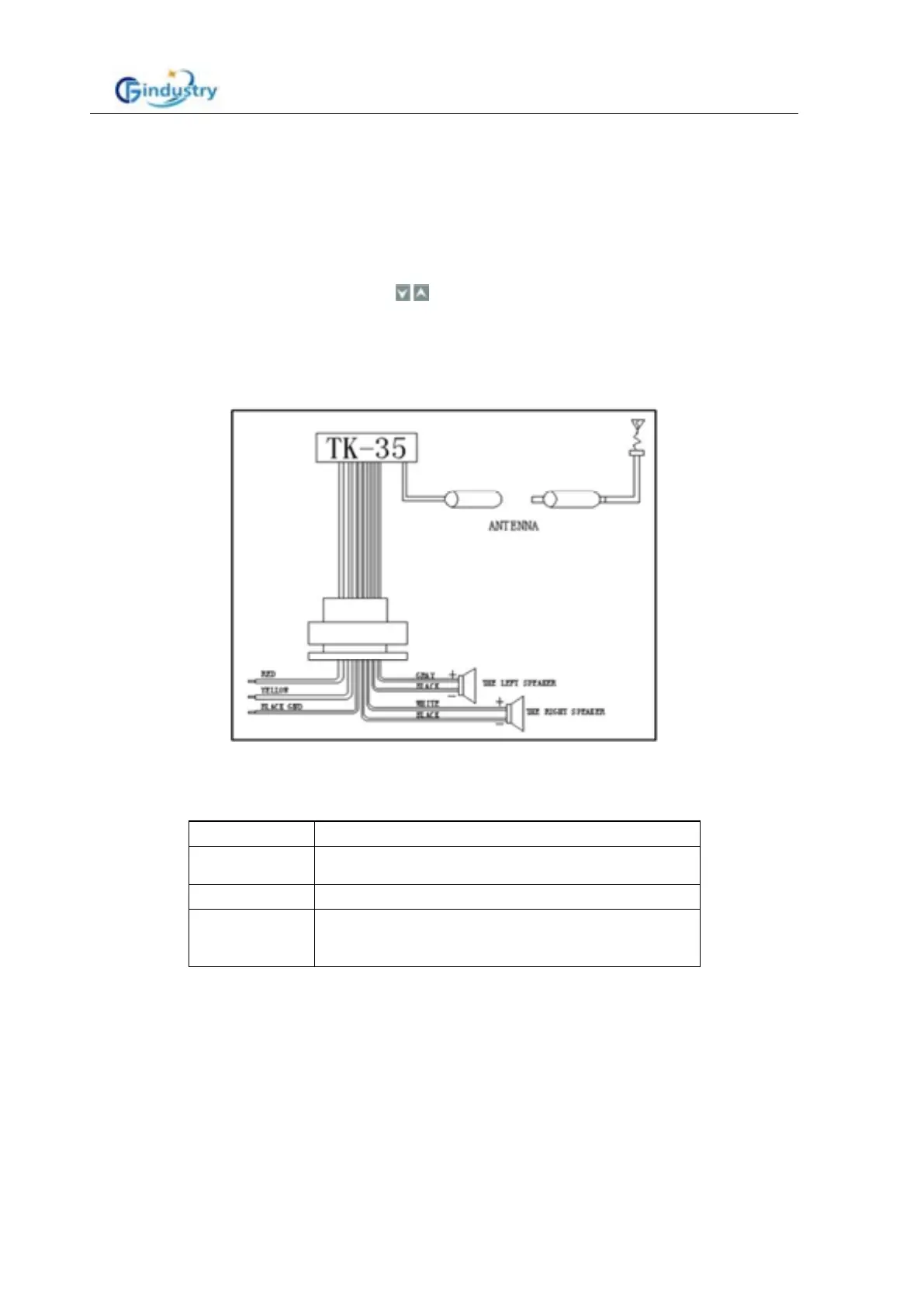
Installation method
Please turn off the power before install the kit, (Below drawing is a standard, customer
requirement is specially made).
Problems Shooting
Problem Why and settle methods
No sound
1.Check connection 2. Delete Mute function
3.Increase Volume up 4. Restart
No Display 1. Wrong installation
USB no play
1. USB in correct insertion
2. USB without MP3 format
3. MP3 sizes over 511
Technical specification
■General characteristics
Power supply voltage DC10~32V
Speaker impedance 4Ω or 8Ω
Max output power 10W (4Ω) * 2CH 24V standard input
■General tuning(FM)
Frequency range 87.5MHz—108 MHz
Station search step length: 100KHz (0.1MHz)



 To Next Page