Programmable DC Power Supply (with Solar Array Simulation) 62000H Series
Operating & Programming Manual
2. Use the numeric keys - or the “Rotary” ( ) knob to select the OUTPUT
MODE. The default is CV/CC MODE.
3. Press “ ” to confirm.
4. Press “ ” to return to the MAIN PAGE.
3.3.9.1 CV/CC MODE
The Chroma 62000H Series DC Power Supply with Solar Array Simulation can also be used
as a general purpose DC Power Supply. The supply provides CV and CC modes as shown in
Figure 3-157. See section 3.2 for detailed operating procedures.
Figure 3-157
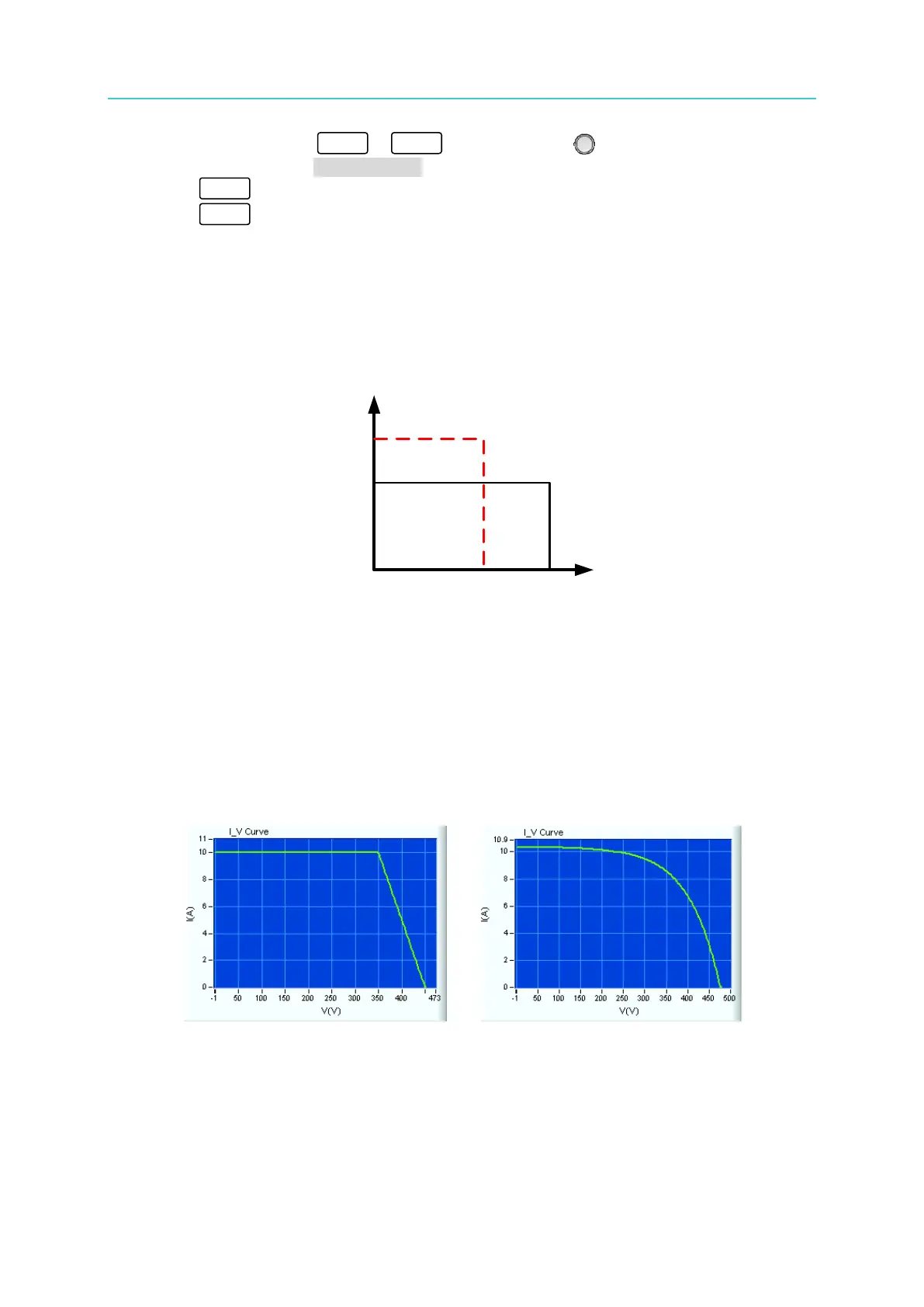
3.3.9.2 TABLE MODE
IV Curve data in an Excel spreadsheet can be imported using the Solar Array Simulation Soft
Panel. This mode allows the creation of various IV Curves, as shown in Figure 3-158, to
generate Solar Cell IV Curves for different types of cells or IV Curves for different operating
environments such as irradiation change, temperature change, cloud shadows, etc. The curve
can be changed in real time to simulate various conditions.
(a) (b)


 To Next Page
 Loading...

