Programmable DC Power Supply (with Solar Array Simulation) 62000H Series
Operating & Programming Manual
7.3.1 IP Settings
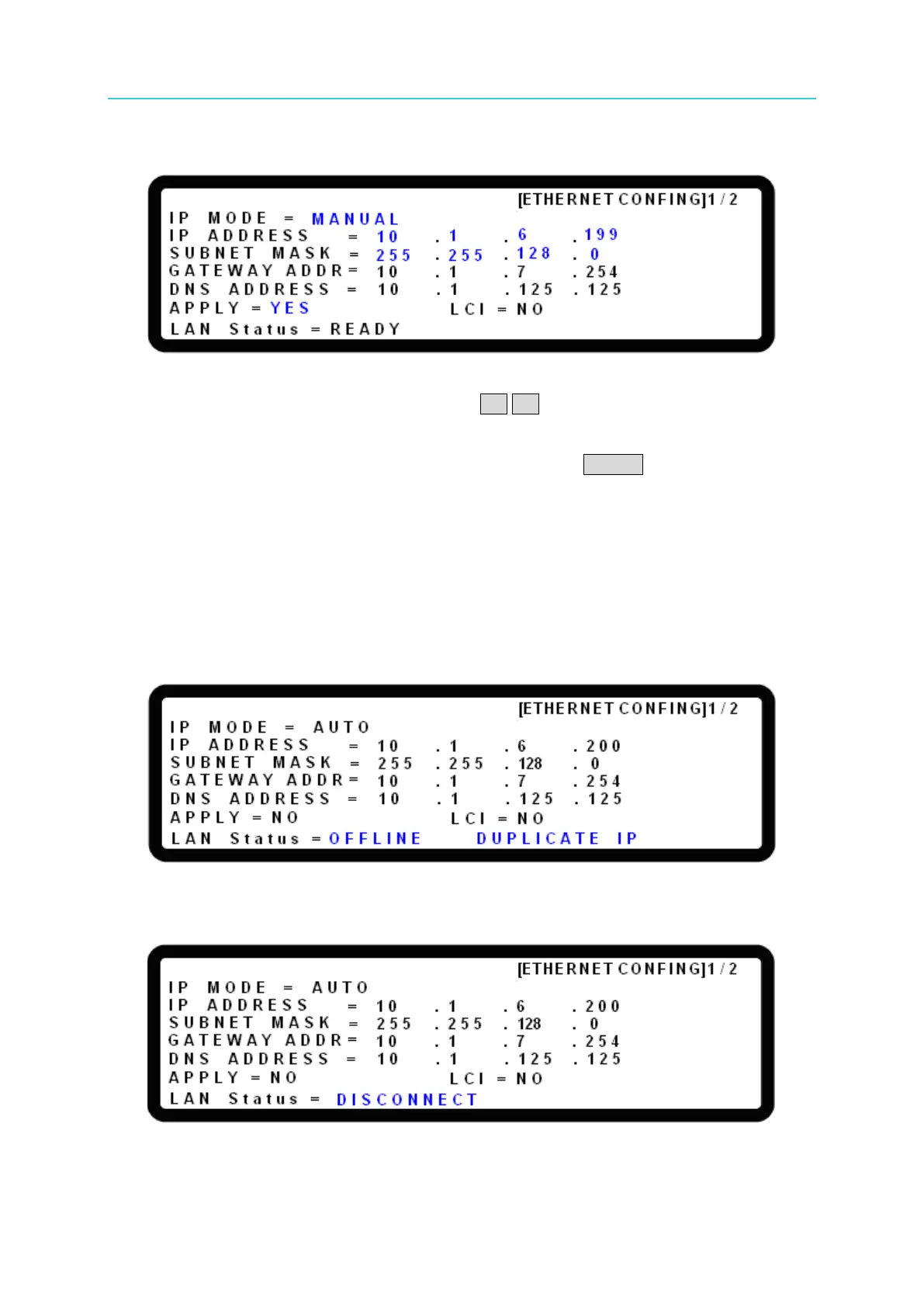
The IP settings can be changed in the [ETHERNET CONFIG] 1/2 page. The settings for each
item can be adjusted by the rotary knob, and the ←↑ ↓→ keys can be used to select the item
to be modified. (The network settings will be applied if the IP MODE is set to MANUAL. If the
IP MODE is set to AUTO, the network settings will be ignored.) When the modifications are
done, go to APPLY and turn the rotary knob to YES and press ENTER to update the network
configuration. During update the display will show LAN Status = SETTING and then return to
LAN Status = READY when the update is done.
7.3.2 Status Indicator
”RENEWAL FAIL” will display in the lower right corner when DHCP Lease Renewal fails.
”DUPLICATE IP” will display in the lower right corner when a Duplicate IP Address is
detected.
”DISCONNECT” will display in the lower left corner when the Ethernet cable is unplugged.
”READY” will display in the lower left corner when there is No Fault (Normal Operation.)


 To Next Page
 Loading...

