1. Install Tera Term. Third party software is available from either of the Eclipse HX 9.0 upgrade
media:
• Software USB > SOFTWARE - EHX.xxx > 3rd_Party_Software > Teraterm
• Drivers USB > ECLIPSE DRIVERS > 3rd_Party_Software > Teraterm
Tip: For more information about installing Tera Term, see Appendix G: Tera
Term
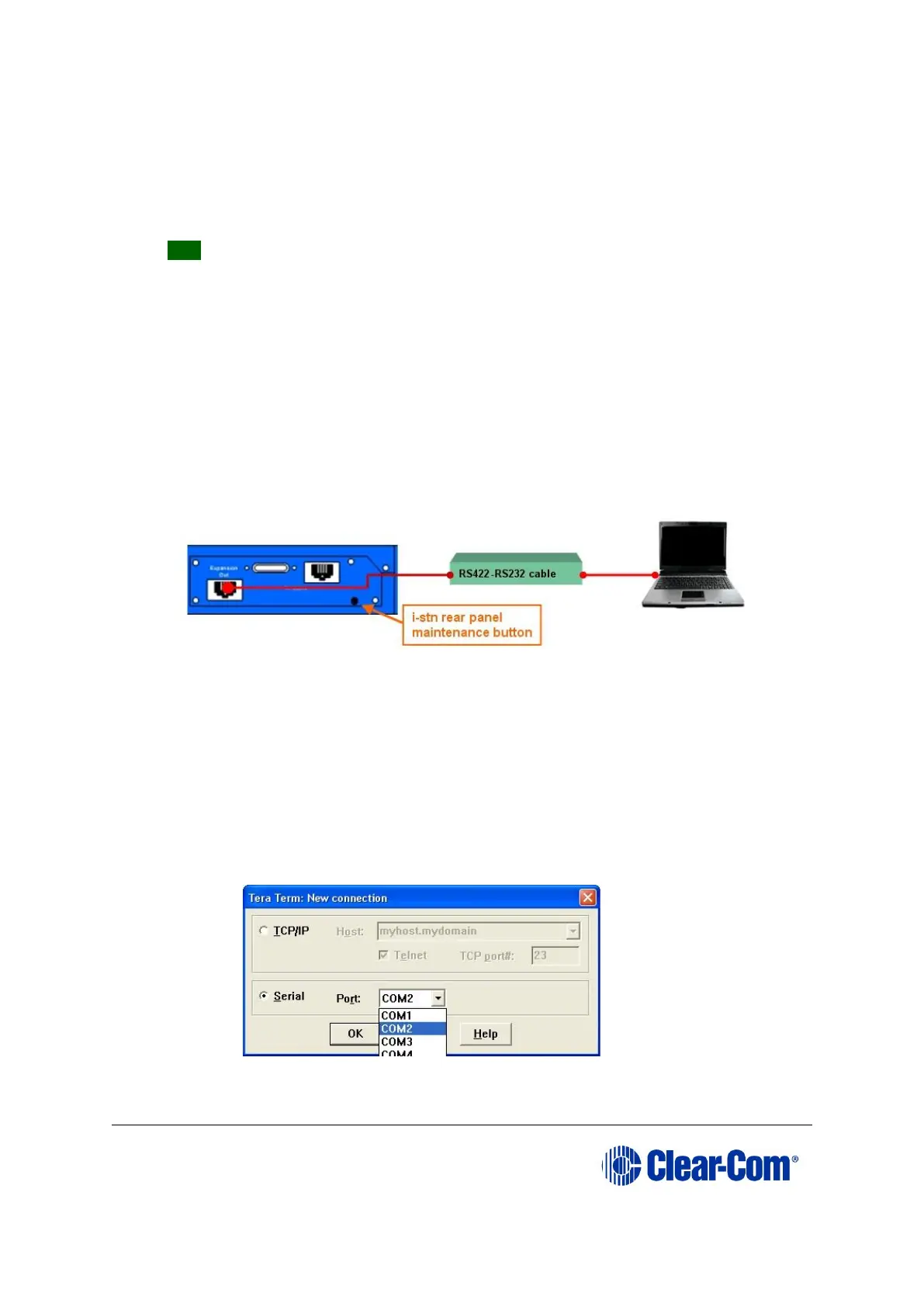
2. Connect the converter cable to the expansion out RJ-45 port (J1) on the i-Station
undergoing the upgrade.
If the cable has separate i-Station and E-station CAT5 cables, the i-Station CAT5
cable is used for the connection to J1 on the i-Station. Connect the other end of
the cable to the serial port of the PC running the Tera Term software.
Note:
The i-Station panel must not be powered while the cable is connected.
Figure 14-4: i-Station manual upgrade
3. Start Tera Term.
Configure Tera Term for the appropriate COM port on the PC, as shown in the
following figure.
Select the Serial radio button and then the correct COM port setting for the PC
from the Port drop-down menu. Click OK.
Figure 14-5: Tera Term: COM port setting



 To Next Page