Introduction Getting Ready
Taking Pictures
Playback Set Up
EN-120
BACK
Contents Glossary Index Nomenclature Menus and Settings Troubleshooting
Erasing all resized images
This procedure erases all resized images.
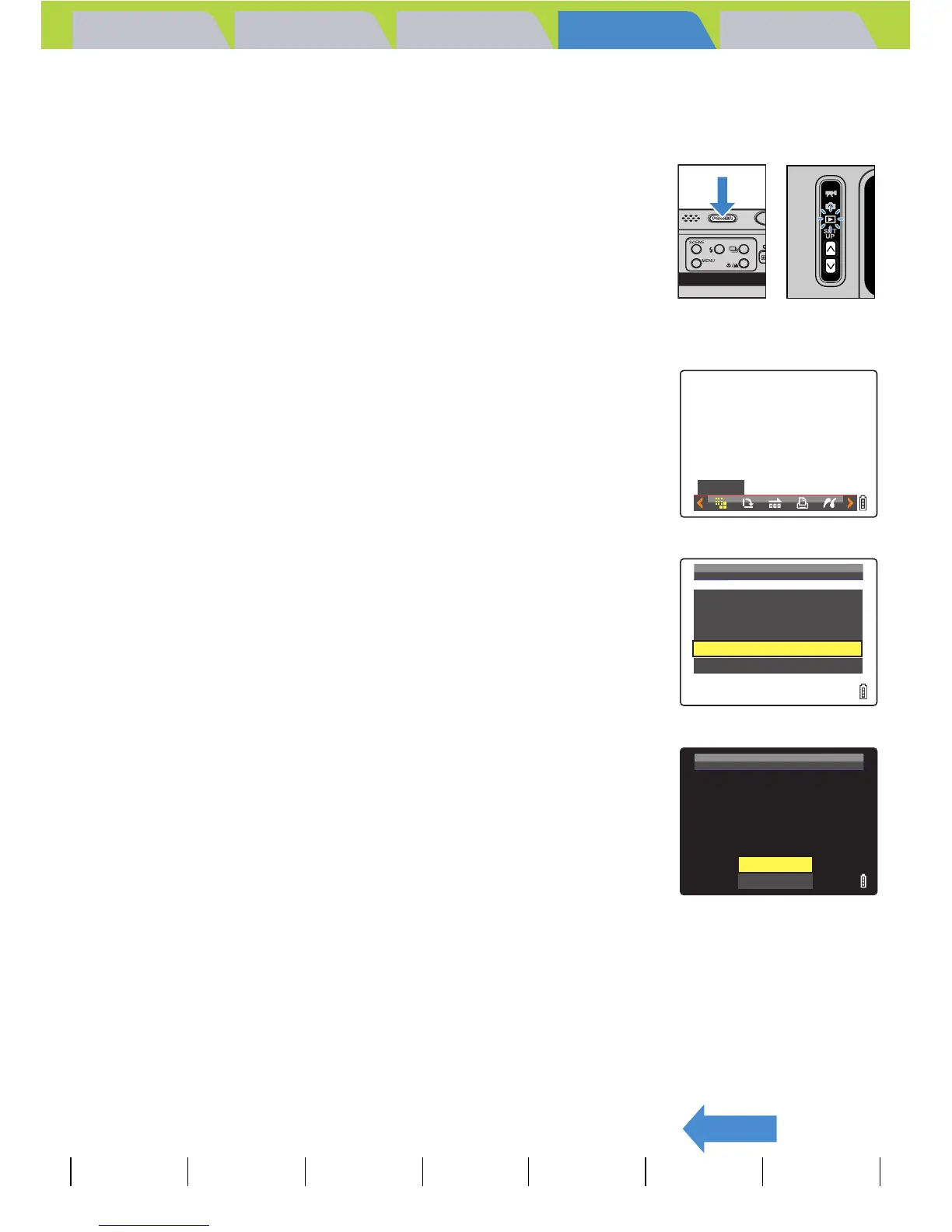
1 Turn the camera on and press the mode
buttons UD until "P" lights up on the
mode select LED.
2 Press the MENU button K to display the menu icons.
3 Move the selector lever left l or right r
to select RESIZE [V ] and press E.
The resize menu appears.
4 Move the selector lever up u or down d
to select [ERASE ALL RESIZED IMAGE],
then press E.
A message appears asking you to confirm that you want to erase all
resized images.
5 Move the selector lever up u to select
[EXECUTE], then press E.
The resized images are all erased.
6 Press the MENU button K.
RESIZE
RESIZE
MENU
EXECUTE
RESIZING
VIEW
RESIZED
IMAGE
RESIZE
ALL
IMAGES
ERASE
ALL
RESIZED
IMAGE
RETURN
ERASE
ALL
RESIZED
IMAGE?
EXECUTE
CANCEL



 To Next Page