Introduction Getting Ready
Taking Pictures
Playback Set Up
EN-181
Contents Glossary Index Nomenclature Menus and Settings Troubleshooting
[DISPLAY INFO] Choosing the Information
Displayed on the Screen
In "C" and "M" modes, a large number of icons are displayed on the LCD
monitor. If you find the icons annoying when you are shooting, it is
possible to change the display to make the screen easier to view.
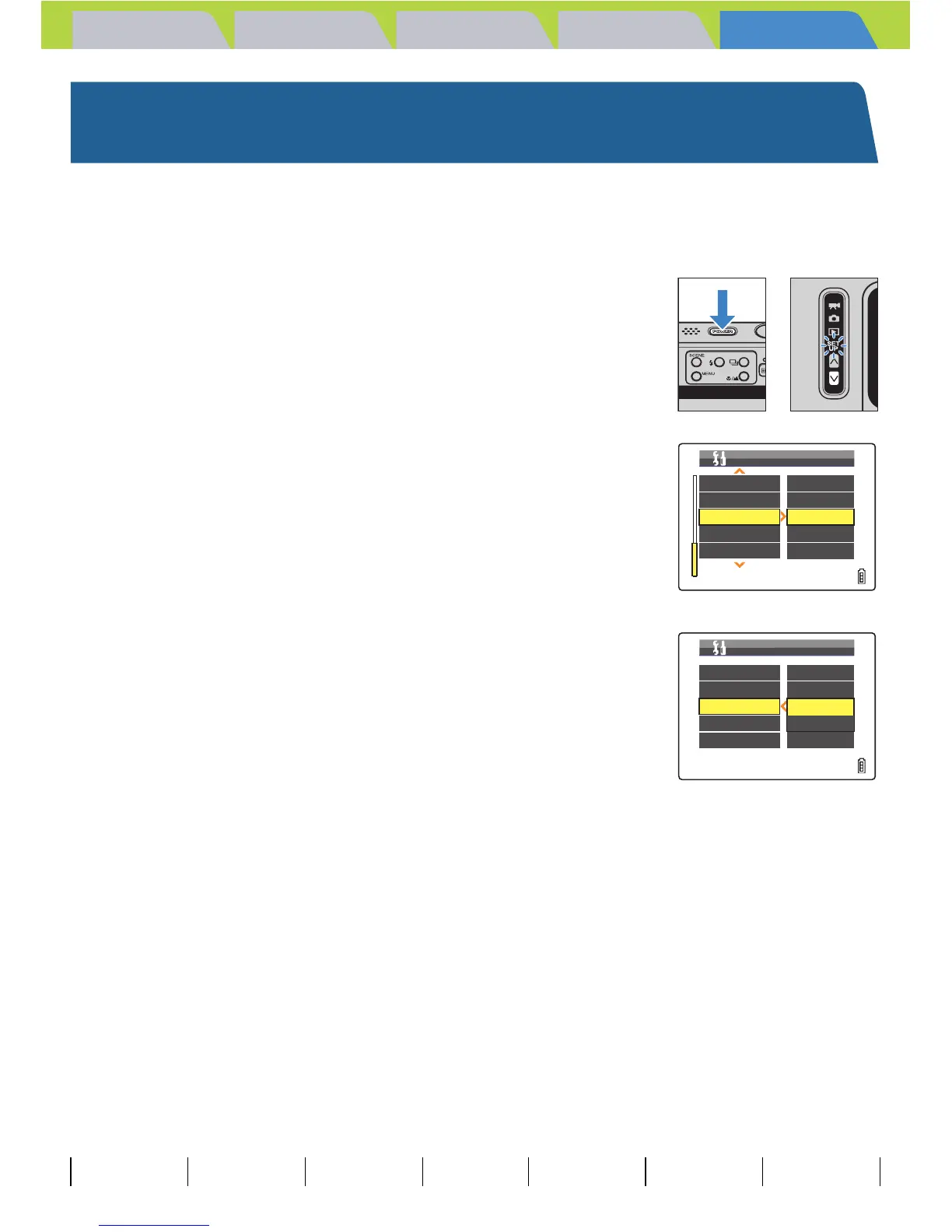
1 Turn the camera on and press the mode
button D until "G" lights up on the mode
select LED.
2 Move the selector lever up u or down d
to select [DISPLAY INFO], then move the
lever right r.
3 Move the selector lever up u or down d
to select the display style, then press E.
The selected setting is applied.
[ON] : Icons for all of the current settings are displayed on the screen.
(Default)
[OFF] : Only the Flash mode, Macro/Landscape mode, Scene mode,
Digital Zoom Magnification and Date are displayed.
BNote
This setting is retained when you turn the camera off.
VIDEO OUT
STARTUP MODE
DISPLAY INFO
FILE NO.
MODE RESET
NTSC
STILL
ON
EXECUTE
EXECUTE
SET UP(3/3)
VIDEO OUT
STARTUP MODE
DISPLAY INFO
FILE NO.
MODE RESET
NTSC
STILL
ON
OFF
EXECUTE
SET UP(3/3)



 To Next Page